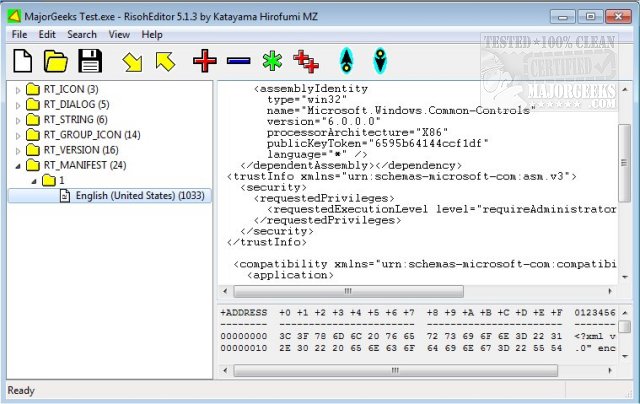
RisohEditor version 5.9.6 has been released as a free tool for modifying resource data in DLL and EXE files. This user-friendly software allows users to add, edit, extract, and delete various Windows resources, including Dialogs, Menus, Icons, Cursors, String Tables, and Message Tables. Named after the Japanese word for "ideal," RisohEditor focuses on providing a straightforward interface that simplifies the editing process, making it accessible even for those with basic programming skills.
The application features color coding for quick identification of resource elements, enhancing usability and efficiency. It supports full Unicode, enabling the handling of international resources, and can read the "resource.h" header file. Additionally, it allows for GUI editing and ensures that exported resources are compatible with Visual C++ 2017.
Users are advised to avoid installing RisohEditor in "C:\Program Files" or "C:\Program Files (x86)" due to issues with the resource compiler, which does not accept spaces in file paths.
In summary, RisohEditor 5.9.6 is a powerful yet simple tool for resource editing in Windows applications, providing essential features for both novice and experienced developers. The application’s high scalability and support for window class libraries further enhance its versatility, making it a valuable resource for those involved in software development and modification.
As software development continues to evolve, tools like RisohEditor play a crucial role in allowing developers to customize and enhance their applications efficiently. Future updates may include additional features, expanded language support, and improved compatibility with newer development environments, ensuring that RisohEditor remains a relevant and effective resource editing solution
The application features color coding for quick identification of resource elements, enhancing usability and efficiency. It supports full Unicode, enabling the handling of international resources, and can read the "resource.h" header file. Additionally, it allows for GUI editing and ensures that exported resources are compatible with Visual C++ 2017.
Users are advised to avoid installing RisohEditor in "C:\Program Files" or "C:\Program Files (x86)" due to issues with the resource compiler, which does not accept spaces in file paths.
In summary, RisohEditor 5.9.6 is a powerful yet simple tool for resource editing in Windows applications, providing essential features for both novice and experienced developers. The application’s high scalability and support for window class libraries further enhance its versatility, making it a valuable resource for those involved in software development and modification.
As software development continues to evolve, tools like RisohEditor play a crucial role in allowing developers to customize and enhance their applications efficiently. Future updates may include additional features, expanded language support, and improved compatibility with newer development environments, ensuring that RisohEditor remains a relevant and effective resource editing solution
RisohEditor 5.9.6 released
RisohEditor is designed for adding, editing, extracting, and removing the resource data from DLL/EXE files for free.