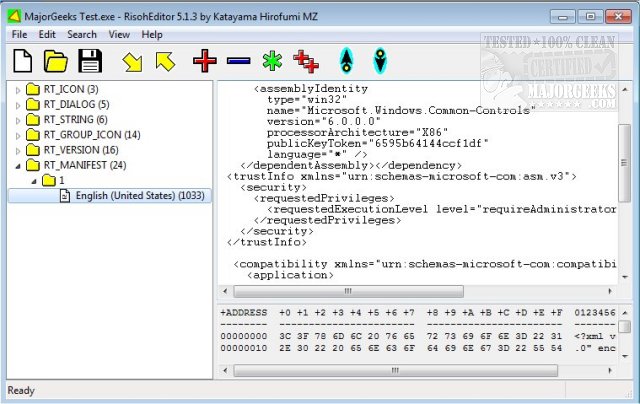
RisohEditor, a free tool for managing resource data in DLL and EXE files, has been updated to version 5.9.5. This user-friendly application enables users to add, edit, extract, and remove various Windows resources such as Dialogs, Menus, Icons, Cursors, String Tables, and Message Tables. The name "Risoh" means "ideal" in Japanese, reflecting its design philosophy of simplicity and efficiency.
With RisohEditor, users can easily modify the source code of Windows applications through an intuitive interface, avoiding the complexities found in many other tools. Key features include color coding for quick identification of resources, making the editing process more straightforward. The application is particularly suitable for individuals with basic programming skills, as it streamlines the process of EXE editing by allowing users to add or remove program components and edit text and descriptions with ease.
Users should note that it is advisable to avoid installing RisohEditor in "C:\Program Files" or "C:\Program Files (x86)" directories, as the resource compiler (windres) does not accept space characters in file paths.
Key Features of RisohEditor:
- High scalability for various resource modifications
- Full Unicode support, accommodating international resources
- Ability to read the "resource.h" header file for enhanced functionality
- Support for GUI editing, allowing for visual resource management
- Exported resources are compatible with Visual C++ 2017
- Support for window class libraries, broadening its applicability
In conclusion, RisohEditor 5.9.5 offers a comprehensive solution for developers and enthusiasts looking to manage Windows resources effectively. Its focus on usability and essential features makes it an ideal choice for those looking to customize and enhance their applications. As software development continues to evolve, tools like RisohEditor will remain valuable assets for creating user-friendly applications
With RisohEditor, users can easily modify the source code of Windows applications through an intuitive interface, avoiding the complexities found in many other tools. Key features include color coding for quick identification of resources, making the editing process more straightforward. The application is particularly suitable for individuals with basic programming skills, as it streamlines the process of EXE editing by allowing users to add or remove program components and edit text and descriptions with ease.
Users should note that it is advisable to avoid installing RisohEditor in "C:\Program Files" or "C:\Program Files (x86)" directories, as the resource compiler (windres) does not accept space characters in file paths.
Key Features of RisohEditor:
- High scalability for various resource modifications
- Full Unicode support, accommodating international resources
- Ability to read the "resource.h" header file for enhanced functionality
- Support for GUI editing, allowing for visual resource management
- Exported resources are compatible with Visual C++ 2017
- Support for window class libraries, broadening its applicability
In conclusion, RisohEditor 5.9.5 offers a comprehensive solution for developers and enthusiasts looking to manage Windows resources effectively. Its focus on usability and essential features makes it an ideal choice for those looking to customize and enhance their applications. As software development continues to evolve, tools like RisohEditor will remain valuable assets for creating user-friendly applications
RisohEditor 5.9.5 released
RisohEditor is designed for adding, editing, extracting, and removing the resource data from DLL/EXE files for free.