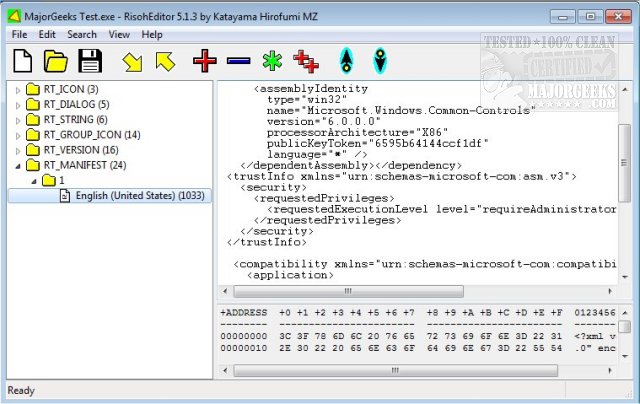
RisohEditor version 5.9.4 has been released, providing users with a free tool for managing resource data within DLL and EXE files. This software allows for the addition, modification, extraction, and removal of various Windows resources such as dialogs, menus, icons, cursors, string tables, and message tables. The name "Risoh" means "ideal" in Japanese, reflecting the application's focus on user-friendliness and efficiency.
The editor features a simple user interface that minimizes complexity, enabling users to concentrate on their tasks without getting lost in a convoluted layout. It includes color coding that facilitates quick identification of elements, making the editing process smoother. RisohEditor is particularly suited for individuals with basic programming knowledge, as it allows for straightforward EXE editing, including the ability to add or remove components and alter text and descriptions as required.
Users are advised against installing the application in "C:\Program Files" or "C:\Program Files (x86)" directories due to compatibility issues with the resource compiler (windres), which cannot process file paths containing spaces.
Key features of RisohEditor include:
- High scalability for diverse editing needs
- Full Unicode support, catering to international resources
- Capability to read the "resource.h" header file
- GUI editing support for enhanced user experience
- Exported resources are compatible with Visual C++ 2017
- Support for window class libraries
In summary, RisohEditor 5.9.4 is a robust and user-friendly resource editing tool that is ideal for both novice and experienced users looking to modify Windows application resources efficiently. Additionally, the continuous updates and support for modern development environments ensure that it remains a valuable resource for software developers
The editor features a simple user interface that minimizes complexity, enabling users to concentrate on their tasks without getting lost in a convoluted layout. It includes color coding that facilitates quick identification of elements, making the editing process smoother. RisohEditor is particularly suited for individuals with basic programming knowledge, as it allows for straightforward EXE editing, including the ability to add or remove components and alter text and descriptions as required.
Users are advised against installing the application in "C:\Program Files" or "C:\Program Files (x86)" directories due to compatibility issues with the resource compiler (windres), which cannot process file paths containing spaces.
Key features of RisohEditor include:
- High scalability for diverse editing needs
- Full Unicode support, catering to international resources
- Capability to read the "resource.h" header file
- GUI editing support for enhanced user experience
- Exported resources are compatible with Visual C++ 2017
- Support for window class libraries
In summary, RisohEditor 5.9.4 is a robust and user-friendly resource editing tool that is ideal for both novice and experienced users looking to modify Windows application resources efficiently. Additionally, the continuous updates and support for modern development environments ensure that it remains a valuable resource for software developers
RisohEditor 5.9.4 released
RisohEditor is designed for adding, editing, extracting, and removing the resource data from DLL/EXE files for free.