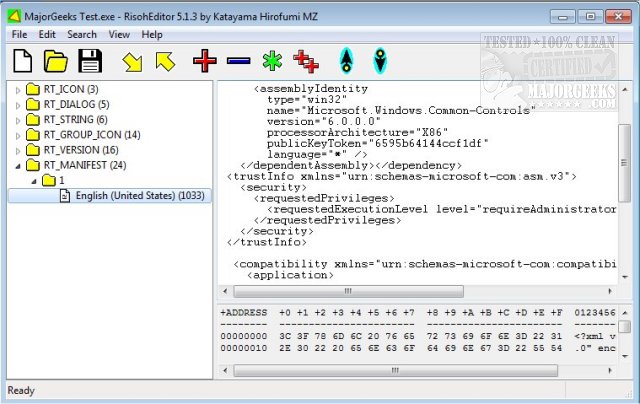
RisohEditor version 5.9.3 has been released, offering a user-friendly tool for editing resource data in DLL and EXE files at no cost. This application, whose name means "ideal" in Japanese, facilitates the addition, editing, extraction, and removal of Windows resources such as dialogs, menus, icons, cursors, string tables, and message tables.
With its simple and intuitive interface, RisohEditor is especially suitable for users with basic programming skills, allowing for efficient navigation and quick execution of tasks without the frustration of a complex interface. The application also features color coding for easier identification of elements, enhancing the editing experience.
In addition to its ease of use, RisohEditor boasts several notable features: high scalability, full Unicode support for international resources, compatibility with the "resource.h" header file, GUI editing capabilities, and the ability to export resources readable by Visual C++ 2017. It also supports window class libraries, making it a versatile tool for developers.
A key installation note is to avoid placing the application in "C:\Program Files" or "C:\Program Files (x86)" directories, as the resource compiler (windres) does not accept file paths containing spaces.
In summary, RisohEditor 5.9.3 is a powerful and accessible tool for anyone looking to modify Windows applications, offering a range of features that cater to both novice and experienced users alike. Its continual updates and support for modern programming standards ensure that it remains a relevant tool in the ever-evolving landscape of software development. Users can expect further enhancements in future releases, possibly expanding its capabilities even further to accommodate more complex resource editing tasks
With its simple and intuitive interface, RisohEditor is especially suitable for users with basic programming skills, allowing for efficient navigation and quick execution of tasks without the frustration of a complex interface. The application also features color coding for easier identification of elements, enhancing the editing experience.
In addition to its ease of use, RisohEditor boasts several notable features: high scalability, full Unicode support for international resources, compatibility with the "resource.h" header file, GUI editing capabilities, and the ability to export resources readable by Visual C++ 2017. It also supports window class libraries, making it a versatile tool for developers.
A key installation note is to avoid placing the application in "C:\Program Files" or "C:\Program Files (x86)" directories, as the resource compiler (windres) does not accept file paths containing spaces.
In summary, RisohEditor 5.9.3 is a powerful and accessible tool for anyone looking to modify Windows applications, offering a range of features that cater to both novice and experienced users alike. Its continual updates and support for modern programming standards ensure that it remains a relevant tool in the ever-evolving landscape of software development. Users can expect further enhancements in future releases, possibly expanding its capabilities even further to accommodate more complex resource editing tasks
RisohEditor 5.9.3 released
RisohEditor is designed for adding, editing, extracting, and removing the resource data from DLL/EXE files for free.