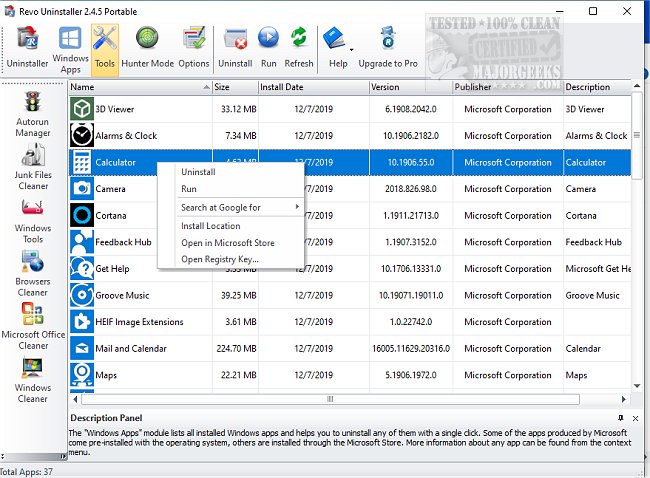
Revo Uninstaller has released two versions: 5.4.7 Pro and 2.6.8 Free, designed to help users effectively remove unwanted applications from their computers. Unlike the standard Windows uninstaller, which often leaves residual files and registry entries, Revo Uninstaller employs advanced "scan before and after" technology to ensure complete removal of all components associated with uninstalled programs. This thoroughness is especially beneficial for stubborn applications that may not uninstall properly; the "Forced Uninstall" feature tackles those effectively, even for partially installed or corrupted programs.
One of the standout features is the "Hunter Mode," which allows users to target specific programs directly from their windows, System Tray icons, or shortcuts, making the uninstallation process intuitive and straightforward. Users can simply drag and drop the Hunter Mode target onto any application they wish to uninstall, streamlining the cleanup process.
Apart from its core uninstallation capabilities, Revo Uninstaller includes a suite of additional utilities designed to enhance PC performance and cleanliness. These include tools for junk file cleaning, autorun management to improve boot times, browser cleaning, and powerful options for securely deleting files that should not be recoverable.
Revo Uninstaller is tailored for various user levels. The Free version covers basic uninstallation needs, while the Pro and Pro Portable versions offer advanced features such as real-time system monitoring and multi-level backups, perfect for tech-savvy individuals who require more control. Plus, users can take the Pro Portable version on the go using a USB stick. All versions come with a 60-day money-back guarantee.
In conclusion, Revo Uninstaller stands out for its combination of power, speed, and user-friendliness. It's suitable for both beginners and experienced users, making it an essential tool for anyone seeking to maintain a clean and efficient Windows environment. Users are encouraged to download Revo Uninstaller to experience its comprehensive and effective features firsthand.
One of the standout features is the "Hunter Mode," which allows users to target specific programs directly from their windows, System Tray icons, or shortcuts, making the uninstallation process intuitive and straightforward. Users can simply drag and drop the Hunter Mode target onto any application they wish to uninstall, streamlining the cleanup process.
Apart from its core uninstallation capabilities, Revo Uninstaller includes a suite of additional utilities designed to enhance PC performance and cleanliness. These include tools for junk file cleaning, autorun management to improve boot times, browser cleaning, and powerful options for securely deleting files that should not be recoverable.
Revo Uninstaller is tailored for various user levels. The Free version covers basic uninstallation needs, while the Pro and Pro Portable versions offer advanced features such as real-time system monitoring and multi-level backups, perfect for tech-savvy individuals who require more control. Plus, users can take the Pro Portable version on the go using a USB stick. All versions come with a 60-day money-back guarantee.
In conclusion, Revo Uninstaller stands out for its combination of power, speed, and user-friendliness. It's suitable for both beginners and experienced users, making it an essential tool for anyone seeking to maintain a clean and efficient Windows environment. Users are encouraged to download Revo Uninstaller to experience its comprehensive and effective features firsthand.
Extended Perspective:
In addition to its existing functionalities, Revo Uninstaller could further enhance its user experience by integrating AI-driven recommendations for system optimization based on user behavior and installed applications. This feature could analyze the user’s software usage patterns and suggest programs that could be uninstalled to improve system performance. Furthermore, providing an educational resource or tutorial section within the software could help users understand the importance of system maintenance and how to effectively utilize all features of Revo Uninstaller. Enhancing its compatibility with various operating systems and incorporating cloud-based backup options for uninstallation data could also cater to the growing demand for versatile and flexible software solutions in an increasingly mobile and diverse computing landscapeRevo Uninstaller 5.4.7 Pro / 2.6.8 Free released
Revo Uninstaller helps you to remove any unwanted applications installed on your computer.
Revo Uninstaller 5.4.7 Pro / 2.6.8 Free released @ MajorGeeks