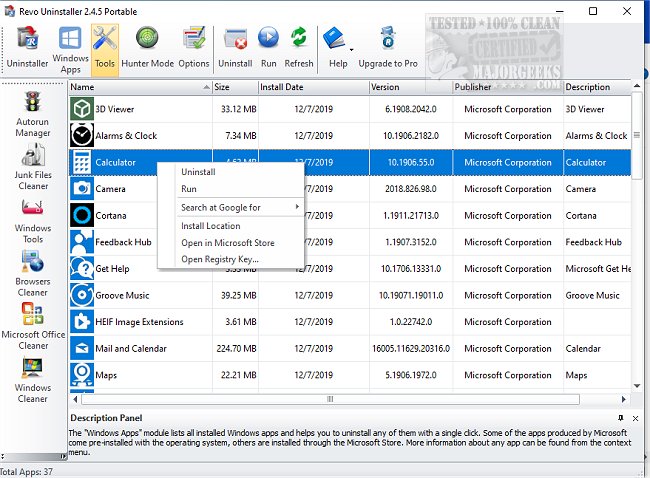
Revo Uninstaller has recently released updates for its Free version (2.6.5) and Pro version (5.4.7), enhancing its capabilities to help users effectively remove unwanted applications from their computers. This utility goes beyond the standard Windows uninstaller, which often leaves residual files and registry entries behind. Revo Uninstaller employs advanced "scan before and after" technology to ensure that all traces of uninstalled programs are completely eradicated, maintaining a clutter-free system.
Key features of Revo Uninstaller include the "Forced Uninstall" option, which tackles stubborn applications that refuse to uninstall properly, and the innovative "Hunter Mode." This mode allows users to directly target and uninstall programs from their windows, system tray icons, or desktop shortcuts, making it a highly versatile tool for system maintenance. In addition, Revo Uninstaller includes several powerful utilities for optimizing PC performance, such as a Junk File Cleaner, Autorun Manager, Browser Cleaner, and Evidence Remover.
Revo Uninstaller caters to a wide range of users, offering a Free version for basic uninstallation tasks and Pro versions with advanced features like real-time system monitoring and multi-level backup options. Users can even utilize the Pro Portable version on USB devices, all backed by a 60-day money-back guarantee.
In summary, Revo Uninstaller is a robust cleaning and uninstallation tool that combines user-friendliness with advanced functionalities, making it suitable for both novices and experienced users. With its comprehensive approach to application removal and additional utilities, it stands out as an essential tool for anyone looking to optimize their Windows system.
Extended Overview:
Revo Uninstaller continues to evolve, promising even more improvements in future releases. Users can expect ongoing updates that may include enhanced scanning algorithms for faster performance, improved user interfaces for easier navigation, and possibly even cloud integration features for seamless management across multiple devices. As digital clutter becomes an increasing concern, tools like Revo Uninstaller will play a crucial role in maintaining system health and efficiency, making it a worthwhile investment for users aiming to enhance their computing experience. Whether you're dealing with old software, managing startup programs, or ensuring data privacy, Revo Uninstaller is poised to remain a critical ally in digital maintenance
Key features of Revo Uninstaller include the "Forced Uninstall" option, which tackles stubborn applications that refuse to uninstall properly, and the innovative "Hunter Mode." This mode allows users to directly target and uninstall programs from their windows, system tray icons, or desktop shortcuts, making it a highly versatile tool for system maintenance. In addition, Revo Uninstaller includes several powerful utilities for optimizing PC performance, such as a Junk File Cleaner, Autorun Manager, Browser Cleaner, and Evidence Remover.
Revo Uninstaller caters to a wide range of users, offering a Free version for basic uninstallation tasks and Pro versions with advanced features like real-time system monitoring and multi-level backup options. Users can even utilize the Pro Portable version on USB devices, all backed by a 60-day money-back guarantee.
In summary, Revo Uninstaller is a robust cleaning and uninstallation tool that combines user-friendliness with advanced functionalities, making it suitable for both novices and experienced users. With its comprehensive approach to application removal and additional utilities, it stands out as an essential tool for anyone looking to optimize their Windows system.
Extended Overview:
Revo Uninstaller continues to evolve, promising even more improvements in future releases. Users can expect ongoing updates that may include enhanced scanning algorithms for faster performance, improved user interfaces for easier navigation, and possibly even cloud integration features for seamless management across multiple devices. As digital clutter becomes an increasing concern, tools like Revo Uninstaller will play a crucial role in maintaining system health and efficiency, making it a worthwhile investment for users aiming to enhance their computing experience. Whether you're dealing with old software, managing startup programs, or ensuring data privacy, Revo Uninstaller is poised to remain a critical ally in digital maintenance
Revo Uninstaller 2.6.5 Free / 5.4.7 Pro released
Revo Uninstaller helps you to remove any unwanted applications installed on your computer.
Revo Uninstaller 2.6.5 Free / 5.4.7 Pro released @ MajorGeeks