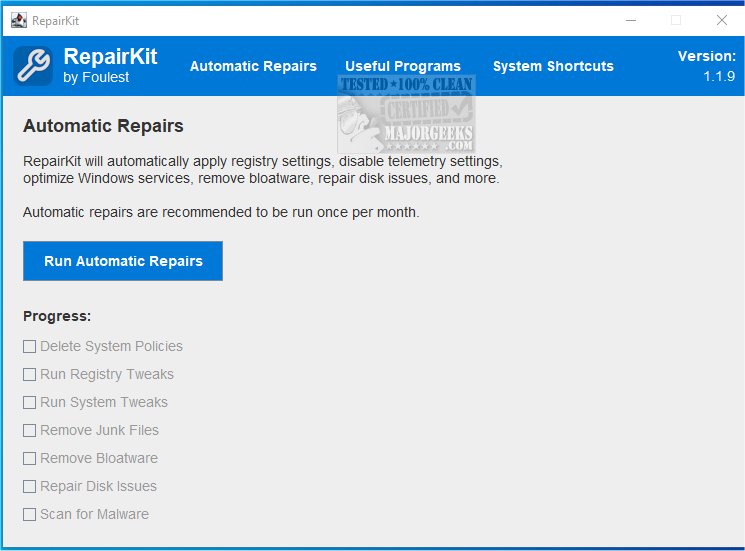
RepairKit is a powerful Java-based utility designed to ensure your computer operates efficiently by consolidating various essential maintenance tools into one centralized platform. The latest version, RepairKit 1.4.0, enhances its user-friendly interface, making it accessible for both tech-savvy individuals and those less familiar with technology.
Efficient System Maintenance
RepairKit serves as an all-in-one solution for system administrators and casual users alike. It combines advanced features and powerful tools to maintain optimal system performance without the hassle of managing multiple applications. The utility offers automatic repair options that encompass a wide range of tasks, such as deleting restrictive system policies, removing bloatware, repairing the WMI repository, and executing registry tweaks.
Time-Saving Features
Whether you're a busy professional or simply looking to minimize the time spent on PC maintenance, RepairKit proves to be an invaluable resource. Its automated repair section provides straightforward solutions, while a centralized platform grants easy access to essential Windows system maintenance features, including Startup Apps, Display Settings, and Device Maintenance. These functionalities are organized as dedicated shortcuts for quick and convenient use.
Comprehensive Cleanup and Repair
RepairKit efficiently performs a thorough system cleanup and repair, including:
- Deleting unnecessary system policies
- Running registry and system optimizations
- Removing pre-installed bloatware
- Cleaning junk files
- Repairing disk issues
- Scanning for malware with integrated security software
Access to Useful Apps
In addition to its built-in features, RepairKit allows quick access to a selection of beneficial third-party applications for PC maintenance. Users can easily update these tools as needed. Notable included apps comprise:
- 7-Zip
- CPU-Z
- TreeSize
- Emsisoft Emergency Kit
- HWMonitor
- Everything
- Sophos Scan
- Winget-AutoUpdate
- Autoruns
- Process Explorer
- Process Monitor
- BlueScreenView
- CrystalDiskMark
- CrystalDiskInfo
- FanControl
- Display Driver Uninstaller (DDU)
- UBlock Origin and Bitdefender TrafficLight extensions
- NVCleanstall
- Bitwarden
- Notepad++
- Twinkle Tray
Empowering Users for Optimal Performance
Experience the transformative power of RepairKit as the ultimate solution for optimizing your computer's performance. With its automated repair functionalities, users can swiftly address any emerging issues, ensuring seamless operation. The accessibility of Windows' PC maintenance features promotes efficient updates and performance enhancements, while the variety of third-party applications offers a diverse toolkit for ongoing maintenance.
RepairKit simplifies the process of keeping your machine in peak condition, empowering you to maintain optimal performance effortlessly.
Related Resources:
- How to Back up or Restore the Windows Registry
- How to Automatically Back up the Registry on Windows 10 & 11
- 5 Ways to Open Registry Editor in Windows
- How to Manage Startup Apps in Windows 10 & 1
Efficient System Maintenance
RepairKit serves as an all-in-one solution for system administrators and casual users alike. It combines advanced features and powerful tools to maintain optimal system performance without the hassle of managing multiple applications. The utility offers automatic repair options that encompass a wide range of tasks, such as deleting restrictive system policies, removing bloatware, repairing the WMI repository, and executing registry tweaks.
Time-Saving Features
Whether you're a busy professional or simply looking to minimize the time spent on PC maintenance, RepairKit proves to be an invaluable resource. Its automated repair section provides straightforward solutions, while a centralized platform grants easy access to essential Windows system maintenance features, including Startup Apps, Display Settings, and Device Maintenance. These functionalities are organized as dedicated shortcuts for quick and convenient use.
Comprehensive Cleanup and Repair
RepairKit efficiently performs a thorough system cleanup and repair, including:
- Deleting unnecessary system policies
- Running registry and system optimizations
- Removing pre-installed bloatware
- Cleaning junk files
- Repairing disk issues
- Scanning for malware with integrated security software
Access to Useful Apps
In addition to its built-in features, RepairKit allows quick access to a selection of beneficial third-party applications for PC maintenance. Users can easily update these tools as needed. Notable included apps comprise:
- 7-Zip
- CPU-Z
- TreeSize
- Emsisoft Emergency Kit
- HWMonitor
- Everything
- Sophos Scan
- Winget-AutoUpdate
- Autoruns
- Process Explorer
- Process Monitor
- BlueScreenView
- CrystalDiskMark
- CrystalDiskInfo
- FanControl
- Display Driver Uninstaller (DDU)
- UBlock Origin and Bitdefender TrafficLight extensions
- NVCleanstall
- Bitwarden
- Notepad++
- Twinkle Tray
Empowering Users for Optimal Performance
Experience the transformative power of RepairKit as the ultimate solution for optimizing your computer's performance. With its automated repair functionalities, users can swiftly address any emerging issues, ensuring seamless operation. The accessibility of Windows' PC maintenance features promotes efficient updates and performance enhancements, while the variety of third-party applications offers a diverse toolkit for ongoing maintenance.
RepairKit simplifies the process of keeping your machine in peak condition, empowering you to maintain optimal performance effortlessly.
Related Resources:
- How to Back up or Restore the Windows Registry
- How to Automatically Back up the Registry on Windows 10 & 11
- 5 Ways to Open Registry Editor in Windows
- How to Manage Startup Apps in Windows 10 & 1
RepairKit 1.4.0 released
RepairKit is a Java-based utility that helps keep your machine running smoothly by providing many necessary tools in one location.