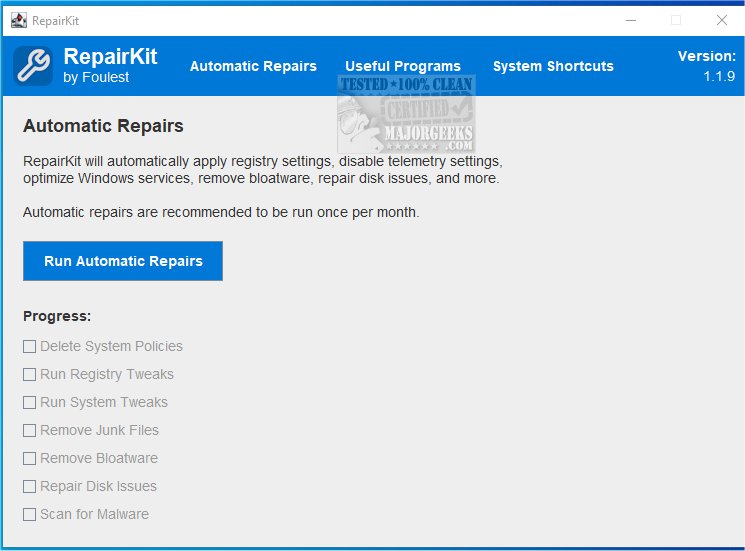
RepairKit is a powerful Java-based utility designed to optimize and maintain your computer's performance by providing a comprehensive suite of essential tools in a single, user-friendly platform. The recently released version 1.3.5 introduces enhancements that further streamline system maintenance for both system administrators and casual users alike.
Key Features and Benefits
1. Efficient System Maintenance: RepairKit acts as an all-in-one solution, allowing users to manage various aspects of system maintenance without juggling multiple applications. It includes advanced tools for diagnosing and resolving common issues, ensuring that your system operates at peak performance.
2. User-Friendly Interface: The intuitive layout makes it accessible for users of all skill levels. The centralized platform enables easy navigation and quick access to critical system maintenance features.
3. Automated Repairs: RepairKit offers a robust Automated Repairs section that can perform tasks such as:
- Deleting restrictive system policies
- Running registry tweaks
- Removing bloatware
- Cleaning up junk files
- Repairing disk issues
- Scanning for malware
4. Time-Saving Features: Users can significantly reduce the time spent on PC maintenance with dedicated shortcuts to Windows' most useful features, including Startup Apps, Display Settings, Apps & Features, and Device Maintenance.
5. Access to Third-Party Applications: RepairKit also provides quick access to essential third-party apps that enhance PC maintenance. Users can ensure these apps are up-to-date whenever they are run. Notable included apps feature:
- 7-Zip, CPU-Z, TreeSize, Emsisoft Scan, HWMonitor, and many more.
Experience RepairKit's Power
With RepairKit, users can effortlessly manage their computer's performance through automated repair options and a diverse array of tools for cleaning and maintenance. This utility empowers users to maintain their systems efficiently, ensuring seamless functionality and optimal performance.
Future Enhancements
As the software continues to evolve, future updates could include even more automated features, enhanced user interfaces, and additional third-party applications to expand its functionality. The aim is to ensure that RepairKit remains a leading solution for users looking to simplify and enhance their PC maintenance routines.
Related Resources
For users interested in maximizing their system's performance, RepairKit complements various guides, such as:
- How to Back up or Restore the Windows Registry
- How to Automatically Back up the Registry on Windows 10 & 11
- 5 Ways to Open Registry Editor in Windows
- How to Manage Startup Apps in Windows 10 & 11
Overall, RepairKit 1.3.5 stands out as an essential tool for anyone seeking to maintain their computer's health and performance efficiently
Key Features and Benefits
1. Efficient System Maintenance: RepairKit acts as an all-in-one solution, allowing users to manage various aspects of system maintenance without juggling multiple applications. It includes advanced tools for diagnosing and resolving common issues, ensuring that your system operates at peak performance.
2. User-Friendly Interface: The intuitive layout makes it accessible for users of all skill levels. The centralized platform enables easy navigation and quick access to critical system maintenance features.
3. Automated Repairs: RepairKit offers a robust Automated Repairs section that can perform tasks such as:
- Deleting restrictive system policies
- Running registry tweaks
- Removing bloatware
- Cleaning up junk files
- Repairing disk issues
- Scanning for malware
4. Time-Saving Features: Users can significantly reduce the time spent on PC maintenance with dedicated shortcuts to Windows' most useful features, including Startup Apps, Display Settings, Apps & Features, and Device Maintenance.
5. Access to Third-Party Applications: RepairKit also provides quick access to essential third-party apps that enhance PC maintenance. Users can ensure these apps are up-to-date whenever they are run. Notable included apps feature:
- 7-Zip, CPU-Z, TreeSize, Emsisoft Scan, HWMonitor, and many more.
Experience RepairKit's Power
With RepairKit, users can effortlessly manage their computer's performance through automated repair options and a diverse array of tools for cleaning and maintenance. This utility empowers users to maintain their systems efficiently, ensuring seamless functionality and optimal performance.
Future Enhancements
As the software continues to evolve, future updates could include even more automated features, enhanced user interfaces, and additional third-party applications to expand its functionality. The aim is to ensure that RepairKit remains a leading solution for users looking to simplify and enhance their PC maintenance routines.
Related Resources
For users interested in maximizing their system's performance, RepairKit complements various guides, such as:
- How to Back up or Restore the Windows Registry
- How to Automatically Back up the Registry on Windows 10 & 11
- 5 Ways to Open Registry Editor in Windows
- How to Manage Startup Apps in Windows 10 & 11
Overall, RepairKit 1.3.5 stands out as an essential tool for anyone seeking to maintain their computer's health and performance efficiently
RepairKit 1.3.5 released
RepairKit is a Java-based utility that helps keep your machine running smoothly by providing many necessary tools in one location.