RemoveDrive 3.4.7 has been released, providing users with a command-line tool to safely prepare removable drives for ejection. This utility is designed for ease of use with various types of removable storage, such as USB drives and SD cards, allowing quick and efficient removal without encountering errors.
Unlike traditional methods that depend on drive letters assigned by Windows, RemoveDrive utilizes the device's ID string for command execution. This means users can specify drives using identifiers or even wildcards, such as "Flash," to eject drives matching specified criteria. The software is available in both 32-bit and 64-bit versions, compatible with Windows XP and newer versions, making it accessible to a wide range of users.
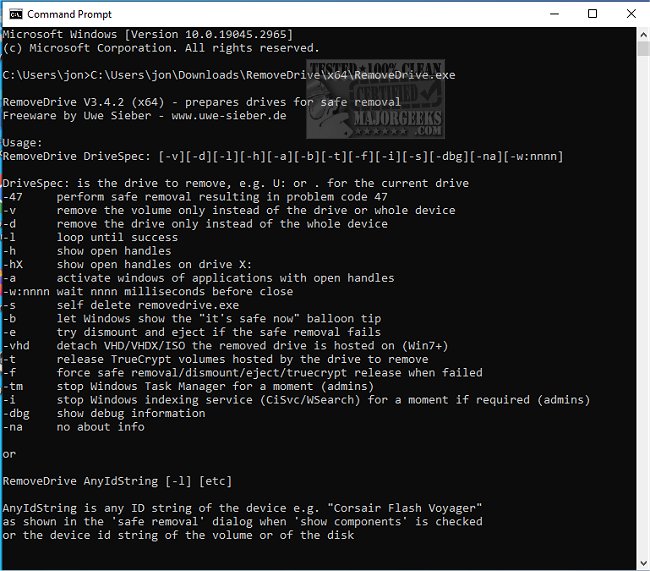
The command syntax provides a variety of options, such as:
- DriveSpec: Specifies which drive to remove (e.g., U:, NTFS mountpoints, volume names, etc.)
- -47: Performs a safe removal, resulting in a specific problem code.
- -v: Removes the volume only (requires admin privileges).
- -f: Forces safe removal if the process fails (requires admin privileges for Vista and later).
- -L: Loops until the removal is successful.
- -h: Shows open handles that may be using the drive.
- -na: Omits information about the drive.
These options give users significant control over the removal process, ensuring that drives can be ejected safely without data loss or system errors.
In addition to its core functionality, RemoveDrive could be beneficial for users who frequently work with multiple drives and require a streamlined way to manage them. For example, IT professionals, data recovery specialists, and everyday users who often plug and unplug devices would find this tool particularly useful.
To extend its usability, the developers could consider adding features such as a graphical user interface (GUI) for those less comfortable with command-line operations, or integration with system notifications to alert users when it's safe to unplug devices. Furthermore, expanding compatibility to other operating systems could broaden its user base and provide a more versatile tool for removable drive management.
Overall, RemoveDrive is a practical solution for anyone looking to manage removable storage efficiently and safely
Unlike traditional methods that depend on drive letters assigned by Windows, RemoveDrive utilizes the device's ID string for command execution. This means users can specify drives using identifiers or even wildcards, such as "Flash," to eject drives matching specified criteria. The software is available in both 32-bit and 64-bit versions, compatible with Windows XP and newer versions, making it accessible to a wide range of users.
The command syntax provides a variety of options, such as:
- DriveSpec: Specifies which drive to remove (e.g., U:, NTFS mountpoints, volume names, etc.)
- -47: Performs a safe removal, resulting in a specific problem code.
- -v: Removes the volume only (requires admin privileges).
- -f: Forces safe removal if the process fails (requires admin privileges for Vista and later).
- -L: Loops until the removal is successful.
- -h: Shows open handles that may be using the drive.
- -na: Omits information about the drive.
These options give users significant control over the removal process, ensuring that drives can be ejected safely without data loss or system errors.
In addition to its core functionality, RemoveDrive could be beneficial for users who frequently work with multiple drives and require a streamlined way to manage them. For example, IT professionals, data recovery specialists, and everyday users who often plug and unplug devices would find this tool particularly useful.
To extend its usability, the developers could consider adding features such as a graphical user interface (GUI) for those less comfortable with command-line operations, or integration with system notifications to alert users when it's safe to unplug devices. Furthermore, expanding compatibility to other operating systems could broaden its user base and provide a more versatile tool for removable drive management.
Overall, RemoveDrive is a practical solution for anyone looking to manage removable storage efficiently and safely
RemoveDrive 3.4.7 released
RemoveDrive enables you to prepare for drive removal via the command line safely, ensuring that fact before you physically remove it.