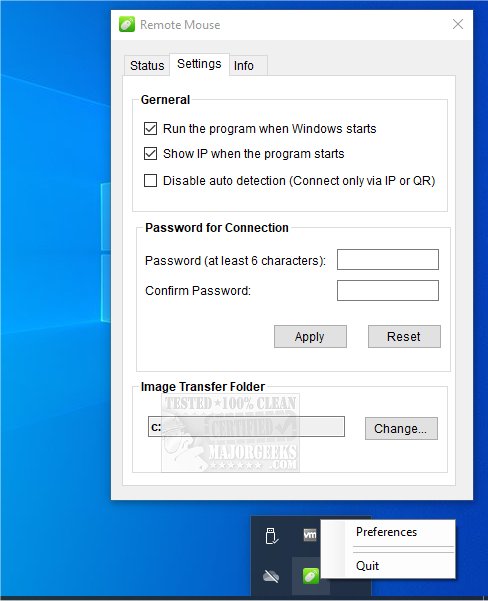
Remote Mouse has released version 4.705, a versatile app that enables users to turn their smartphones or tablets into Wi-Fi-enabled mice, touchpads, and keyboards. Available for multiple platforms, the app requires a two-part installation: the mobile app for Android, iPhone, or iPad, and the server component for PCs running Windows, Mac, or Linux. It is recommended to download the mobile app first.
The app offers a fully simulated mouse function, including a gyro mouse feature for cursor movement using the device's gyro sensor, and supports left-handed mode. Users can type remotely with integrated system and third-party keyboards, voice recognition capabilities, and customizable shortcuts available through in-app purchases.
Remote Mouse also includes specialized control panels for specific tasks, such as a Media Remote for managing various media players, a Web Remote for browser navigation, and an Application Switcher for quickly launching and switching between applications. Additionally, it provides power options for remote shutdown, sleep, restart, and logoff.
The app supports three connection methods: auto-connect, connecting via IP address or QR code, and connecting through history, making it convenient to use over Wi-Fi or 3G/4G networks. This functionality is particularly useful in scenarios like replacing a lost mouse during a presentation, controlling online movies, or shutting down a computer remotely.
Other notable features include the ability to use physical volume buttons on the mobile device for remote control, setting a password for secure connections, and customizable wallpapers for a personalized experience.
In summary, Remote Mouse 4.705 is a powerful tool for enhancing productivity and convenience in various computing situations, with a focus on intuitive, one-handed operation. As technology continues to evolve, future versions may introduce enhanced features such as improved voice recognition, additional gesture controls, or expanded compatibility with more applications and operating systems
The app offers a fully simulated mouse function, including a gyro mouse feature for cursor movement using the device's gyro sensor, and supports left-handed mode. Users can type remotely with integrated system and third-party keyboards, voice recognition capabilities, and customizable shortcuts available through in-app purchases.
Remote Mouse also includes specialized control panels for specific tasks, such as a Media Remote for managing various media players, a Web Remote for browser navigation, and an Application Switcher for quickly launching and switching between applications. Additionally, it provides power options for remote shutdown, sleep, restart, and logoff.
The app supports three connection methods: auto-connect, connecting via IP address or QR code, and connecting through history, making it convenient to use over Wi-Fi or 3G/4G networks. This functionality is particularly useful in scenarios like replacing a lost mouse during a presentation, controlling online movies, or shutting down a computer remotely.
Other notable features include the ability to use physical volume buttons on the mobile device for remote control, setting a password for secure connections, and customizable wallpapers for a personalized experience.
In summary, Remote Mouse 4.705 is a powerful tool for enhancing productivity and convenience in various computing situations, with a focus on intuitive, one-handed operation. As technology continues to evolve, future versions may introduce enhanced features such as improved voice recognition, additional gesture controls, or expanded compatibility with more applications and operating systems
Remote Mouse 4.705 released
Remote Mouse is a multiplatform app that transforms your smartphone or tablet into a Wi-Fi-connected mouse, touchpad, and keyboard.