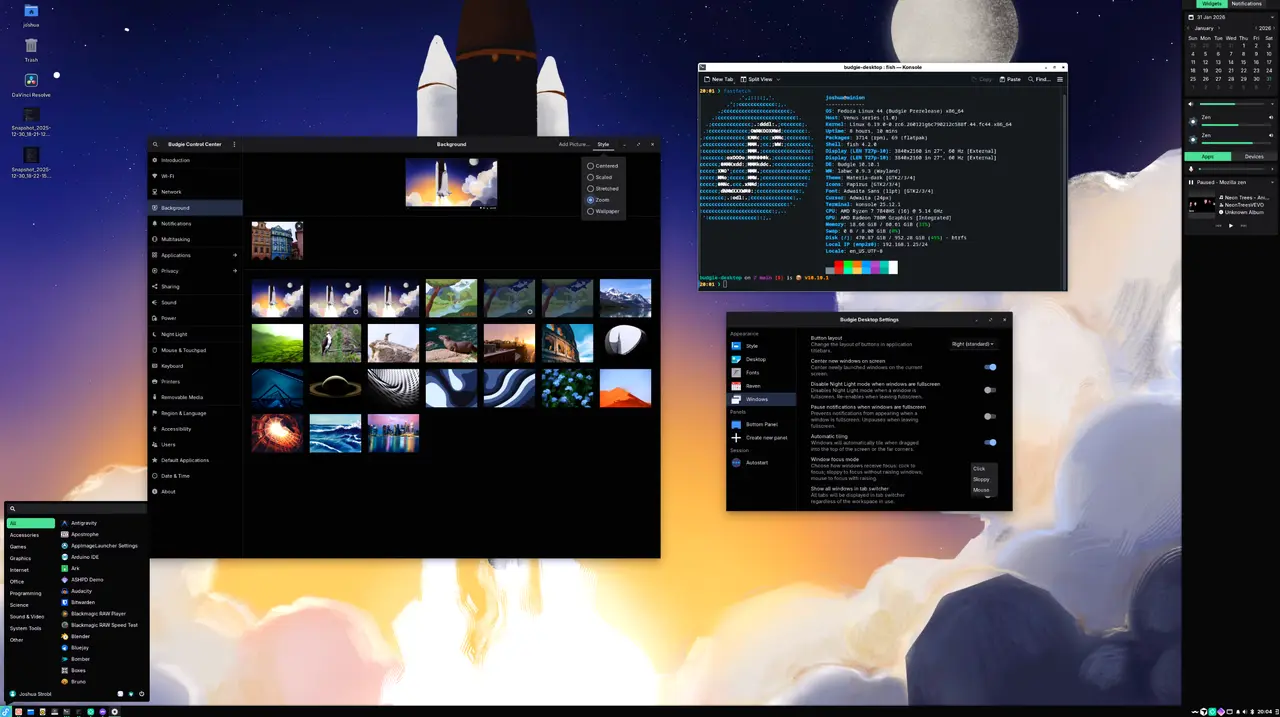
Summary of Budgie 10.10.1 Release
The release of Budgie 10.10.1 brings several significant under-the-hood changes aimed at enhancing user experience and addressing common issues that may arise post-upgrade. Key updates include the introduction of a new helper for brightness controls, which replaces the old GNOME Settings Daemon. This has led to the need for users to delete their outdated rc.xml files to restore functionality to brightness keys. Additionally, the new version offers improved focus behavior options, including a "Sloppy" mode, and resolves issues with panel visibility, which can be corrected by toggling settings or using keyboard shortcuts.
Key Fixes and Features
1. Brightness Keys: After the upgrade, users may find their brightness keys non-functional. The solution involves deleting or refreshing the rc.xml file located in the ~/.config/budgie-desktop/labwc directory, allowing the new budgie-brightness-helper to take effect.
2. Focus Behavior Options: Budgie 10.10.1 introduces three focus modes: Click-to-Focus, Mouse, and Sloppy. The Sloppy mode allows users to focus on windows without bringing them to the front, which is useful in multi-monitor setups.
3. Panel Behavior: The new intelligent hiding feature may cause panels to disappear unexpectedly. Users can toggle the panel visibility using the Super key or disable the intelligent hiding option for consistent behavior.
4. Wayland Support: Applications launched via pkexec can now correctly inherit Wayland environment variables. Users encountering issues should ensure they have the latest libgnome-volume-control installed.
Checklist After Upgrading:
- Refresh or delete the ~/.config/budgie-desktop/labwc/rc.xml file for proper brightness control.
- Select a focus mode suited to your workflow, with Sloppy as an option.
- Test panel visibility using the Super key and adjust intelligent hiding settings if necessary.
- Ensure pkexec applications run smoothly, and update libgnome-volume-control if issues persist.
Further Information and Resources
This release aims to stabilize the Budgie desktop environment, fix existing bugs, and expand on labwc support. Users are encouraged to download the source code from GitHub for further exploration and development.
Extended Perspective
The Budgie 10.10.1 release not only enhances functionality but also signifies the developers' commitment to user feedback. By addressing common post-upgrade issues promptly, they demonstrate a proactive approach to software development. The introduction of new features like the Sloppy focus mode reflects an understanding of diverse user workflows, particularly among those utilizing multi-monitor setups. As the Budgie desktop continues to evolve, ongoing updates and community engagement will be crucial for maintaining its relevance and user satisfaction in a competitive landscape of desktop environments. For users keen on exploring customization and maximizing their productivity, the option to delve into the source code provides an avenue for deeper engagement with the software
The release of Budgie 10.10.1 brings several significant under-the-hood changes aimed at enhancing user experience and addressing common issues that may arise post-upgrade. Key updates include the introduction of a new helper for brightness controls, which replaces the old GNOME Settings Daemon. This has led to the need for users to delete their outdated rc.xml files to restore functionality to brightness keys. Additionally, the new version offers improved focus behavior options, including a "Sloppy" mode, and resolves issues with panel visibility, which can be corrected by toggling settings or using keyboard shortcuts.
Key Fixes and Features
1. Brightness Keys: After the upgrade, users may find their brightness keys non-functional. The solution involves deleting or refreshing the rc.xml file located in the ~/.config/budgie-desktop/labwc directory, allowing the new budgie-brightness-helper to take effect.
2. Focus Behavior Options: Budgie 10.10.1 introduces three focus modes: Click-to-Focus, Mouse, and Sloppy. The Sloppy mode allows users to focus on windows without bringing them to the front, which is useful in multi-monitor setups.
3. Panel Behavior: The new intelligent hiding feature may cause panels to disappear unexpectedly. Users can toggle the panel visibility using the Super key or disable the intelligent hiding option for consistent behavior.
4. Wayland Support: Applications launched via pkexec can now correctly inherit Wayland environment variables. Users encountering issues should ensure they have the latest libgnome-volume-control installed.
Checklist After Upgrading:
- Refresh or delete the ~/.config/budgie-desktop/labwc/rc.xml file for proper brightness control.
- Select a focus mode suited to your workflow, with Sloppy as an option.
- Test panel visibility using the Super key and adjust intelligent hiding settings if necessary.
- Ensure pkexec applications run smoothly, and update libgnome-volume-control if issues persist.
Further Information and Resources
This release aims to stabilize the Budgie desktop environment, fix existing bugs, and expand on labwc support. Users are encouraged to download the source code from GitHub for further exploration and development.
Extended Perspective
The Budgie 10.10.1 release not only enhances functionality but also signifies the developers' commitment to user feedback. By addressing common post-upgrade issues promptly, they demonstrate a proactive approach to software development. The introduction of new features like the Sloppy focus mode reflects an understanding of diverse user workflows, particularly among those utilizing multi-monitor setups. As the Budgie desktop continues to evolve, ongoing updates and community engagement will be crucial for maintaining its relevance and user satisfaction in a competitive landscape of desktop environments. For users keen on exploring customization and maximizing their productivity, the option to delve into the source code provides an avenue for deeper engagement with the software
Budgie 10.10. released
The article outlines the key under‑the‑hood changes introduced in Budgie 10.10.1 and provides practical fixes for common post‑upgrade problems such as non‑functional brightness keys (solved by deleting an outdated rc.xml file so the new budgie‑brightness‑helper is used), new focus‑behaviour options including a “Sloppy” mode, and unreliable panel hiding that can be corrected by toggling with Super or disabling intelligent hiding. It also notes that graphical tools launched via pkexec now correctly inherit Wayland environment variables, requiring an updated libgnome‑volume‑control if issues persist. A concise checklist at the end summarizes these steps to ensure a smooth transition to the new release.