Release Summary: AM 9.9.3
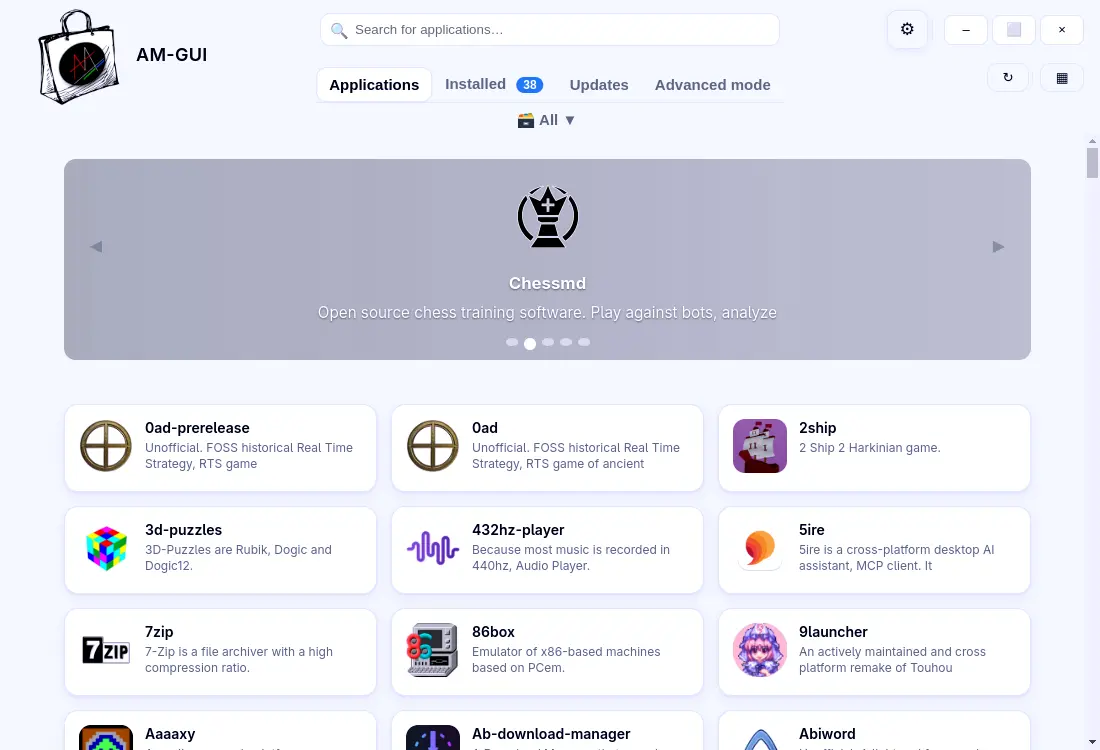
The AppImage Package Manager, AM, has just launched version 9.9.3, which introduces a significant expansion of its catalog to 2,779 entries, resolves issues with missing launchers when utilizing custom .desktop locations, and enhances compatibility with Ubuntu's namespace restrictions. A notable feature of this release is the addition of an experimental graphical user interface (AM-GUI) that simplifies the process of browsing and installing AppImages through a point-and-click method.
Key Updates and Benefits
1. Expanded Catalog: The increase in available AppImages provides users with a broader selection of portable applications, streamlining the installation process with the new one-click functionality.
2. Improved Launcher Management: The update addresses the common issue of disappearing .desktop files, allowing users to maintain their custom launcher setups more effectively. This enhancement is particularly beneficial for users who manage local launchers in directories like $HOME/.local/share/applications.
3. Experimental GUI: The introduction of AM-GUI offers a more user-friendly approach for those who prefer a graphical interface over command-line operations. While power users may still favor the command line, the GUI provides a welcoming option for newcomers or those less comfortable with terminal commands.
4. Namespace Handling: The AM 9.9.3 version adeptly navigates Ubuntu's recent sandbox changes, which previously hindered the operation of certain AppImages. By automatically switching to proot when necessary, users can avoid configuration headaches and ensure smoother application launches.
Installation and Upgrade Process
Upgrading to version 9.9.3 is straightforward. Users can execute:
Why Consider Upgrading?
For those who currently rely on manual methods of managing AppImages, the upgrade may not present immediate dramatic improvements. However, the enhancements offered—especially the larger catalog, improved launcher support, and the optional GUI—can significantly streamline the user experience. If you've encountered frustrations with missing launcher files or issues related to Ubuntu's sandboxing, upgrading to AM 9.9.3 is a low-risk decision that could enhance your workflow.
Conclusion
In summary, AM 9.9.3 may seem modest in terms of changes, yet it introduces substantial practical benefits for users of AppImages. The improvements in catalog size, launcher management, and user interface make it a notable update worth considering for both casual users and seasoned developers alike. Enjoy exploring the expanded options and the occasional convenience offered by the new GUI
The AppImage Package Manager, AM, has just launched version 9.9.3, which introduces a significant expansion of its catalog to 2,779 entries, resolves issues with missing launchers when utilizing custom .desktop locations, and enhances compatibility with Ubuntu's namespace restrictions. A notable feature of this release is the addition of an experimental graphical user interface (AM-GUI) that simplifies the process of browsing and installing AppImages through a point-and-click method.
Key Updates and Benefits
1. Expanded Catalog: The increase in available AppImages provides users with a broader selection of portable applications, streamlining the installation process with the new one-click functionality.
2. Improved Launcher Management: The update addresses the common issue of disappearing .desktop files, allowing users to maintain their custom launcher setups more effectively. This enhancement is particularly beneficial for users who manage local launchers in directories like $HOME/.local/share/applications.
3. Experimental GUI: The introduction of AM-GUI offers a more user-friendly approach for those who prefer a graphical interface over command-line operations. While power users may still favor the command line, the GUI provides a welcoming option for newcomers or those less comfortable with terminal commands.
4. Namespace Handling: The AM 9.9.3 version adeptly navigates Ubuntu's recent sandbox changes, which previously hindered the operation of certain AppImages. By automatically switching to proot when necessary, users can avoid configuration headaches and ensure smoother application launches.
Installation and Upgrade Process
Upgrading to version 9.9.3 is straightforward. Users can execute:
sudo am -uThis command updates the AM package to the latest version. For user-only installations, the command can be run without `sudo`. After upgrading, it's recommended to run `am -s` to refresh the local database, making the new entries available without needing to restart the session.
Why Consider Upgrading?
For those who currently rely on manual methods of managing AppImages, the upgrade may not present immediate dramatic improvements. However, the enhancements offered—especially the larger catalog, improved launcher support, and the optional GUI—can significantly streamline the user experience. If you've encountered frustrations with missing launcher files or issues related to Ubuntu's sandboxing, upgrading to AM 9.9.3 is a low-risk decision that could enhance your workflow.
Conclusion
In summary, AM 9.9.3 may seem modest in terms of changes, yet it introduces substantial practical benefits for users of AppImages. The improvements in catalog size, launcher management, and user interface make it a notable update worth considering for both casual users and seasoned developers alike. Enjoy exploring the expanded options and the occasional convenience offered by the new GUI
AM 9.9.3 released
AM 9.9.3 updates the AppImage Package Manager with a bigger catalog (2,779 entries), a fix for missing launchers when using custom .desktop locations, and better handling of Ubuntu’s namespace restrictions. The release also adds an experimental GUI (“AM‑GUI”) that lets you browse and install AppImages with clicks instead of commands.