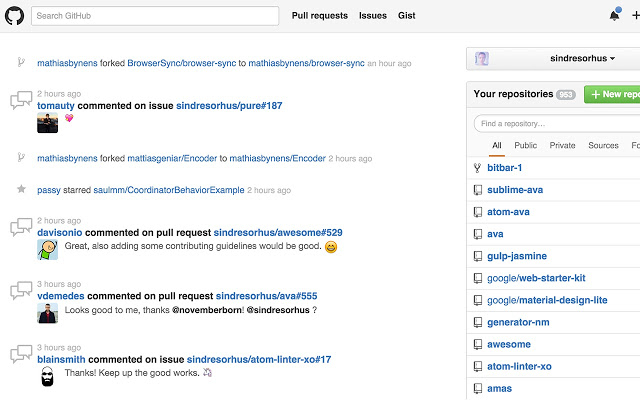
The latest release of Refined GitHub, version 26.3.17, is now available for Chrome, Firefox, and Edge. This open-source browser extension enhances the GitHub experience by introducing a variety of productivity-boosting features aimed at simplifying navigation and repository management.
Key features of Refined GitHub include the ability to mark issues and pull requests as unread, linkify references for branches and issues, and provide additional navigation options like a 'Releases' and 'Compare' tab. The extension also improves the user interface by adding avatars to reactions, a quick edit button for README files, and enhanced visibility of filenames and user names in comments.
Moreover, Refined GitHub streamlines the user experience by offering shortcuts for common tasks, such as deleting a forked repository or viewing diffs without whitespace changes. It also enhances the commenting experience by providing a search filter for user comments, improving copy-pasting functionality, and relocating potentially destructive buttons away from primary actions.
Additional improvements include automatic expansion of the news feed, hiding certain notifications, and refining the dashboard layout, all while removing unnecessary hover effects and tooltips to create a cleaner interface.
This extension continues to evolve, reflecting community needs and feedback, making GitHub more user-friendly and efficient for developers and contributors alike.
In future releases, users may anticipate further enhancements, such as more integrations with third-party tools, advanced filtering options, and enhanced collaboration features that foster a more streamlined workflow on GitHub. The ongoing goal of Refined GitHub remains to provide users with a robust set of tools that can adapt to the changing landscape of software development and version control
Key features of Refined GitHub include the ability to mark issues and pull requests as unread, linkify references for branches and issues, and provide additional navigation options like a 'Releases' and 'Compare' tab. The extension also improves the user interface by adding avatars to reactions, a quick edit button for README files, and enhanced visibility of filenames and user names in comments.
Moreover, Refined GitHub streamlines the user experience by offering shortcuts for common tasks, such as deleting a forked repository or viewing diffs without whitespace changes. It also enhances the commenting experience by providing a search filter for user comments, improving copy-pasting functionality, and relocating potentially destructive buttons away from primary actions.
Additional improvements include automatic expansion of the news feed, hiding certain notifications, and refining the dashboard layout, all while removing unnecessary hover effects and tooltips to create a cleaner interface.
This extension continues to evolve, reflecting community needs and feedback, making GitHub more user-friendly and efficient for developers and contributors alike.
In future releases, users may anticipate further enhancements, such as more integrations with third-party tools, advanced filtering options, and enhanced collaboration features that foster a more streamlined workflow on GitHub. The ongoing goal of Refined GitHub remains to provide users with a robust set of tools that can adapt to the changing landscape of software development and version control
Refined GitHub for Chrome, Firefox, and Edge 26.3.17 released
Refined GitHub is an Open Source extension/add-on that simplifies navigating and utilizing the GitHub repository.
Refined GitHub for Chrome, Firefox, and Edge 26.3.17 released @ MajorGeeks