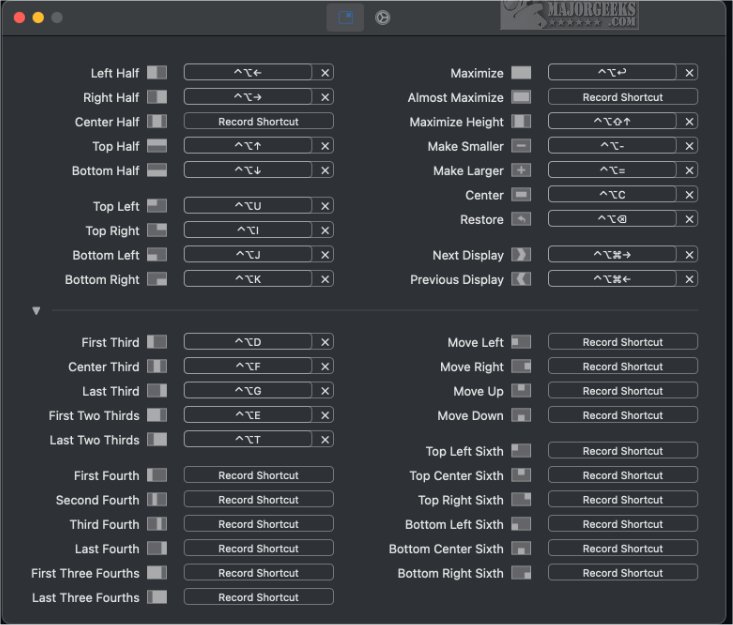
Rectangle, the latest application tailored for macOS, enhances the user experience by streamlining the management of windows on your screen. With its user-friendly interface, it allows you to effortlessly move and resize windows, fostering a more organized workspace and boosting productivity. Users can take advantage of keyboard shortcuts or snap areas to arrange their open applications and documents more efficiently.
Upon launching Rectangle, you'll encounter a selection of preset shortcuts designed to facilitate quick window adjustments. For those who favor customization, the app also allows you to create personalized hotkeys by recording your preferred keyboard actions. The system for understanding these shortcuts is intuitive, making it accessible even for those who may be new to window management tools.
Rectangle incorporates a unique snap feature that activates when you drag a window to the edge of your screen. As you approach the edge, you'll notice a visual cue, referred to as a "footprint," indicating how the window will be positioned upon release. This feature is particularly beneficial for multitasking, as it allows for quick organization of multiple windows.
In addition to snapping, Rectangle supports a variety of gestures that enable users to maximize windows, position them in corners, or resize them seamlessly. Once you unsnap a window, it returns to its previous dimensions and position, but you can also utilize a hotkey to restore it to its original state.
With Rectangle's intuitive functionalities, users quickly find it indispensable for window management on their Mac. The ease of acclimatizing to its snap areas transforms how you navigate your desktop, making it a critical tool for anyone looking to enhance their productivity and multitasking capabilities.
Extension: Future Developments and User Impact
As Rectangle continues to evolve, future updates could include enhanced compatibility with other applications, expanded customization options, and additional features that cater to specific user needs. There is potential for integrating AI-driven suggestions for window arrangements based on usage patterns, further simplifying the user experience.
Moreover, Rectangle could explore the inclusion of collaborative features that allow users to share window layouts with others in real-time, making it an excellent tool for team projects and remote work environments. As remote work becomes increasingly prevalent, having a robust window management tool like Rectangle could significantly improve workflow efficiency and communication among team members.
In conclusion, Rectangle's 0.94 release marks a significant step in optimizing window management for macOS users, and with continued innovation, it stands to become an essential tool in both personal and professional settings
Upon launching Rectangle, you'll encounter a selection of preset shortcuts designed to facilitate quick window adjustments. For those who favor customization, the app also allows you to create personalized hotkeys by recording your preferred keyboard actions. The system for understanding these shortcuts is intuitive, making it accessible even for those who may be new to window management tools.
Rectangle incorporates a unique snap feature that activates when you drag a window to the edge of your screen. As you approach the edge, you'll notice a visual cue, referred to as a "footprint," indicating how the window will be positioned upon release. This feature is particularly beneficial for multitasking, as it allows for quick organization of multiple windows.
In addition to snapping, Rectangle supports a variety of gestures that enable users to maximize windows, position them in corners, or resize them seamlessly. Once you unsnap a window, it returns to its previous dimensions and position, but you can also utilize a hotkey to restore it to its original state.
With Rectangle's intuitive functionalities, users quickly find it indispensable for window management on their Mac. The ease of acclimatizing to its snap areas transforms how you navigate your desktop, making it a critical tool for anyone looking to enhance their productivity and multitasking capabilities.
Extension: Future Developments and User Impact
As Rectangle continues to evolve, future updates could include enhanced compatibility with other applications, expanded customization options, and additional features that cater to specific user needs. There is potential for integrating AI-driven suggestions for window arrangements based on usage patterns, further simplifying the user experience.
Moreover, Rectangle could explore the inclusion of collaborative features that allow users to share window layouts with others in real-time, making it an excellent tool for team projects and remote work environments. As remote work becomes increasingly prevalent, having a robust window management tool like Rectangle could significantly improve workflow efficiency and communication among team members.
In conclusion, Rectangle's 0.94 release marks a significant step in optimizing window management for macOS users, and with continued innovation, it stands to become an essential tool in both personal and professional settings
Rectangle 0.94 released
Rectangle, designed for macOS systems, simplifies the process of moving and resizing windows.