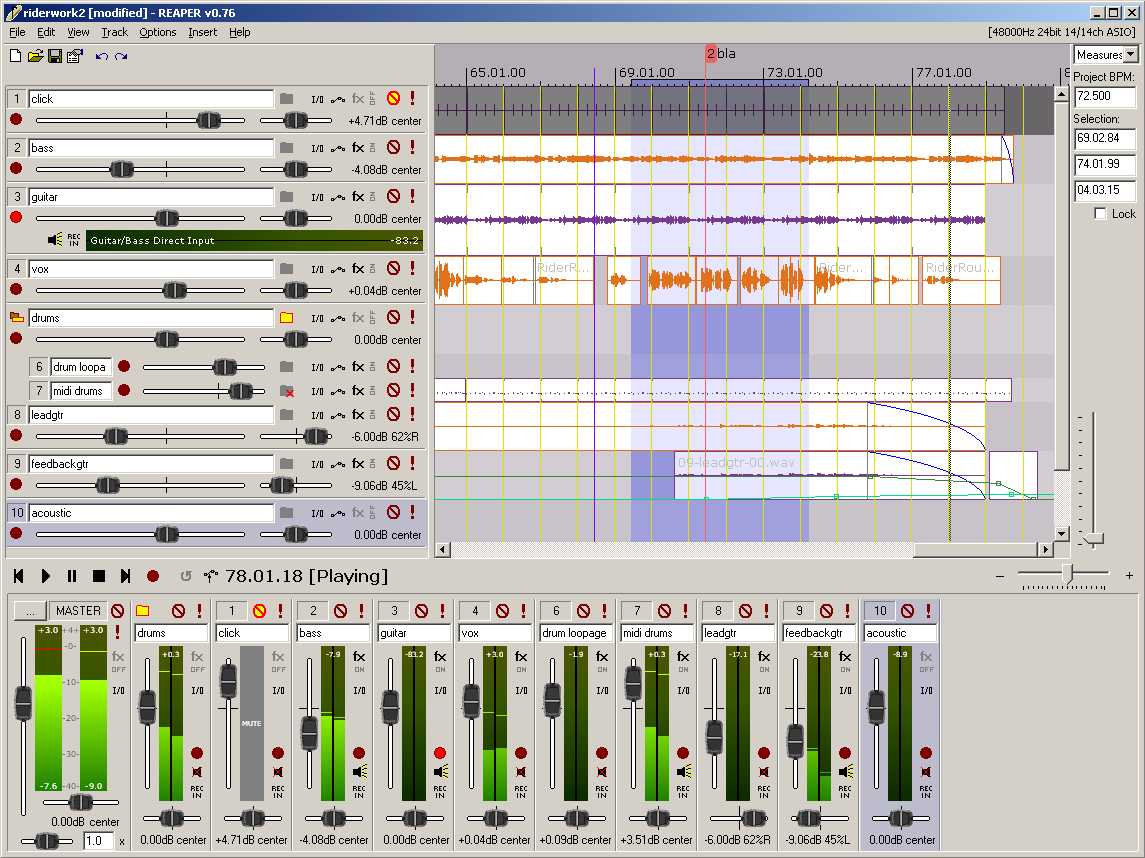
REAPER is a robust digital audio workstation (DAW) designed for recording, arranging, editing, and rendering multi-track audio. The recent release of version 7.6.2 marks a continuation of its commitment to providing powerful audio editing tools without the bloat that often accompanies other DAWs. Notably, REAPER still offers a freeware version, making it accessible to a wide range of users.
Key Features of REAPER
REAPER stands out among digital audio workstations for several reasons:
1. Driver Support: REAPER supports various audio drivers including ASIO, Kernel Streaming, WaveOut, and DirectSound. This flexibility allows users to switch drivers seamlessly, ensuring minimal disruption during crucial mixing sessions.
2. File Compatibility: The software supports a variety of audio formats such as WAV, OGG, MP3, and MIDI, allowing users to work with the most commonly utilized formats without complications.
3. Unlimited Tracks: Users can arrange an unlimited number of audio tracks and items, which is particularly beneficial for complex projects requiring numerous layers, such as vocal harmonization.
4. Plugin Support: REAPER is compatible with a wide array of plugins, including DirectX, VST, and Jesusonic formats, and it comes with bundled JSFX tools that are efficient and effective for quick fixes.
5. Automation Features: The automation capabilities in REAPER are user-friendly, allowing for precise control over volume, pan, and envelopes without the frustration of erratic behaviors often found in other DAWs.
6. Customizable User Interface: While the default interface may appear outdated, REAPER offers extensive customization options, allowing users to tailor the look and functionality to their preferences.
Target Audience for REAPER
REAPER is particularly appealing to users who:
- Seek a lightweight and efficient DAW.
- Prioritize software stability over flashy features.
- Utilize older hardware without sacrificing performance.
- Enjoy personalized software customization.
However, it may not be the best fit for those who:
- Expect a wealth of pre-installed synthesizers and loops.
- Prefer a polished, ready-to-use interface without additional customization.
- Are not inclined to explore extensive settings and options.
Suitability for Beginners
REAPER is surprisingly beginner-friendly. Many professional engineers use it, and despite its seemingly complex menus, the workflow becomes intuitive once the fundamentals are grasped. Its lightweight nature is also advantageous for newcomers who may fear system overload from too many plugins.
Overall Assessment
In summary, REAPER is a powerful, efficient, and flexible digital audio workstation that prioritizes speed and stability. While it lacks the flashy aesthetics of some competitors, its performance and extensive plugin support make it a favorite among audio professionals. Users may find the initial interface somewhat dated until they explore community themes, and the vast customization options can be both a blessing and a potential time sink. For those seeking assistance, the MajorGeeks forums and other online communities are valuable resources for troubleshooting and scripting queries.
As the digital audio landscape continues to evolve, the ongoing development of REAPER suggests it will remain a relevant and respected tool for audio enthusiasts and professionals alike
Key Features of REAPER
REAPER stands out among digital audio workstations for several reasons:
1. Driver Support: REAPER supports various audio drivers including ASIO, Kernel Streaming, WaveOut, and DirectSound. This flexibility allows users to switch drivers seamlessly, ensuring minimal disruption during crucial mixing sessions.
2. File Compatibility: The software supports a variety of audio formats such as WAV, OGG, MP3, and MIDI, allowing users to work with the most commonly utilized formats without complications.
3. Unlimited Tracks: Users can arrange an unlimited number of audio tracks and items, which is particularly beneficial for complex projects requiring numerous layers, such as vocal harmonization.
4. Plugin Support: REAPER is compatible with a wide array of plugins, including DirectX, VST, and Jesusonic formats, and it comes with bundled JSFX tools that are efficient and effective for quick fixes.
5. Automation Features: The automation capabilities in REAPER are user-friendly, allowing for precise control over volume, pan, and envelopes without the frustration of erratic behaviors often found in other DAWs.
6. Customizable User Interface: While the default interface may appear outdated, REAPER offers extensive customization options, allowing users to tailor the look and functionality to their preferences.
Target Audience for REAPER
REAPER is particularly appealing to users who:
- Seek a lightweight and efficient DAW.
- Prioritize software stability over flashy features.
- Utilize older hardware without sacrificing performance.
- Enjoy personalized software customization.
However, it may not be the best fit for those who:
- Expect a wealth of pre-installed synthesizers and loops.
- Prefer a polished, ready-to-use interface without additional customization.
- Are not inclined to explore extensive settings and options.
Suitability for Beginners
REAPER is surprisingly beginner-friendly. Many professional engineers use it, and despite its seemingly complex menus, the workflow becomes intuitive once the fundamentals are grasped. Its lightweight nature is also advantageous for newcomers who may fear system overload from too many plugins.
Overall Assessment
In summary, REAPER is a powerful, efficient, and flexible digital audio workstation that prioritizes speed and stability. While it lacks the flashy aesthetics of some competitors, its performance and extensive plugin support make it a favorite among audio professionals. Users may find the initial interface somewhat dated until they explore community themes, and the vast customization options can be both a blessing and a potential time sink. For those seeking assistance, the MajorGeeks forums and other online communities are valuable resources for troubleshooting and scripting queries.
As the digital audio landscape continues to evolve, the ongoing development of REAPER suggests it will remain a relevant and respected tool for audio enthusiasts and professionals alike
Reaper 7.6.2 released
REAPER is an application that lets you record, arrange, edit, and render multi-track waveform audio. The last freeware version also available.