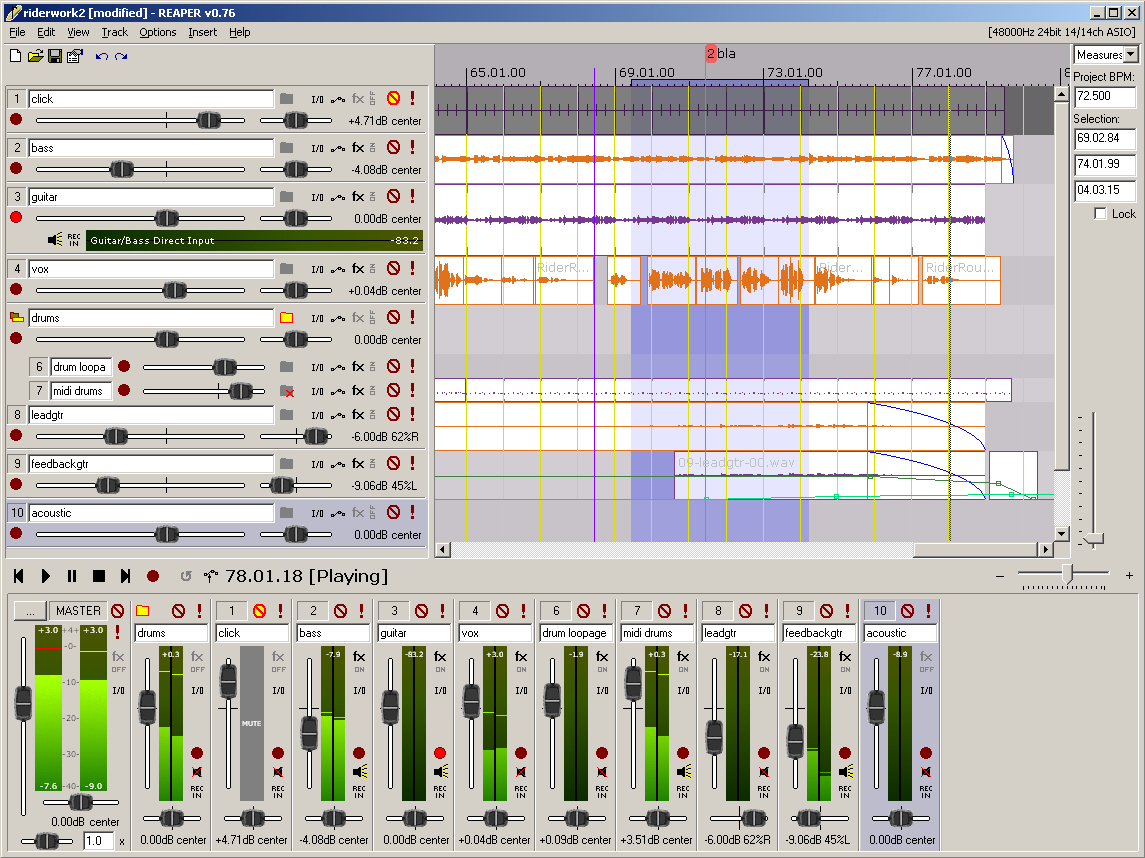
Reaper 7.58 has been released, continuing its legacy as a highly efficient digital audio workstation (DAW) designed for recording, arranging, editing, and rendering multi-track waveform audio. It is notable for being lightweight and versatile, making it a popular choice among audio professionals and enthusiasts. Reaper stands out for its fast boot times, stability, and minimal resource demands, unlike more cumbersome DAWs that often come with excessive built-in content.
Key features of Reaper include:
- Driver Support: Reaper supports various audio drivers such as ASIO, Kernel Streaming, WaveOut, and DirectSound, allowing users to switch drivers seamlessly if issues arise, which is particularly useful during critical mixing sessions.
- File Format Compatibility: It supports common audio formats like WAV, OGG, MP3, and MIDI, enabling straightforward recording and playback without unnecessary complexity.
- Unlimited Tracks: Users can arrange an unlimited number of items across multiple tracks, accommodating extensive vocal stacks or complex arrangements without hitting artificial limits.
- Extensive Plugin Support: Reaper supports a wide range of plugins including DirectX, VST, and the unique Jesusonic plugins, all of which are fully automatable. The bundled JSFX tools are efficient for quick fixes.
- User-Friendly Automation: The automation features allow for consistent control over volume, pan, and envelopes, avoiding frustrations commonly found in other DAWs.
- Customizable User Interface: While the default interface may seem dated, Reaper offers extensive customization options through community themes that enhance the visual experience.
Reaper is particularly well-suited for users who prioritize a lightweight, stable audio workstation that can run smoothly on older machines. It caters to those who enjoy fine-tuning settings for a personalized experience. However, it may not appeal to users seeking a plethora of built-in instruments or those who dislike customization.
Despite its depth, Reaper is friendly for beginners, as many professionals use it effectively. Its logical workflow becomes intuitive after mastering the basics, and its lightweight nature minimizes performance issues even with multiple plugins.
In summary, Reaper 7.58 is a powerful and reliable DAW that emphasizes speed and stability over unnecessary features. While its default interface may require some initial adjustment, the customizable options and broad compatibility make it an excellent choice for both seasoned audio engineers and beginners. For any setup challenges, users can seek assistance through community forums, such as MajorGeeks, where support is readily available. With ongoing updates, Reaper continues to be a formidable tool in the audio production landscape
Key features of Reaper include:
- Driver Support: Reaper supports various audio drivers such as ASIO, Kernel Streaming, WaveOut, and DirectSound, allowing users to switch drivers seamlessly if issues arise, which is particularly useful during critical mixing sessions.
- File Format Compatibility: It supports common audio formats like WAV, OGG, MP3, and MIDI, enabling straightforward recording and playback without unnecessary complexity.
- Unlimited Tracks: Users can arrange an unlimited number of items across multiple tracks, accommodating extensive vocal stacks or complex arrangements without hitting artificial limits.
- Extensive Plugin Support: Reaper supports a wide range of plugins including DirectX, VST, and the unique Jesusonic plugins, all of which are fully automatable. The bundled JSFX tools are efficient for quick fixes.
- User-Friendly Automation: The automation features allow for consistent control over volume, pan, and envelopes, avoiding frustrations commonly found in other DAWs.
- Customizable User Interface: While the default interface may seem dated, Reaper offers extensive customization options through community themes that enhance the visual experience.
Reaper is particularly well-suited for users who prioritize a lightweight, stable audio workstation that can run smoothly on older machines. It caters to those who enjoy fine-tuning settings for a personalized experience. However, it may not appeal to users seeking a plethora of built-in instruments or those who dislike customization.
Despite its depth, Reaper is friendly for beginners, as many professionals use it effectively. Its logical workflow becomes intuitive after mastering the basics, and its lightweight nature minimizes performance issues even with multiple plugins.
In summary, Reaper 7.58 is a powerful and reliable DAW that emphasizes speed and stability over unnecessary features. While its default interface may require some initial adjustment, the customizable options and broad compatibility make it an excellent choice for both seasoned audio engineers and beginners. For any setup challenges, users can seek assistance through community forums, such as MajorGeeks, where support is readily available. With ongoing updates, Reaper continues to be a formidable tool in the audio production landscape
Reaper 7.58 released
REAPER is an application that lets you record, arrange, edit, and render multi-track waveform audio. The last freeware version also available.