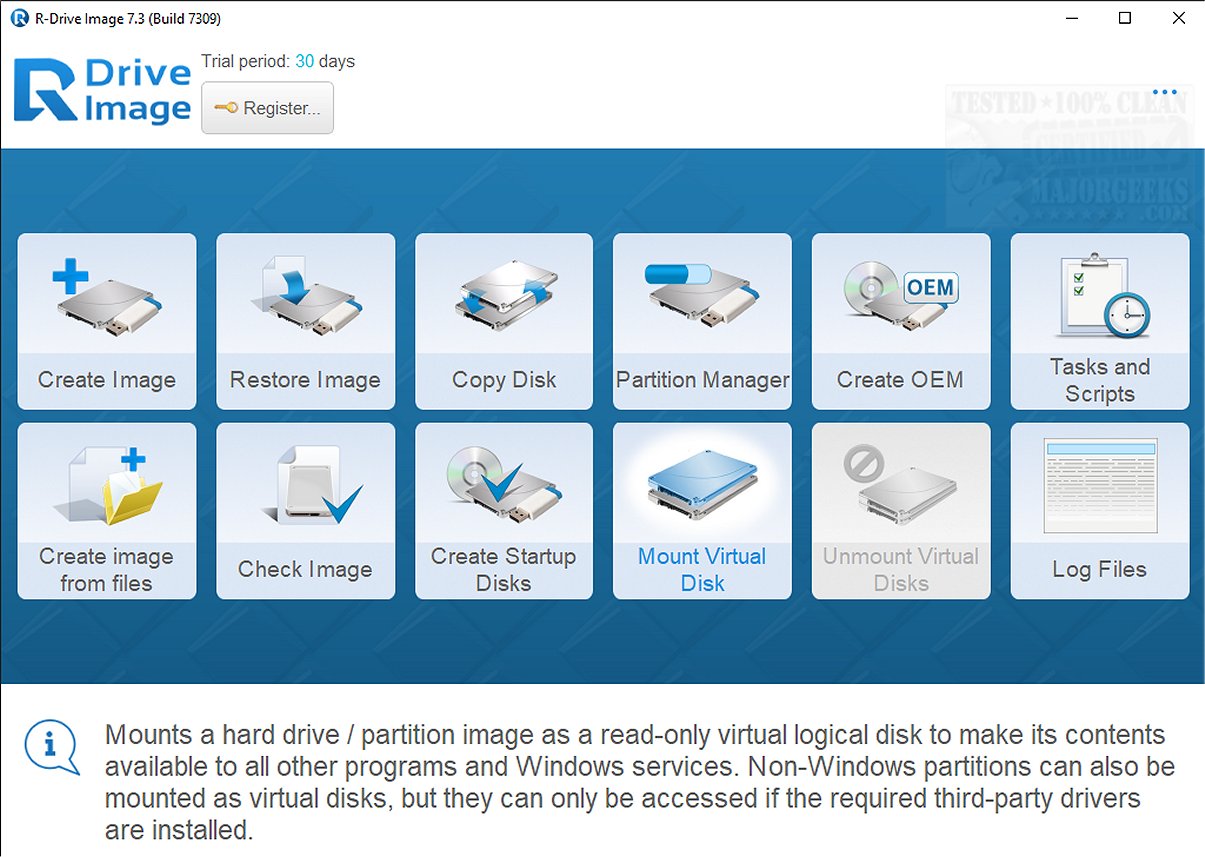
R-Drive Image is a sophisticated backup software designed to safeguard data by creating precise copies of hard drives and partitions, ensuring that crucial information remains protected.
Key Features of R-Drive Image
The software specializes in generating disk image files, which are complete byte-for-byte replicas of hard drives, partitions, or logical disks. One of its standout features is the ability to create these images while the Windows operating system is operational, allowing users to maintain their workflow without interruptions. Users can save these image files in various locations, including removable media such as CD-R(W), DVD, and Iomega Zip and Jazz disks.
Versatile Use Cases
R-Drive Image is particularly valuable in recovery scenarios, enabling quick restoration after data loss due to crashes, viruses, or hardware malfunctions. Its user-friendly interface streamlines the process of creating and restoring images, copying disks, and connecting images as virtual logical disks. The software also allows for the creation of startup disks for added convenience.
Getting Started with R-Drive Image
To initiate the imaging process, users simply select the partition to be imaged, designate a storage directory, and assign a file name. This ensures that the image is stored correctly and can be easily retrieved when needed. The software offers options for verifying file integrity, adjusting compression levels, performing sector-by-sector backups, and setting password protection. Furthermore, users can enable snapshot services, prioritize backups, and configure settings for future operations.
R-Drive Image supports multiple scripts and backup sets, allowing for full backups or incremental changes, all while minimizing CPU and RAM usage during the process.
Final Thoughts
R-Drive Image is distinguished as a powerful and feature-rich disk imaging solution that caters to users requiring high reliability and efficiency in their data management strategies. Its proprietary image format, extensive features, and intuitive interface make it a standout choice for those looking to enhance their data security and backup practices.
Additional Resources
For users looking to expand their knowledge on data management, related topics include:
- How to Back Up Google Drive
- How to Delete Some or All System Restore Points on Windows 10 & 11
- Managing System Restore Points: Enabling, Disabling, and Creating New Points
In conclusion, R-Drive Image 7.3.7314 provides a robust and efficient approach to data backup, ensuring users can protect their vital information with ease
Key Features of R-Drive Image
The software specializes in generating disk image files, which are complete byte-for-byte replicas of hard drives, partitions, or logical disks. One of its standout features is the ability to create these images while the Windows operating system is operational, allowing users to maintain their workflow without interruptions. Users can save these image files in various locations, including removable media such as CD-R(W), DVD, and Iomega Zip and Jazz disks.
Versatile Use Cases
R-Drive Image is particularly valuable in recovery scenarios, enabling quick restoration after data loss due to crashes, viruses, or hardware malfunctions. Its user-friendly interface streamlines the process of creating and restoring images, copying disks, and connecting images as virtual logical disks. The software also allows for the creation of startup disks for added convenience.
Getting Started with R-Drive Image
To initiate the imaging process, users simply select the partition to be imaged, designate a storage directory, and assign a file name. This ensures that the image is stored correctly and can be easily retrieved when needed. The software offers options for verifying file integrity, adjusting compression levels, performing sector-by-sector backups, and setting password protection. Furthermore, users can enable snapshot services, prioritize backups, and configure settings for future operations.
R-Drive Image supports multiple scripts and backup sets, allowing for full backups or incremental changes, all while minimizing CPU and RAM usage during the process.
Final Thoughts
R-Drive Image is distinguished as a powerful and feature-rich disk imaging solution that caters to users requiring high reliability and efficiency in their data management strategies. Its proprietary image format, extensive features, and intuitive interface make it a standout choice for those looking to enhance their data security and backup practices.
Additional Resources
For users looking to expand their knowledge on data management, related topics include:
- How to Back Up Google Drive
- How to Delete Some or All System Restore Points on Windows 10 & 11
- Managing System Restore Points: Enabling, Disabling, and Creating New Points
In conclusion, R-Drive Image 7.3.7314 provides a robust and efficient approach to data backup, ensuring users can protect their vital information with ease
R-Drіvе Іmаgе 7.3.7314 released
R-Drive Image is an effective software application designed for backing up data from your computer's hard drive. It excels in creating exact copies of disks and partitions, providing reliable protection for your essential information.