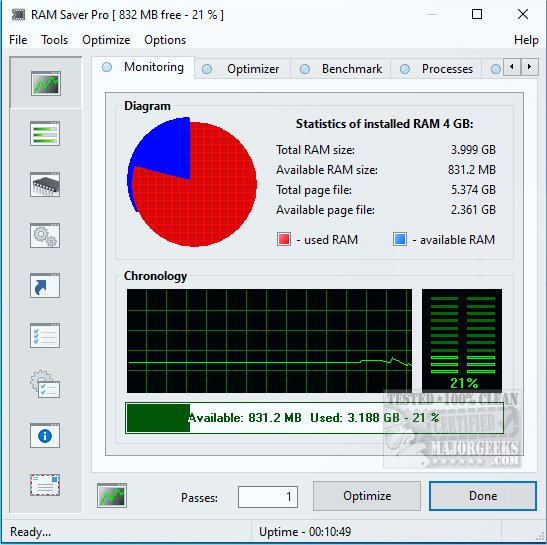
Ram Saver Pro is a specialized RAM optimization tool designed for Windows operating systems, which provides users with enhanced control over their computer's memory management. This software is particularly beneficial for users experiencing performance issues when multitasking or using resource-intensive applications. By freeing up RAM, Ram Saver Pro aims to restore lost performance without the need for hardware upgrades.
The software addresses common inefficiencies in Windows memory management by actively monitoring and optimizing RAM usage. It works in real-time to clear out unused memory and enhance the performance of active processes. Users receive detailed statistics regarding their memory usage, allowing them to see what is consuming resources and how much memory is available. The program can be set to optimize memory automatically on a schedule or manually activated when needed.
- One-Click RAM Optimization: Instantly clears unused memory to improve performance during demanding tasks like gaming or video editing.
- System Tray Integration: Allows for quick access to controls without needing to open the full application.
- Memory Benchmarking Tool: Offers built-in tests to evaluate system performance.
- Startup Manager: Lets users delay or disable background apps that can slow down boot times.
Ram Saver Pro is ideal for users with older Windows desktops or budget laptops with limited RAM (4–8 GB). It's also suitable for individuals who frequently manage multiple browser tabs or use memory-heavy applications like Photoshop or integrated development environments (IDEs). Even casual users can benefit from improved responsiveness during everyday tasks such as streaming or document editing.
- Effective in real-time RAM optimization.
- Lightweight on system resources.
- Customizable scheduling and automatic tweaks.
- Combines useful system tools into one application.
Cons:
- The interface appears outdated compared to modern Windows applications.
- Some features are only accessible in the paid version.
- Lacks a portable version for use on different devices.
Ram Saver Pro is a practical utility that offers enhanced control over memory management, providing significant benefits, especially for systems with limited RAM. While it may not feature the most modern interface, its functionality and efficiency make it a valuable tool for users looking to improve system performance without hardware upgrades. Whether for gaming, editing, or managing multiple applications simultaneously, Ram Saver Pro can help maintain smooth operation with minimal effort.
To further enhance the tool, future updates could focus on modernizing the user interface, introducing a portable version for flexibility, and possibly expanding free features to attract a broader user base. Additionally, integrating AI-driven optimization suggestions could provide users with tailored recommendations for improving their system's performance based on usage patterns
Key Functionalities
The software addresses common inefficiencies in Windows memory management by actively monitoring and optimizing RAM usage. It works in real-time to clear out unused memory and enhance the performance of active processes. Users receive detailed statistics regarding their memory usage, allowing them to see what is consuming resources and how much memory is available. The program can be set to optimize memory automatically on a schedule or manually activated when needed.
Main Features
- Real-Time RAM Monitoring: Provides live tracking of memory usage through a user-friendly interface.- One-Click RAM Optimization: Instantly clears unused memory to improve performance during demanding tasks like gaming or video editing.
- System Tray Integration: Allows for quick access to controls without needing to open the full application.
- Memory Benchmarking Tool: Offers built-in tests to evaluate system performance.
- Startup Manager: Lets users delay or disable background apps that can slow down boot times.
Target Audience
Ram Saver Pro is ideal for users with older Windows desktops or budget laptops with limited RAM (4–8 GB). It's also suitable for individuals who frequently manage multiple browser tabs or use memory-heavy applications like Photoshop or integrated development environments (IDEs). Even casual users can benefit from improved responsiveness during everyday tasks such as streaming or document editing.
Pros and Cons
Pros:- Effective in real-time RAM optimization.
- Lightweight on system resources.
- Customizable scheduling and automatic tweaks.
- Combines useful system tools into one application.
Cons:
- The interface appears outdated compared to modern Windows applications.
- Some features are only accessible in the paid version.
- Lacks a portable version for use on different devices.
Conclusion
Ram Saver Pro is a practical utility that offers enhanced control over memory management, providing significant benefits, especially for systems with limited RAM. While it may not feature the most modern interface, its functionality and efficiency make it a valuable tool for users looking to improve system performance without hardware upgrades. Whether for gaming, editing, or managing multiple applications simultaneously, Ram Saver Pro can help maintain smooth operation with minimal effort.
Future Considerations
To further enhance the tool, future updates could focus on modernizing the user interface, introducing a portable version for flexibility, and possibly expanding free features to attract a broader user base. Additionally, integrating AI-driven optimization suggestions could provide users with tailored recommendations for improving their system's performance based on usage patterns
Ram Saver Pro 25.12.1 released
Ram Saver Pro is a RAM optimizer for Windows that gives you direct control over your system's memory management.