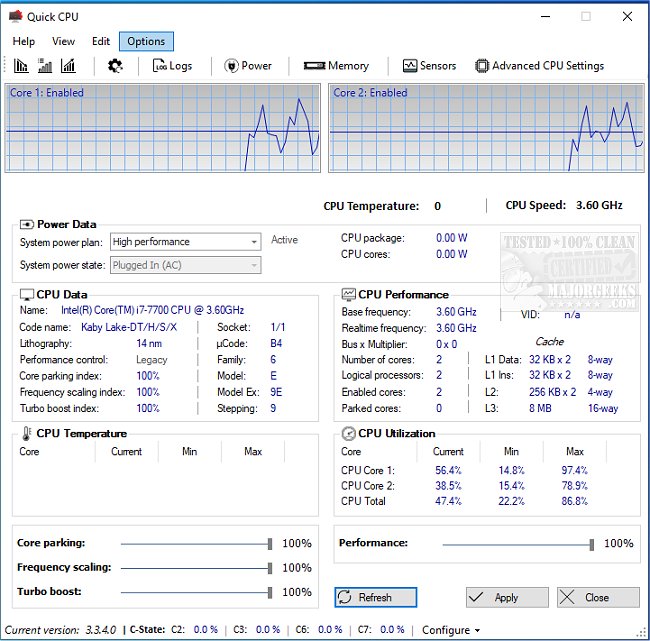
Quick CPU has released version 6.4.0.0, a comprehensive tool designed for fine-tuning and monitoring a wide range of critical CPU and system parameters. This user-friendly software empowers users to optimize their computer's performance, whether they are gamers, content creators, or simply looking to enhance their everyday computing experience. Quick CPU offers real-time hardware monitoring, allowing users to track important metrics like CPU temperature, core utilization, power consumption, and voltage conveniently.
Key features include advanced CPU tuning options, such as Core Parking, Turbo Boost, and Frequency Scaling, giving users control over their system's performance versus power consumption. The software also provides preset performance modes—Minimal, Balanced, and Maximum—making it accessible for beginners, while experienced users can delve into custom settings and advanced options. Additional functionalities such as custom alerts for changes, a highly customizable interface with various themes, and power plan management further enhance user experience.
For gamers, Quick CPU minimizes lag and maximizes performance; for content creators, it streamlines rendering and editing processes; and for laptop users, it extends battery life by managing core usage. Even those new to tech can benefit from its straightforward features, while power users will appreciate its in-depth monitoring capabilities.
One of the standout advantages of Quick CPU is its balance of expert-level functionality and user-friendly design, distinguishing it from other performance monitoring tools. While it may present a learning curve for first-time users engaging with advanced settings, the preset options ensure safe optimization. However, it does not support macOS or Linux systems.
Overall, Quick CPU serves as an essential tool for unlocking a computer's full potential, whether for enhancing gaming experiences, improving energy efficiency, or simply enjoying a more responsive system. With its rich features and smooth performance, Quick CPU invites users to take control of their CPU management. Are you ready to harness the power of your system? Download Quick CPU today and experience the difference firsthand.
In addition to its core functionalities, users can explore resources on identifying their Intel processor, checking core counts, and understanding their hardware configurations, ensuring they are well-equipped to make informed decisions about their system's performance
Key features include advanced CPU tuning options, such as Core Parking, Turbo Boost, and Frequency Scaling, giving users control over their system's performance versus power consumption. The software also provides preset performance modes—Minimal, Balanced, and Maximum—making it accessible for beginners, while experienced users can delve into custom settings and advanced options. Additional functionalities such as custom alerts for changes, a highly customizable interface with various themes, and power plan management further enhance user experience.
For gamers, Quick CPU minimizes lag and maximizes performance; for content creators, it streamlines rendering and editing processes; and for laptop users, it extends battery life by managing core usage. Even those new to tech can benefit from its straightforward features, while power users will appreciate its in-depth monitoring capabilities.
One of the standout advantages of Quick CPU is its balance of expert-level functionality and user-friendly design, distinguishing it from other performance monitoring tools. While it may present a learning curve for first-time users engaging with advanced settings, the preset options ensure safe optimization. However, it does not support macOS or Linux systems.
Overall, Quick CPU serves as an essential tool for unlocking a computer's full potential, whether for enhancing gaming experiences, improving energy efficiency, or simply enjoying a more responsive system. With its rich features and smooth performance, Quick CPU invites users to take control of their CPU management. Are you ready to harness the power of your system? Download Quick CPU today and experience the difference firsthand.
In addition to its core functionalities, users can explore resources on identifying their Intel processor, checking core counts, and understanding their hardware configurations, ensuring they are well-equipped to make informed decisions about their system's performance
Quick CPU 6.4.0.0 released
Quick CPU enables fine-tuning and monitoring of a myriad of essential CPU and system parameters.