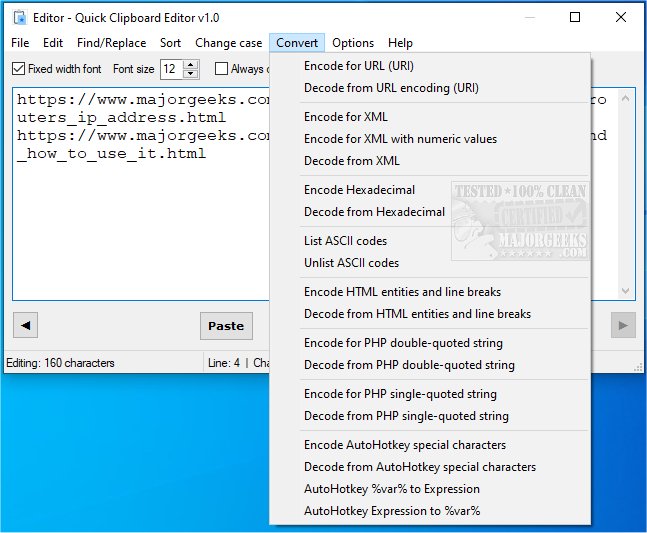
Quick Clipboard Editor (QCE) version 3.3.0.0 has been released, enhancing its capabilities for users who need to edit text stored in their clipboard. This free and user-friendly text editor is designed specifically for Windows users, providing a seamless way to modify clipboard content before pasting it into applications.
Key features of Quick Clipboard Editor include the ability to access and retrieve previous clipboard entries, perform find and replace operations, insert new content, trim unwanted text, and manage line deletions based on various criteria. Users can also sort text, change text case, and convert text formats for different coding needs, including HTML, XML, PHP, and AutoHotkey (AHK). Additionally, the software allows users to save frequently used commands for quick access, making repetitive tasks more efficient.
The intuitive interface of Quick Clipboard Editor facilitates quick edits with just a few clicks, making it an ideal tool for anyone who frequently handles text. For comprehensive information about its features, users can refer to the provided link.
As an extension of this functionality, Quick Clipboard Editor could benefit from incorporating cloud synchronization features, enabling users to access their clipboard history across multiple devices. Additionally, integrating advanced AI-driven text analysis tools could enhance text editing capabilities, providing suggestions for improvements or corrections in real-time. These enhancements would further solidify Quick Clipboard Editor's position as an essential tool for text editing.
For further reading, users may explore related topics such as copying file paths to the clipboard, managing clipboard history, and disabling clipboard history features in Windows 10 and 11
Key features of Quick Clipboard Editor include the ability to access and retrieve previous clipboard entries, perform find and replace operations, insert new content, trim unwanted text, and manage line deletions based on various criteria. Users can also sort text, change text case, and convert text formats for different coding needs, including HTML, XML, PHP, and AutoHotkey (AHK). Additionally, the software allows users to save frequently used commands for quick access, making repetitive tasks more efficient.
The intuitive interface of Quick Clipboard Editor facilitates quick edits with just a few clicks, making it an ideal tool for anyone who frequently handles text. For comprehensive information about its features, users can refer to the provided link.
As an extension of this functionality, Quick Clipboard Editor could benefit from incorporating cloud synchronization features, enabling users to access their clipboard history across multiple devices. Additionally, integrating advanced AI-driven text analysis tools could enhance text editing capabilities, providing suggestions for improvements or corrections in real-time. These enhancements would further solidify Quick Clipboard Editor's position as an essential tool for text editing.
For further reading, users may explore related topics such as copying file paths to the clipboard, managing clipboard history, and disabling clipboard history features in Windows 10 and 11
Quick Clipboard Editor 3.3.0.0 released
Quick Clipboard Editor gives you the ability to make a wide variety of edits to the text stored in your clipboard.