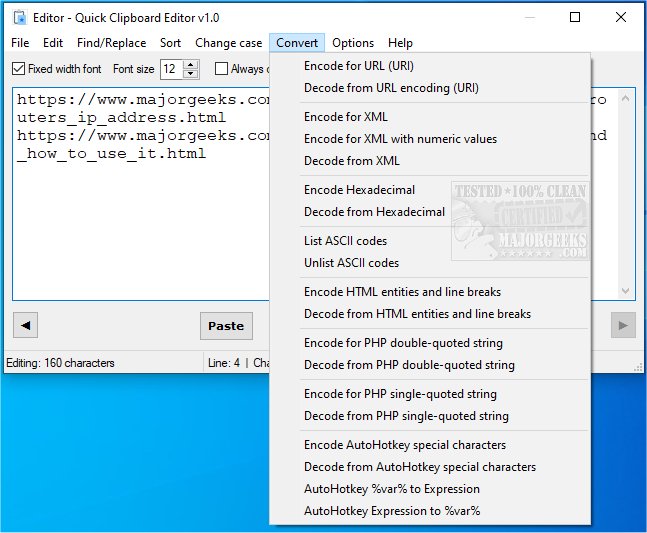
Quick Clipboard Editor (QCE) has released its latest version (3.1.2.0), enhancing the way Windows users can edit their clipboard text. This user-friendly and free text editor provides comprehensive access to the clipboard, allowing for efficient modifications before pasting into other applications.
With QCE, users can easily retrieve previous clipboard entries, perform find-and-replace operations for specific text, add new content line by line, and trim away unnecessary sections. The software also offers options to keep or delete certain lines or characters based on user-defined criteria, sort text according to various parameters, and alter the case of text segments. Moreover, it supports conversions for multiple coding formats such as HTML, XML, PHP, and AHK, making it a versatile tool for programmers and text editors alike.
In addition to editing capabilities, Quick Clipboard Editor allows users to save commonly used commands for repetitive tasks and directly save their modifications back to the clipboard. This streamlined approach ensures that users can perform edits quickly and efficiently, making it an ideal companion for anyone dealing with text regularly.
For further insights, a complete outline of features can be found on the official site. The software is also linked to related tutorials, including methods for copying file paths to the clipboard, clearing clipboard history, and disabling clipboard history in Windows 10 and 11.
Extended Information:
In addition to its existing features, future updates to Quick Clipboard Editor could include enhancements like cloud synchronization for clipboard history, support for additional programming languages, and improved user interface customization options. These improvements would cater to a broader audience and facilitate even more efficient editing workflows for users across various fields, from content creators to developers. As the software evolves, it may also integrate AI-powered suggestions for text modifications, making it an even more powerful tool for enhancing productivity and creativity
With QCE, users can easily retrieve previous clipboard entries, perform find-and-replace operations for specific text, add new content line by line, and trim away unnecessary sections. The software also offers options to keep or delete certain lines or characters based on user-defined criteria, sort text according to various parameters, and alter the case of text segments. Moreover, it supports conversions for multiple coding formats such as HTML, XML, PHP, and AHK, making it a versatile tool for programmers and text editors alike.
In addition to editing capabilities, Quick Clipboard Editor allows users to save commonly used commands for repetitive tasks and directly save their modifications back to the clipboard. This streamlined approach ensures that users can perform edits quickly and efficiently, making it an ideal companion for anyone dealing with text regularly.
For further insights, a complete outline of features can be found on the official site. The software is also linked to related tutorials, including methods for copying file paths to the clipboard, clearing clipboard history, and disabling clipboard history in Windows 10 and 11.
Extended Information:
In addition to its existing features, future updates to Quick Clipboard Editor could include enhancements like cloud synchronization for clipboard history, support for additional programming languages, and improved user interface customization options. These improvements would cater to a broader audience and facilitate even more efficient editing workflows for users across various fields, from content creators to developers. As the software evolves, it may also integrate AI-powered suggestions for text modifications, making it an even more powerful tool for enhancing productivity and creativity
Quick Clipboard Editor 3.1.2.0 released
Quick Clipboard Editor gives you the ability to make a wide variety of edits to the text stored in your clipboard.