QontrolPanel, previously known as QuickSoundSwitcher, has released its latest version, 1.11.1, enhancing the user experience for audio device management on your computer. This application streamlines the process of switching between various audio devices, such as headphones, speakers, and external sound systems, eliminating the need for navigating through cumbersome settings menus. With just a click, users can effortlessly toggle between devices, significantly improving their audio experience and saving time when adjusting sound settings.
Streamlined Functionality Without Traditional Interface
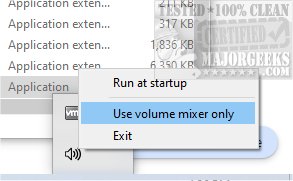
QontrolPanel sets itself apart by forgoing a conventional user interface, focusing instead on a minimalist approach that prioritizes functionality. Users can quickly launch the app without a lengthy installation process. Once running, it integrates seamlessly into the System Tray, providing quick access to essential audio management features.
From the System Tray icon, users have three primary options:
- Input Management: This feature allows for quick selection and management of microphone settings, ensuring the right mic is used for gaming, video calls, or recording tasks.
- Output Switching: Users can easily toggle between various audio output devices, simplifying the process for those who frequently switch between speakers and headphones.
- Volume Mixer: This option enables users to control individual application sound levels independently. Each application that produces sound is listed, with sliders for precise volume adjustments and a quick mute button for convenience.
Individual App Volume Control
In addition to the general audio management features, QontrolPanel permits users to fine-tune the volume levels of different applications. This allows for a customized audio experience, as users can adjust the sound for each app without affecting the overall system volume.
Final Thoughts: A Must-Have Tool for Audio Management
In summary, QontrolPanel is an exceptional tool for anyone looking to manage their audio settings with ease. Its user-friendly design and efficient functionality make it ideal for users who need to quickly switch between different audio devices without dealing with complicated interfaces. This application is essential for those who frequently toggle between speakers, headphones, and microphones, providing a seamless audio experience.
Related Resources:
- How to Enable Windows Sonic Surround Sound on Windows 10 & 11
- How to Turn Toggle Key Sounds on or off in Windows 10 & 11
Future Enhancements and Community Feedback
As QontrolPanel continues to evolve, future updates may include additional features based on user feedback, such as enhanced customization options or integration with smart audio devices. Users are encouraged to share their suggestions to further refine the application's capabilities. Overall, QontrolPanel stands as a vital solution in the realm of audio management, catering to the needs of diverse users in an increasingly audio-centric digital environment
Streamlined Functionality Without Traditional Interface
QontrolPanel sets itself apart by forgoing a conventional user interface, focusing instead on a minimalist approach that prioritizes functionality. Users can quickly launch the app without a lengthy installation process. Once running, it integrates seamlessly into the System Tray, providing quick access to essential audio management features.
From the System Tray icon, users have three primary options:
- Input Management: This feature allows for quick selection and management of microphone settings, ensuring the right mic is used for gaming, video calls, or recording tasks.
- Output Switching: Users can easily toggle between various audio output devices, simplifying the process for those who frequently switch between speakers and headphones.
- Volume Mixer: This option enables users to control individual application sound levels independently. Each application that produces sound is listed, with sliders for precise volume adjustments and a quick mute button for convenience.
Individual App Volume Control
In addition to the general audio management features, QontrolPanel permits users to fine-tune the volume levels of different applications. This allows for a customized audio experience, as users can adjust the sound for each app without affecting the overall system volume.
Final Thoughts: A Must-Have Tool for Audio Management
In summary, QontrolPanel is an exceptional tool for anyone looking to manage their audio settings with ease. Its user-friendly design and efficient functionality make it ideal for users who need to quickly switch between different audio devices without dealing with complicated interfaces. This application is essential for those who frequently toggle between speakers, headphones, and microphones, providing a seamless audio experience.
Related Resources:
- How to Enable Windows Sonic Surround Sound on Windows 10 & 11
- How to Turn Toggle Key Sounds on or off in Windows 10 & 11
Future Enhancements and Community Feedback
As QontrolPanel continues to evolve, future updates may include additional features based on user feedback, such as enhanced customization options or integration with smart audio devices. Users are encouraged to share their suggestions to further refine the application's capabilities. Overall, QontrolPanel stands as a vital solution in the realm of audio management, catering to the needs of diverse users in an increasingly audio-centric digital environment
QontrolPanel 1.11.1 released
QontrolPanel (formerly QuickSoundSwitcher) simplifies the process of switching between various audio devices on your machine.