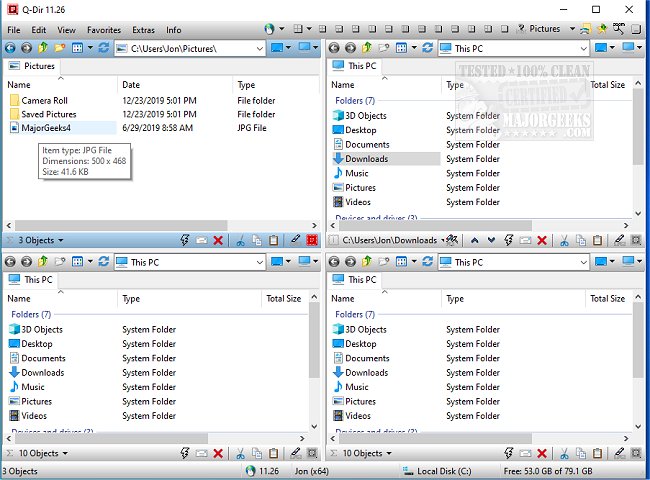
Q-Dir 12.55 has been released as a powerful, free file management tool designed to enhance the way you organize files and folders across various storage devices such as hard disks, USB drives, and network folders. Unlike the standard Windows File Explorer, Q-Dir (the Quad Explorer) features a unique four-pane interface that allows users to manage multiple folders at once, streamlining the process of copying, moving, and organizing files.
- Drag & Drop Support: Easily transfer files between panels.
- Custom Layouts & Color Filters: Tailor the interface to suit individual workflows.
- Tab Support: Open several folders within each panel for increased efficiency.
- Rapid File Operations: Quickly copy, move, or delete files.
- Portable Version: No installation is needed, allowing for on-the-go file management.
- Resource-Friendly: Operates smoothly on older computers.
- IT Professionals: Facilitates the management of system files and backups across different drives.
- Developers & Designers: Keeps project directories easily accessible for efficient work.
- Power Users: Enables quicker execution of bulk file operations.
- Network Administrators: Simplifies file transfers across multiple locations.
- No Built-In File Search: For comprehensive file searches, users may still need to rely on Windows Search.
- Customization: Leveraging hotkeys, color filters, and custom layouts can significantly enhance efficiency.
Key Features of Q-Dir
- Quad-Pane Interface: View and manage up to four directories simultaneously.- Drag & Drop Support: Easily transfer files between panels.
- Custom Layouts & Color Filters: Tailor the interface to suit individual workflows.
- Tab Support: Open several folders within each panel for increased efficiency.
- Rapid File Operations: Quickly copy, move, or delete files.
- Portable Version: No installation is needed, allowing for on-the-go file management.
- Resource-Friendly: Operates smoothly on older computers.
Benefits for Various Users
- Everyday Users: Simplifies personal file organization without the clutter of multiple windows.- IT Professionals: Facilitates the management of system files and backups across different drives.
- Developers & Designers: Keeps project directories easily accessible for efficient work.
- Power Users: Enables quicker execution of bulk file operations.
- Network Administrators: Simplifies file transfers across multiple locations.
Additional Features
Q-Dir includes several productivity-enhancing tools such as bookmarks for quick access to frequently used folders, a File Preview feature for instant viewing without opening files, and multi-monitor support for those working with multiple screens. Users can also take advantage of built-in file filters, Tree View navigation for easier folder exploration, and support for ZIP and FTP files. The interface can be customized with Dark Mode and themes to fit personal preferences.Tips for New Users
- Initial Overwhelm: New users may find the quad-pane layout daunting; it's advisable to start with default settings to become familiar with the interface.- No Built-In File Search: For comprehensive file searches, users may still need to rely on Windows Search.
- Customization: Leveraging hotkeys, color filters, and custom layouts can significantly enhance efficiency.
Conclusion
For users who find Windows File Explorer lacking, Q-Dir offers a robust alternative that is fast, efficient, and highly customizable. Download Q-Dir today to experience a new level of file management.Extension
Looking ahead, the potential for Q-Dir to incorporate even more advanced features could further enhance its appeal. Features such as AI-driven file organization, enhanced collaboration tools for teams, and improved integration with cloud storage solutions would make Q-Dir an even more indispensable tool for users across various domains. Additionally, ongoing user feedback could drive further refinements, ensuring that Q-Dir evolves to meet the changing needs of its user baseQ-Dir 12.55 released
Q-Dir is a free option to make managing your files and folders easy by allowing you to quickly regulate your hard disks, network folders, USB-drives, floppy disks, and other storage devices.