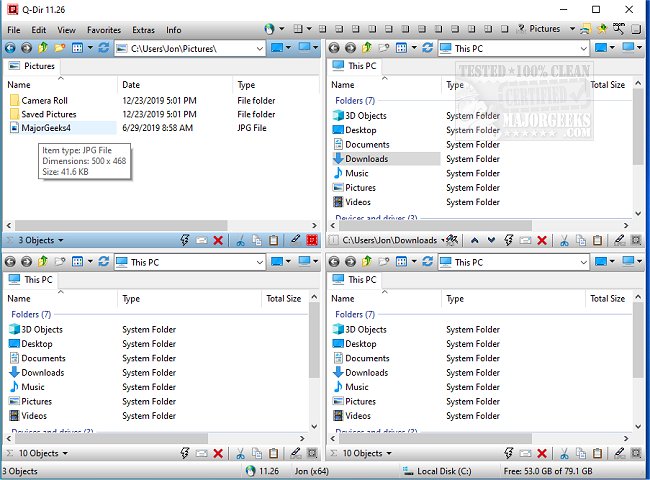
Q-Dir 12.51 has been released, enhancing the experience of managing files and folders across various storage devices, including hard disks, USB drives, and network folders. Unlike the standard Windows File Explorer, which suffices for basic tasks, Q-Dir—also known as The Quad Explorer—offers a superior file management experience with its unique four-pane interface. This design allows users to navigate and manage up to four folders concurrently, streamlining processes like copying, moving, and organizing files.
Key Features of Q-Dir:
- Quad-Pane Interface: View and manage up to four folders simultaneously.
- Drag & Drop Support: Effortlessly transfer files between panels.
- Custom Layouts & Color Filters: Personalize your workspace to fit your preferences.
- Tab Support: Enable multiple folders within each panel for easier navigation.
- Fast File Operations: Quickly copy, move, or delete files.
- Portable Version: Use without the need for installation, making it convenient for on-the-go file management.
- Lightweight & Resource-Friendly: Operates efficiently, even on older computers.
Optimizing Workflow with Q-Dir:
Q-Dir is designed for a variety of users:
- Everyday Users: Simplifies organizing personal files and photos.
- IT Professionals: Facilitates efficient management of system files and backups.
- Developers & Designers: Enables simultaneous access to project folders.
- Power Users: Accelerates bulk file operations.
- Network Admins: Streamlines file transfers across multiple locations.
Unlocking Q-Dir’s Full Potential:
Q-Dir includes additional tools that enhance productivity. Users can bookmark frequently accessed folders, preview files without opening them, and integrate with the clipboard for easy path copying. Multi-monitor support, customizable file filters, and improvements in navigation make exploring complex folder structures more intuitive. Additionally, Q-Dir supports ZIP and FTP functionalities, allowing users to manage compressed files and remote directories effectively. The interface is also customizable with Dark Mode and themes to suit individual workflows.
Mastering Q-Dir: Pro Tips & Tricks:
- Initial Overwhelm: New users may find the quad-pane interface daunting; it’s recommended to start with default layouts until familiar.
- Limited Built-In Search: For deeper file searches, users might still rely on Windows Search.
- Emphasize Customization: Utilizing hotkeys, color filters, and personalized layouts can significantly enhance efficiency.
Conclusion:
If Windows File Explorer feels inadequate for your file management needs, Q-Dir presents a robust, efficient, and highly customizable alternative. Its powerful features cater to a wide range of users, making tasks faster and more organized. Download Q-Dir today to experience its capabilities and optimize your file management process.
Related Resources:
- Manage Default Apps and File Associations
- Reset Folder View Settings in Windows 10 & 11
- Show or Hide File Name Extensions in File Explorer
- Display the Actual Path in Windows 10 & 11 File Explore
Key Features of Q-Dir:
- Quad-Pane Interface: View and manage up to four folders simultaneously.
- Drag & Drop Support: Effortlessly transfer files between panels.
- Custom Layouts & Color Filters: Personalize your workspace to fit your preferences.
- Tab Support: Enable multiple folders within each panel for easier navigation.
- Fast File Operations: Quickly copy, move, or delete files.
- Portable Version: Use without the need for installation, making it convenient for on-the-go file management.
- Lightweight & Resource-Friendly: Operates efficiently, even on older computers.
Optimizing Workflow with Q-Dir:
Q-Dir is designed for a variety of users:
- Everyday Users: Simplifies organizing personal files and photos.
- IT Professionals: Facilitates efficient management of system files and backups.
- Developers & Designers: Enables simultaneous access to project folders.
- Power Users: Accelerates bulk file operations.
- Network Admins: Streamlines file transfers across multiple locations.
Unlocking Q-Dir’s Full Potential:
Q-Dir includes additional tools that enhance productivity. Users can bookmark frequently accessed folders, preview files without opening them, and integrate with the clipboard for easy path copying. Multi-monitor support, customizable file filters, and improvements in navigation make exploring complex folder structures more intuitive. Additionally, Q-Dir supports ZIP and FTP functionalities, allowing users to manage compressed files and remote directories effectively. The interface is also customizable with Dark Mode and themes to suit individual workflows.
Mastering Q-Dir: Pro Tips & Tricks:
- Initial Overwhelm: New users may find the quad-pane interface daunting; it’s recommended to start with default layouts until familiar.
- Limited Built-In Search: For deeper file searches, users might still rely on Windows Search.
- Emphasize Customization: Utilizing hotkeys, color filters, and personalized layouts can significantly enhance efficiency.
Conclusion:
If Windows File Explorer feels inadequate for your file management needs, Q-Dir presents a robust, efficient, and highly customizable alternative. Its powerful features cater to a wide range of users, making tasks faster and more organized. Download Q-Dir today to experience its capabilities and optimize your file management process.
Related Resources:
- Manage Default Apps and File Associations
- Reset Folder View Settings in Windows 10 & 11
- Show or Hide File Name Extensions in File Explorer
- Display the Actual Path in Windows 10 & 11 File Explore
Q-Dir 12.51 released
Q-Dir is a free option to make managing your files and folders easy by allowing you to quickly regulate your hard disks, network folders, USB-drives, floppy disks, and other storage devices.