Q-Dir, a powerful yet free file management tool, has recently released version 12.45. This advanced program simplifies the management of your files and folders, allowing users to efficiently handle hard disks, network folders, USB drives, floppy disks, and other storage devices.
Experience the Power of the Quad-Panel Interface
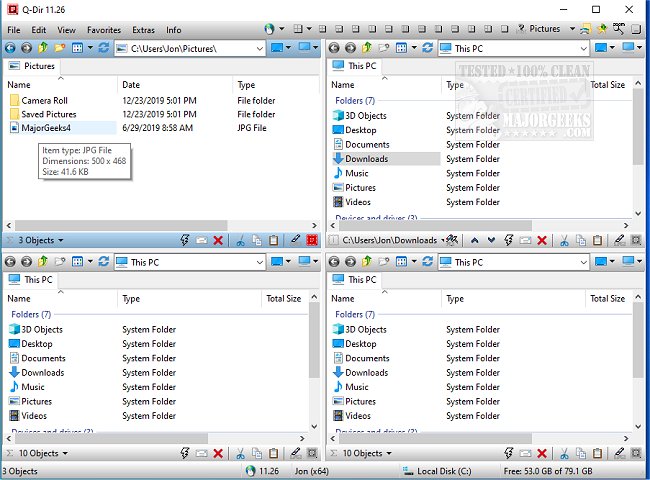
Unlike the basic Windows File Explorer, Q-Dir offers an innovative quad-pane interface that enables users to view and manage up to four folders at once. This feature significantly streamlines tasks such as copying, moving, and organizing files.
Key Features of Q-Dir:
- Quad-Pane Interface: Manage multiple folders simultaneously for efficient file handling.
- Drag & Drop Support: Easily transfer files between different panels.
- Custom Layouts & Color Filters: Personalize your file management experience.
- Tab Support: Open multiple folders within each panel for added convenience.
- Fast File Operations: Quickly copy, move, and delete files.
- Portable Version: Use Q-Dir without installation, perfect for on-the-go access.
- Lightweight & Resource-Friendly: Ideal for older PCs, ensuring smooth performance.
Optimize Your Workflow with Q-Dir
Q-Dir is designed for a variety of users:
- Everyday Users: Organize personal files and documents effortlessly.
- IT Professionals: Manage system files and backups efficiently.
- Developers & Designers: Keep project directories accessible side by side.
- Power Users: Execute bulk file operations quickly.
- Network Admins: Simplify file transfers across multiple locations.
Unlocking Q-Dir’s Full Potential
Beyond its core functionalities, Q-Dir includes additional tools to boost productivity:
- Favorites & Quick Access: Bookmark frequently used folders for quick navigation.
- File Preview Feature: View documents and images without opening them fully.
- Clipboard & Shortcut Integration: Easily copy paths and create shortcuts.
- Multi-Monitor Support: Manage files across different displays.
- Built-in File Filters: Highlight specific file types with custom colors.
- ZIP & FTP Support: Handle compressed files and remote directories effortlessly.
- Customizable Interface: With Dark Mode and Themes, users can tailor the appearance to their preferences.
Mastering Q-Dir: Pro Tips & Tricks
While Q-Dir is packed with features, new users may initially find the interface overwhelming. It is advisable to stick with default layouts until comfortable. Additionally, while Q-Dir excels in file management, it lacks a built-in file search function, making Windows Search useful for deeper searches. Customization options like hotkeys and color filters can optimize your workflow further.
Geek Verdict
For anyone finding Windows File Explorer lacking, Q-Dir provides a fast, efficient, and customizable alternative. Download Q-Dir today to elevate your file management experience!
Related Resources:
- Manage Default Apps and File Associations
- Reset Folder View Settings in Windows 10 & 11
- Show or Hide File Name Extensions in File Explorer
- Display Actual Path in Windows 10 & 11 File Explorer
Conclusion
With its robust features and user-centric design, Q-Dir is a top choice for anyone looking to enhance their file management capabilities. Whether you're a casual user or a professional, Q-Dir offers the tools necessary to streamline your workflow and improve productivity
Experience the Power of the Quad-Panel Interface
Unlike the basic Windows File Explorer, Q-Dir offers an innovative quad-pane interface that enables users to view and manage up to four folders at once. This feature significantly streamlines tasks such as copying, moving, and organizing files.
Key Features of Q-Dir:
- Quad-Pane Interface: Manage multiple folders simultaneously for efficient file handling.
- Drag & Drop Support: Easily transfer files between different panels.
- Custom Layouts & Color Filters: Personalize your file management experience.
- Tab Support: Open multiple folders within each panel for added convenience.
- Fast File Operations: Quickly copy, move, and delete files.
- Portable Version: Use Q-Dir without installation, perfect for on-the-go access.
- Lightweight & Resource-Friendly: Ideal for older PCs, ensuring smooth performance.
Optimize Your Workflow with Q-Dir
Q-Dir is designed for a variety of users:
- Everyday Users: Organize personal files and documents effortlessly.
- IT Professionals: Manage system files and backups efficiently.
- Developers & Designers: Keep project directories accessible side by side.
- Power Users: Execute bulk file operations quickly.
- Network Admins: Simplify file transfers across multiple locations.
Unlocking Q-Dir’s Full Potential
Beyond its core functionalities, Q-Dir includes additional tools to boost productivity:
- Favorites & Quick Access: Bookmark frequently used folders for quick navigation.
- File Preview Feature: View documents and images without opening them fully.
- Clipboard & Shortcut Integration: Easily copy paths and create shortcuts.
- Multi-Monitor Support: Manage files across different displays.
- Built-in File Filters: Highlight specific file types with custom colors.
- ZIP & FTP Support: Handle compressed files and remote directories effortlessly.
- Customizable Interface: With Dark Mode and Themes, users can tailor the appearance to their preferences.
Mastering Q-Dir: Pro Tips & Tricks
While Q-Dir is packed with features, new users may initially find the interface overwhelming. It is advisable to stick with default layouts until comfortable. Additionally, while Q-Dir excels in file management, it lacks a built-in file search function, making Windows Search useful for deeper searches. Customization options like hotkeys and color filters can optimize your workflow further.
Geek Verdict
For anyone finding Windows File Explorer lacking, Q-Dir provides a fast, efficient, and customizable alternative. Download Q-Dir today to elevate your file management experience!
Related Resources:
- Manage Default Apps and File Associations
- Reset Folder View Settings in Windows 10 & 11
- Show or Hide File Name Extensions in File Explorer
- Display Actual Path in Windows 10 & 11 File Explorer
Conclusion
With its robust features and user-centric design, Q-Dir is a top choice for anyone looking to enhance their file management capabilities. Whether you're a casual user or a professional, Q-Dir offers the tools necessary to streamline your workflow and improve productivity
Q-Dir 12.45 released
Q-Dir is a free option to make managing your files and folders easy by allowing you to quickly regulate your hard disks, network folders, USB-drives, floppy disks, and other storage devices.