Q-Dir is a free and powerful file management tool designed to streamline the way users interact with their files and folders. Released in version 12.43, Q-Dir offers a significant upgrade over the standard Windows File Explorer, especially for those who require speed, efficiency, and enhanced control over their file management tasks.
Key Features of Q-Dir
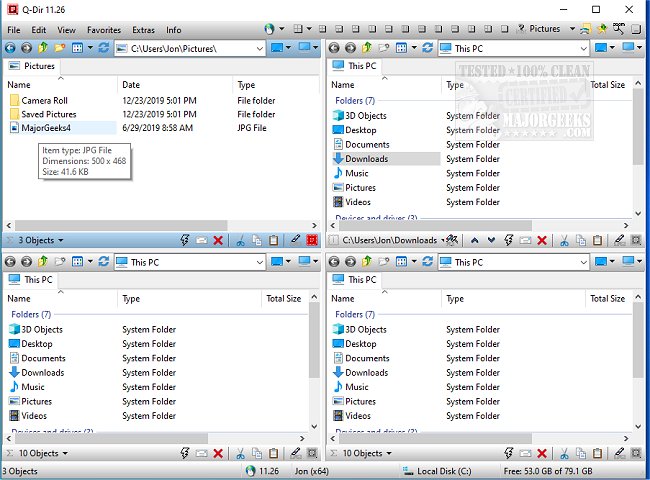
The standout feature of Q-Dir is its unique quad-pane interface, which allows users to view and manage up to four folders simultaneously. This multi-pane approach simplifies tasks such as copying, moving, and organizing files, making it a breeze to juggle multiple directories without the hassle of opening numerous Explorer windows. Additional features include:
- Drag & Drop Support: Effortlessly move files between different panels.
- Custom Layouts & Color Filters: Tailor the interface to suit individual workflows.
- Tab Support: Open multiple folders within each panel for enhanced productivity.
- Fast File Operations: Quickly copy, move, and delete files.
- Portable Version: No installation is required, allowing for easy use on any device.
- Lightweight & Resource-Friendly: Runs smoothly on older computers.
Who Can Benefit from Q-Dir?
Q-Dir caters to a wide range of users, including:
- Everyday Users: Simplify the organization of personal files, photos, and documents.
- IT Professionals: Efficiently manage system files, backups, and multiple drives.
- Developers & Designers: Easily access project directories side by side.
- Power Users: Execute bulk file operations with speed.
- Network Administrators: Seamlessly handle file transfers across various locations.
Maximizing Productivity with Q-Dir
Q-Dir enhances productivity through additional tools and features:
- Favorites & Quick Access: Bookmark frequently used folders for easy navigation.
- File Preview: Quickly view contents of files without opening them.
- Clipboard & Shortcut Integration: Simplify copying paths and creating shortcuts.
- Multi-Monitor Support: Manage files across different screens effectively.
- Built-in File Filters: Highlight specific file types using custom color coding.
- ZIP & FTP Support: Manage compressed files and remote directories effortlessly.
- Dark Mode & Custom Themes: Personalize the interface to match user preferences.
Pro Tips for Using Q-Dir
While Q-Dir is feature-rich, new users may find the interface a bit overwhelming initially. It is recommended to stick with default layouts until familiar with the tool. Since Q-Dir does not include a built-in file search function, users may still rely on Windows Search for comprehensive file lookups. Customization through hotkeys, color filters, and layouts can significantly enhance the user experience.
Conclusion
For those seeking an advanced file management solution beyond the capabilities of Windows File Explorer, Q-Dir stands out as an efficient, customizable, and user-friendly option. Download Q-Dir today to experience its powerful features and see how it can transform your file management tasks.
Related Topics:
- Managing Default Apps and File Associations
- Resetting Folder View Settings in Windows 10 & 11
- Showing or Hiding File Name Extensions in File Explorer
- Displaying the Actual Path in Windows 10 & 11 File Explore
Key Features of Q-Dir
The standout feature of Q-Dir is its unique quad-pane interface, which allows users to view and manage up to four folders simultaneously. This multi-pane approach simplifies tasks such as copying, moving, and organizing files, making it a breeze to juggle multiple directories without the hassle of opening numerous Explorer windows. Additional features include:
- Drag & Drop Support: Effortlessly move files between different panels.
- Custom Layouts & Color Filters: Tailor the interface to suit individual workflows.
- Tab Support: Open multiple folders within each panel for enhanced productivity.
- Fast File Operations: Quickly copy, move, and delete files.
- Portable Version: No installation is required, allowing for easy use on any device.
- Lightweight & Resource-Friendly: Runs smoothly on older computers.
Who Can Benefit from Q-Dir?
Q-Dir caters to a wide range of users, including:
- Everyday Users: Simplify the organization of personal files, photos, and documents.
- IT Professionals: Efficiently manage system files, backups, and multiple drives.
- Developers & Designers: Easily access project directories side by side.
- Power Users: Execute bulk file operations with speed.
- Network Administrators: Seamlessly handle file transfers across various locations.
Maximizing Productivity with Q-Dir
Q-Dir enhances productivity through additional tools and features:
- Favorites & Quick Access: Bookmark frequently used folders for easy navigation.
- File Preview: Quickly view contents of files without opening them.
- Clipboard & Shortcut Integration: Simplify copying paths and creating shortcuts.
- Multi-Monitor Support: Manage files across different screens effectively.
- Built-in File Filters: Highlight specific file types using custom color coding.
- ZIP & FTP Support: Manage compressed files and remote directories effortlessly.
- Dark Mode & Custom Themes: Personalize the interface to match user preferences.
Pro Tips for Using Q-Dir
While Q-Dir is feature-rich, new users may find the interface a bit overwhelming initially. It is recommended to stick with default layouts until familiar with the tool. Since Q-Dir does not include a built-in file search function, users may still rely on Windows Search for comprehensive file lookups. Customization through hotkeys, color filters, and layouts can significantly enhance the user experience.
Conclusion
For those seeking an advanced file management solution beyond the capabilities of Windows File Explorer, Q-Dir stands out as an efficient, customizable, and user-friendly option. Download Q-Dir today to experience its powerful features and see how it can transform your file management tasks.
Related Topics:
- Managing Default Apps and File Associations
- Resetting Folder View Settings in Windows 10 & 11
- Showing or Hiding File Name Extensions in File Explorer
- Displaying the Actual Path in Windows 10 & 11 File Explore
Q-Dir 12.43 released
Q-Dir is a free option to make managing your files and folders easy by allowing you to quickly regulate your hard disks, network folders, USB-drives, floppy disks, and other storage devices.