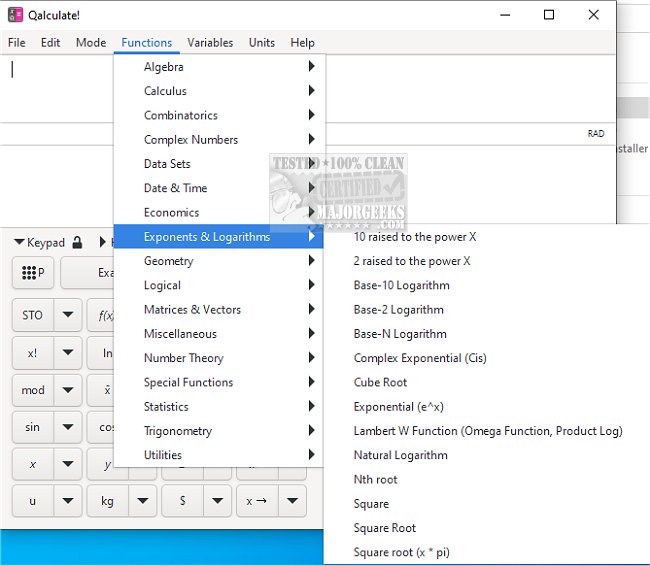
Qalculate! has recently launched version 5.9.0 of its powerful and user-friendly mathematical software. This application is designed not only for complex mathematical computations but also for practical tasks like currency conversion and percentage calculations. For those who prefer portability, a portable version is available, allowing users to run the software without installation.
The software boasts a wide array of features including a vast library of customizable functions, unit conversions, physical constants, and symbolic calculations such as integrals and solving equations. One of the standout features of Qalculate! is its ability to handle arbitrary precision, which allows for highly accurate calculations. Additionally, it provides tools for uncertainty propagation and interval arithmetic, making it suitable for both casual users and professionals who require precision in their calculations.
A unique aspect of Qalculate! is its intuitive expression entry method. Users can input mathematical expressions in a natural manner—similar to how they would write them on paper. Upon pressing Enter, the software interprets the expression and delivers the result. Qalculate! is forgiving of user errors; it can recognize and manage mistakes, providing helpful warnings and error messages to guide users toward corrections. In instances where an expression cannot be fully resolved, the software strives to simplify it as much as possible and provides a response.
Expressions in Qalculate! can incorporate variables, units, functions, numbers, and arithmetic operators, which users can easily access through an intuitive user interface. The automatic completion feature and navigation tools like the menu bar, object managers, and calculator keypad enhance the user experience, making it easier to work with complex calculations.
In addition to its core functionality, Qalculate! offers specific tools such as a number-based conversion dialog and a user-friendly plotting interface for visual representation of data. While the software is intuitive, users are encouraged to review the comprehensive manual, which contains valuable insights and instructions on maximizing the software's capabilities.
In summary, Qalculate! 5.9.0 is a versatile mathematical tool that caters to a wide range of users, from students to professionals, with its extensive features and user-friendly design. For those interested in exploring its myriad functionalities, a complete list of features can be found on their official website, and the portable version remains an excellent option for those on the go.
Further Extensions:
As technology continues to evolve, future updates of Qalculate! could potentially integrate advanced features such as machine learning algorithms for predictive calculations, enhanced graphical interfaces for more complex plotting, and even collaborative tools that allow multiple users to work on calculations simultaneously. Additionally, expanding its database for unit conversions and including more real-time data feeds, such as live currency rates, could further enhance its functionality
The software boasts a wide array of features including a vast library of customizable functions, unit conversions, physical constants, and symbolic calculations such as integrals and solving equations. One of the standout features of Qalculate! is its ability to handle arbitrary precision, which allows for highly accurate calculations. Additionally, it provides tools for uncertainty propagation and interval arithmetic, making it suitable for both casual users and professionals who require precision in their calculations.
A unique aspect of Qalculate! is its intuitive expression entry method. Users can input mathematical expressions in a natural manner—similar to how they would write them on paper. Upon pressing Enter, the software interprets the expression and delivers the result. Qalculate! is forgiving of user errors; it can recognize and manage mistakes, providing helpful warnings and error messages to guide users toward corrections. In instances where an expression cannot be fully resolved, the software strives to simplify it as much as possible and provides a response.
Expressions in Qalculate! can incorporate variables, units, functions, numbers, and arithmetic operators, which users can easily access through an intuitive user interface. The automatic completion feature and navigation tools like the menu bar, object managers, and calculator keypad enhance the user experience, making it easier to work with complex calculations.
In addition to its core functionality, Qalculate! offers specific tools such as a number-based conversion dialog and a user-friendly plotting interface for visual representation of data. While the software is intuitive, users are encouraged to review the comprehensive manual, which contains valuable insights and instructions on maximizing the software's capabilities.
In summary, Qalculate! 5.9.0 is a versatile mathematical tool that caters to a wide range of users, from students to professionals, with its extensive features and user-friendly design. For those interested in exploring its myriad functionalities, a complete list of features can be found on their official website, and the portable version remains an excellent option for those on the go.
Further Extensions:
As technology continues to evolve, future updates of Qalculate! could potentially integrate advanced features such as machine learning algorithms for predictive calculations, enhanced graphical interfaces for more complex plotting, and even collaborative tools that allow multiple users to work on calculations simultaneously. Additionally, expanding its database for unit conversions and including more real-time data feeds, such as live currency rates, could further enhance its functionality
Qalculate! 5.9.0 released
Qalculate! is a powerful math software with user-friendly tools like currency conversion and percent calculation. Portable version is also available.