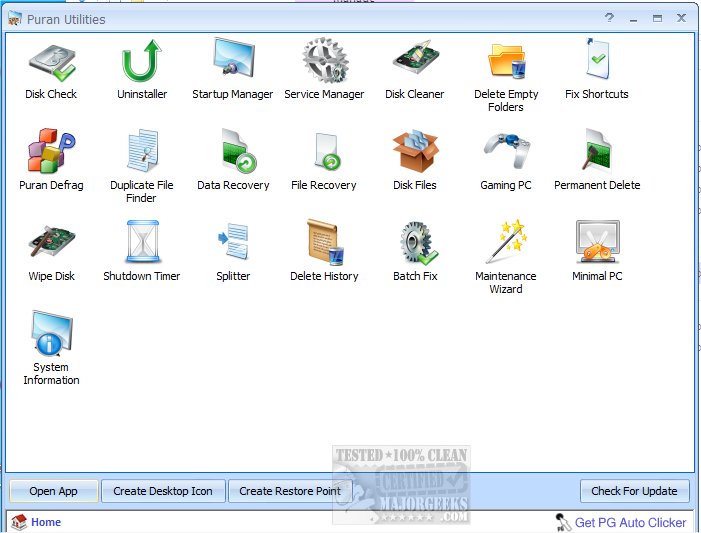
Puran Utilities version 3.2.1 has been released, offering a comprehensive suite of over 20 software utilities designed to enhance your computer's performance and maintain its health. This toolkit includes an automatic, one-click solution that simplifies the process of keeping your computer clean and free of errors.
Key features of Puran Utilities include:
- Disk Check: This utility fixes errors and recovers bad sectors on your hard disk using the built-in chkdsk tool.
- Uninstaller: Enables the removal of unnecessary or stubborn software.
- Puran Startup Manager: Allows users to manage startup items on Windows, helping to improve boot times.
- Puran Service Manager: Enables or disables Windows services to optimize system performance.
- Puran Disk Cleaner: Identifies and removes junk files, offering customization options.
- Delete Empty Folders: Quickly removes empty folders from the system.
- Fix Shortcuts: Automatically repairs or deletes broken shortcuts.
- Puran Registry Cleaner: Cleans the Windows registry to enhance performance.
- Puran Registry Defrag: Defragments and compacts the Windows registry for efficiency.
- Puran Defrag: Automatically defragments and optimizes hard disk drives.
- Puran Duplicate File Finder: A customizable tool for locating duplicate files quickly.
- Data Recovery: Recovers data from damaged media like scratched DVDs and Blu-rays.
- Disk Files: Provides insights into file distribution on your computer.
- Gaming PC: Optimizes the PC environment for gaming.
- Permanent Delete: Ensures that files are deleted permanently and cannot be recovered.
- Puran Wipe Disk: Erases entire disks or free space so that no data can be retrieved.
- Puran Shutdown Timer: Schedules shutdown tasks with various options.
- Splitter: Splits files into specified sizes.
- Delete History: Clears history and data from applications, including web browsers.
- Minimal PC: Closes and switches back specified services/processes with a single click.
- Batch Fix: Automates the cleaning process by running selected utilities.
- Maintenance Wizard: Orchestrates utilities in a pre-defined sequence for optimal performance.
In addition to these features, Puran Utilities 3.2.1 continues to evolve with user feedback, adding new functionalities and improving existing ones. Its user-friendly interface and efficient tools make it an essential utility for anyone looking to maintain and enhance their computer's performance effectively. As technology advances, the software may also integrate artificial intelligence to provide smarter recommendations for system optimization and maintenance, making it even more powerful in future updates
Key features of Puran Utilities include:
- Disk Check: This utility fixes errors and recovers bad sectors on your hard disk using the built-in chkdsk tool.
- Uninstaller: Enables the removal of unnecessary or stubborn software.
- Puran Startup Manager: Allows users to manage startup items on Windows, helping to improve boot times.
- Puran Service Manager: Enables or disables Windows services to optimize system performance.
- Puran Disk Cleaner: Identifies and removes junk files, offering customization options.
- Delete Empty Folders: Quickly removes empty folders from the system.
- Fix Shortcuts: Automatically repairs or deletes broken shortcuts.
- Puran Registry Cleaner: Cleans the Windows registry to enhance performance.
- Puran Registry Defrag: Defragments and compacts the Windows registry for efficiency.
- Puran Defrag: Automatically defragments and optimizes hard disk drives.
- Puran Duplicate File Finder: A customizable tool for locating duplicate files quickly.
- Data Recovery: Recovers data from damaged media like scratched DVDs and Blu-rays.
- Disk Files: Provides insights into file distribution on your computer.
- Gaming PC: Optimizes the PC environment for gaming.
- Permanent Delete: Ensures that files are deleted permanently and cannot be recovered.
- Puran Wipe Disk: Erases entire disks or free space so that no data can be retrieved.
- Puran Shutdown Timer: Schedules shutdown tasks with various options.
- Splitter: Splits files into specified sizes.
- Delete History: Clears history and data from applications, including web browsers.
- Minimal PC: Closes and switches back specified services/processes with a single click.
- Batch Fix: Automates the cleaning process by running selected utilities.
- Maintenance Wizard: Orchestrates utilities in a pre-defined sequence for optimal performance.
In addition to these features, Puran Utilities 3.2.1 continues to evolve with user feedback, adding new functionalities and improving existing ones. Its user-friendly interface and efficient tools make it an essential utility for anyone looking to maintain and enhance their computer's performance effectively. As technology advances, the software may also integrate artificial intelligence to provide smarter recommendations for system optimization and maintenance, making it even more powerful in future updates
Puran Utilities 3.2.1 released
Puran Utilities includes a set of more than 20 software utilities, including but not limited to utilities that can help you get the best performance out of your computer.