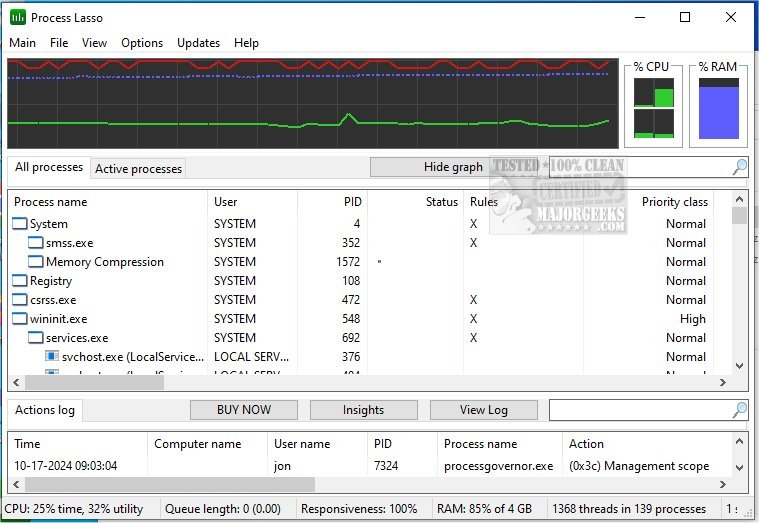
Process Lasso has recently released two versions: a beta version 18.0.0.57 and a stable version 17.1.0.50. This software is designed to optimize and manage the performance of processes and services running on a computer, making it a valuable tool for users seeking to enhance system efficiency.
Among its many features, Process Lasso allows users to set default priorities and CPU affinities for processes, terminate processes that are not allowed, and impose limits on the number of instances of a process that can run simultaneously. It also provides a unique system responsiveness graph to monitor performance and logging capabilities to track processes over time. One standout feature is the ability to automatically restart designated processes, ensuring that critical applications remain operational.
Key features of Process Lasso include:
- ProBalance, which dynamically optimizes process priorities
- Sticky priorities and CPU affinities that persist after restarts
- Instance count limits to prevent overuse of system resources
- The ability to designate specific processes that should not be allowed to run
- A mechanism to prevent the PC from entering sleep mode for certain processes
- Differentiation between instances of svchost.exe to manage system resources better
- Minimal resource consumption, with the stand-alone process management engine using as little as 1MB of RAM
- Comprehensive event logging to keep track of process activity
In addition to its core functionalities, users may find related articles and guides useful, such as identifying processes or services on their computers, saving a text file of all running processes, customizing process information in Task Manager, and managing startup applications in Windows 10 and 11.
Overall, Process Lasso is designed to help users maintain optimal system performance by providing a range of tools for process management and resource optimization. The new releases indicate ongoing development and improvements, catering to the needs of tech-savvy users looking to enhance their computing experience
Among its many features, Process Lasso allows users to set default priorities and CPU affinities for processes, terminate processes that are not allowed, and impose limits on the number of instances of a process that can run simultaneously. It also provides a unique system responsiveness graph to monitor performance and logging capabilities to track processes over time. One standout feature is the ability to automatically restart designated processes, ensuring that critical applications remain operational.
Key features of Process Lasso include:
- ProBalance, which dynamically optimizes process priorities
- Sticky priorities and CPU affinities that persist after restarts
- Instance count limits to prevent overuse of system resources
- The ability to designate specific processes that should not be allowed to run
- A mechanism to prevent the PC from entering sleep mode for certain processes
- Differentiation between instances of svchost.exe to manage system resources better
- Minimal resource consumption, with the stand-alone process management engine using as little as 1MB of RAM
- Comprehensive event logging to keep track of process activity
In addition to its core functionalities, users may find related articles and guides useful, such as identifying processes or services on their computers, saving a text file of all running processes, customizing process information in Task Manager, and managing startup applications in Windows 10 and 11.
Overall, Process Lasso is designed to help users maintain optimal system performance by providing a range of tools for process management and resource optimization. The new releases indicate ongoing development and improvements, catering to the needs of tech-savvy users looking to enhance their computing experience
Process Lasso 18.0.0.57 Beta / 17.1.0.50 released
Process Lasso is a free tool designed to manage and edit how your processes and services run.
Process Lasso 18.0.0.57 Beta / 17.1.0.50 released @ MajorGeeks