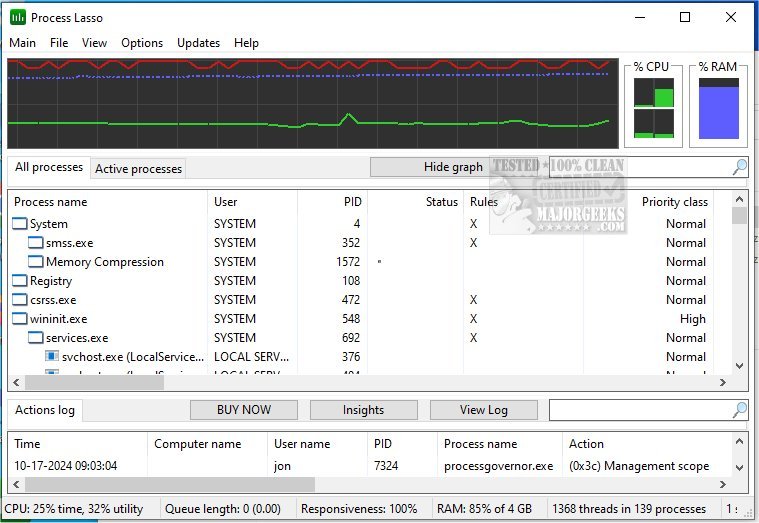
Process Lasso has recently released two versions: 17.0.2.9 Beta and 17.0.1.18. This free utility is designed to improve the management and operation of processes and services on your computer, offering a comprehensive range of features that cater to user needs. Some of its notable capabilities include adjusting default process priorities and affinities, terminating processes that are not allowed, enforcing instance count limits, and providing a system responsiveness graph. Additionally, it can log processes and ensure that selected processes remain active through an auto-restart feature.
Key features of Process Lasso include:
- ProBalance dynamic priority optimization
- Persistent (sticky) priorities and CPU affinities
- Limits on the number of instances that can run
- Management of disallowed processes
- Auto-restart functionality for critical processes
- A unique system responsiveness graph to monitor performance
- Preventing the computer from sleeping for designated processes
- Differentiation between instances of svchost.exe
- Extremely low resource consumption (as low as 1MB of RAM)
- A stand-alone process management engine
- Comprehensive event logging for better monitoring
As a useful tool, Process Lasso enhances system performance and user control, making it a valuable addition for those looking to optimize their computing experience. For users interested in further enhancing their knowledge about process management, related topics include identifying processes or services on a computer, saving a text file of all running processes with TaskList, customizing process information in Task Manager, and managing startup applications in Windows 10 and 11.
In summary, Process Lasso simplifies process management, enhances system responsiveness, and ultimately contributes to a more efficient computing environment. Users looking to optimize their system performance will find its features particularly beneficial
Key features of Process Lasso include:
- ProBalance dynamic priority optimization
- Persistent (sticky) priorities and CPU affinities
- Limits on the number of instances that can run
- Management of disallowed processes
- Auto-restart functionality for critical processes
- A unique system responsiveness graph to monitor performance
- Preventing the computer from sleeping for designated processes
- Differentiation between instances of svchost.exe
- Extremely low resource consumption (as low as 1MB of RAM)
- A stand-alone process management engine
- Comprehensive event logging for better monitoring
As a useful tool, Process Lasso enhances system performance and user control, making it a valuable addition for those looking to optimize their computing experience. For users interested in further enhancing their knowledge about process management, related topics include identifying processes or services on a computer, saving a text file of all running processes with TaskList, customizing process information in Task Manager, and managing startup applications in Windows 10 and 11.
In summary, Process Lasso simplifies process management, enhances system responsiveness, and ultimately contributes to a more efficient computing environment. Users looking to optimize their system performance will find its features particularly beneficial
Process Lasso 17.0.2.9 Beta / 17.0.1.18 released
Process Lasso is a free tool designed to manage and edit how your processes and services run.
Process Lasso 17.0.2.9 Beta / 17.0.1.18 released @ MajorGeeks