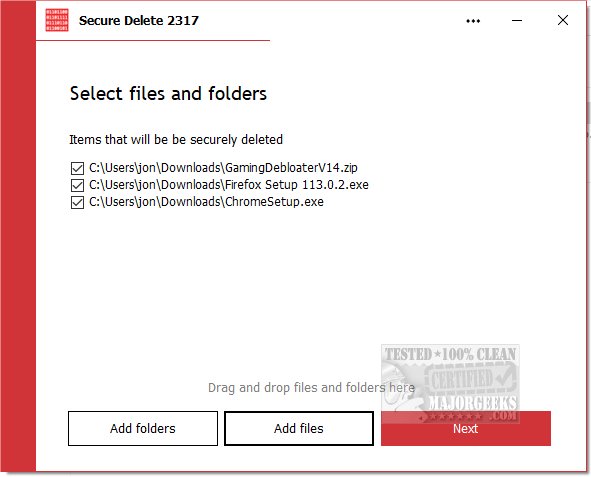
PrivacyRoot has released version 215 of its Secure Delete software, a tool designed for permanently erasing files and folders from your computer without utilizing the recycle bin. This application provides various security levels for the deletion process, allowing users to select the degree of thoroughness they prefer—higher security settings result in longer deletion times.
Users can utilize Secure Delete in three primary ways: by dragging and dropping files or folders into the application window, by selecting files via the "Add Files" button on the main interface, or by right-clicking any item in Windows Explorer and choosing "Send To" followed by Secure Deleter. The program operates through a step-by-step process, offering users the option to halt the deletion at any point. Once initiated, the files and folders are permanently deleted, making it crucial to have backups of important data.
The interface of Secure Delete is user-friendly, making it accessible for beginners while maintaining powerful algorithms for effective data destruction. This ensures that even novice users can achieve maximum security effortlessly.
In addition to PrivacyRoot Secure Delete, users interested in file management may also explore related tools and methods, such as using Storage Sense to automatically delete junk files in Windows 10 and 11, securely deleting files with PowerShell and Cipher, troubleshooting access issues when deleting files or folders, and managing Windows activity history settings.
As data privacy becomes increasingly important, tools like PrivacyRoot Secure Delete are essential for ensuring that sensitive information is irretrievably erased from devices, providing users with peace of mind regarding their digital security
Users can utilize Secure Delete in three primary ways: by dragging and dropping files or folders into the application window, by selecting files via the "Add Files" button on the main interface, or by right-clicking any item in Windows Explorer and choosing "Send To" followed by Secure Deleter. The program operates through a step-by-step process, offering users the option to halt the deletion at any point. Once initiated, the files and folders are permanently deleted, making it crucial to have backups of important data.
The interface of Secure Delete is user-friendly, making it accessible for beginners while maintaining powerful algorithms for effective data destruction. This ensures that even novice users can achieve maximum security effortlessly.
In addition to PrivacyRoot Secure Delete, users interested in file management may also explore related tools and methods, such as using Storage Sense to automatically delete junk files in Windows 10 and 11, securely deleting files with PowerShell and Cipher, troubleshooting access issues when deleting files or folders, and managing Windows activity history settings.
As data privacy becomes increasingly important, tools like PrivacyRoot Secure Delete are essential for ensuring that sensitive information is irretrievably erased from devices, providing users with peace of mind regarding their digital security
PrivacyRoot Secure Delete 215 released
PrivacyRoot Secure Delete lets you securely erase files and folders permanently from your machine without going to the recycle bin.