The newly released PrivacyRoot Clean Space 719 offers a streamlined solution for managing disk space and enhancing privacy. This software effectively removes unnecessary files from your drive, ensuring that deleted files become unrecoverable, thereby protecting your sensitive information.
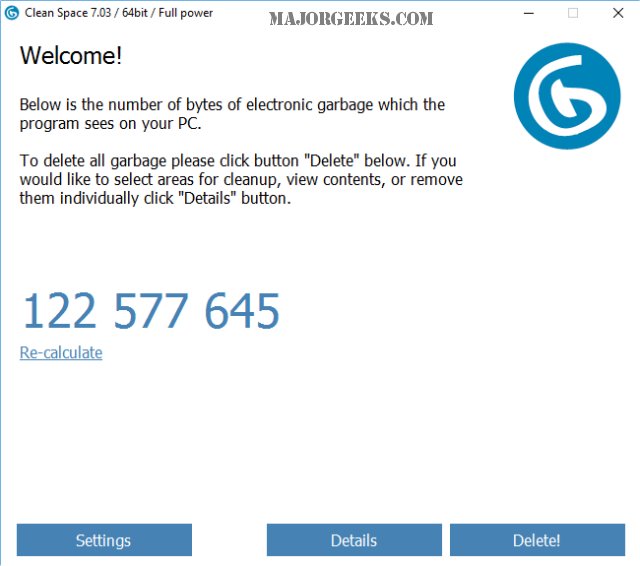
Upon installation, PrivacyRoot Clean Space prompts users to run the program in Administrator mode for optimal performance. This feature is automatically selected during the first run if the user agrees. The program is user-friendly, initiating a quick scan at startup to identify removable files, and it provides updates on the number of files available for deletion. Users can also refresh the scan to account for additional files that may have accumulated since the last check.
The software includes a detailed tab that categorizes detected files, covering areas like Windows 10, various applications (including Media Player, Skype, and OneDrive), and popular web browsers like Chrome and Internet Explorer. While the default settings are generally safe, users have the option to preserve certain data, such as cookies or browsing history, by unchecking those items before deletion.
When comparing PrivacyRoot Clean Space to other cleaning tools like CCleaner and Wise Disk Cleaner, Clean Space performs admirably. In a recent test, CCleaner identified 139.6 MB of removable data, while Clean Space found slightly more at 139.8 MB. Although Wise Disk Cleaner is known for its aggressive cleaning capabilities, it may not suit every user. Clean Space stands out by offering a similar level of efficiency to CCleaner without the additional complexities and bloatware that have been incorporated into CCleaner in recent updates. While it does not include features like a registry cleaner or startup manager, its primary focus on cleaning junk files makes it an attractive option for those seeking simplicity.
Overall, PrivacyRoot Clean Space 719 is an excellent choice for users looking to declutter their computers and securely erase unwanted files without the hassle of navigating a complicated interface. The emphasis on ease of use suggests that sometimes, a simpler approach can be more effective.
Extended Insights:
In addition to its cleaning capabilities, PrivacyRoot Clean Space could enhance its appeal by integrating more advanced features such as scheduled cleaning, customizable cleaning profiles, or cloud backup options for important files. As privacy concerns continue to grow, incorporating additional privacy-related tools, such as a password manager or encrypted file storage, could position Clean Space as a more comprehensive solution for users looking for both cleaning and security in one package. Furthermore, user feedback mechanisms could be introduced to allow customers to suggest improvements, ensuring that the software evolves according to user needs and technological advancements
Upon installation, PrivacyRoot Clean Space prompts users to run the program in Administrator mode for optimal performance. This feature is automatically selected during the first run if the user agrees. The program is user-friendly, initiating a quick scan at startup to identify removable files, and it provides updates on the number of files available for deletion. Users can also refresh the scan to account for additional files that may have accumulated since the last check.
The software includes a detailed tab that categorizes detected files, covering areas like Windows 10, various applications (including Media Player, Skype, and OneDrive), and popular web browsers like Chrome and Internet Explorer. While the default settings are generally safe, users have the option to preserve certain data, such as cookies or browsing history, by unchecking those items before deletion.
When comparing PrivacyRoot Clean Space to other cleaning tools like CCleaner and Wise Disk Cleaner, Clean Space performs admirably. In a recent test, CCleaner identified 139.6 MB of removable data, while Clean Space found slightly more at 139.8 MB. Although Wise Disk Cleaner is known for its aggressive cleaning capabilities, it may not suit every user. Clean Space stands out by offering a similar level of efficiency to CCleaner without the additional complexities and bloatware that have been incorporated into CCleaner in recent updates. While it does not include features like a registry cleaner or startup manager, its primary focus on cleaning junk files makes it an attractive option for those seeking simplicity.
Overall, PrivacyRoot Clean Space 719 is an excellent choice for users looking to declutter their computers and securely erase unwanted files without the hassle of navigating a complicated interface. The emphasis on ease of use suggests that sometimes, a simpler approach can be more effective.
Extended Insights:
In addition to its cleaning capabilities, PrivacyRoot Clean Space could enhance its appeal by integrating more advanced features such as scheduled cleaning, customizable cleaning profiles, or cloud backup options for important files. As privacy concerns continue to grow, incorporating additional privacy-related tools, such as a password manager or encrypted file storage, could position Clean Space as a more comprehensive solution for users looking for both cleaning and security in one package. Furthermore, user feedback mechanisms could be introduced to allow customers to suggest improvements, ensuring that the software evolves according to user needs and technological advancements
PrivacyRoot Clean Space 719 released
PrivacyRoot Clean Space can remove unneeded files that waste space on your drive and protect your privacy by making deleted files unrecoverable.