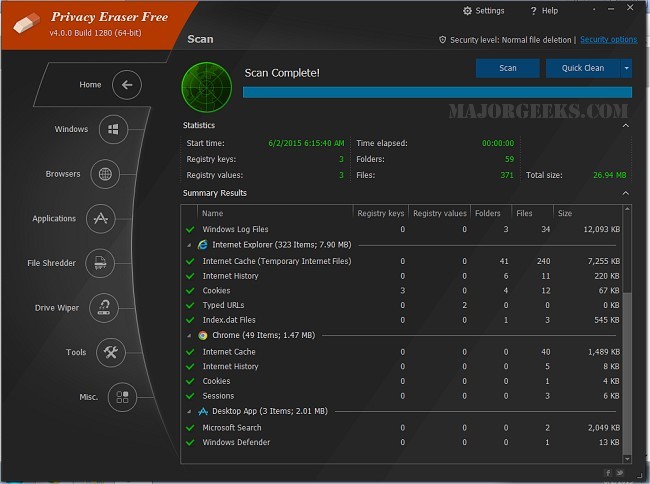
Privacy Eraser is an innovative software solution designed not only for cleaning drives but also as a comprehensive privacy suite that enhances your computer's performance by safeguarding your data. A video tutorial is available to assist users in navigating its features.
Key Features and Benefits
Privacy Eraser focuses on protecting user privacy and optimizing system performance by erasing both online and offline activity traces. It effectively removes unwanted data, freeing up disk space and improving security, which is essential for users who frequently browse the web or handle sensitive information. The software aims to eliminate the risk of personal data exposure to trackers, advertisers, and cyber threats, providing a safer online experience.
The application boasts a user-friendly interface, allowing beginners to perform one-click cleaning operations, while offering advanced cleaning options for experienced users. Users can customize cleaning preferences by specifying folders, applications, or logs, thereby gaining full control over their system maintenance.
Versions Available
Privacy Eraser is available in both a Free and a Pro version. The Free version includes essential features such as browser and Windows cleaning, third-party application data removal, secure file deletion, and registry cleaning. However, it includes a nag screen prompting users to consider upgrading to the Pro version, which provides additional functionalities, including real-time monitoring, automatic cleaning, automatic software updates, premium customer support, and a commercial use license.
Comprehensive Cleaning Capabilities
Privacy Eraser serves various cleaning needs:
- Browser Cleaning: Removes browsing history, cookies, cache, and auto-complete forms from major web browsers like Chrome, Edge, Firefox, and Opera.
- Windows Cleanup: Deletes temporary files, recent documents, clipboard data, and Recycle Bin contents.
- Third-Party Application Support: Cleans residual data from popular applications, ensuring efficient data storage.
- Drive & File Wiping: Securely deletes files using advanced erasure methods, making recovery impossible.
- Registry Cleaning: Removes invalid entries to enhance system stability and performance.
- Automation & Scheduling: Users can schedule automatic cleaning sessions for continuous protection.
Considerations Before Use
While Privacy Eraser offers substantial benefits for privacy and performance, users should exercise caution when deleting files as these actions are irreversible. It's advisable to back up important data before file shredding or registry modifications, as these processes can impact system stability. Moreover, advanced drive wiping methods may require additional time.
Pros and Cons
Pros:
- Supports multiple browsers and applications.
- Provides secure file deletion using military-grade methods.
- Offers automation for cleaning tasks.
- The Free version includes core cleaning features.
Cons:
- Some advanced features are exclusive to the Pro version.
- Users should approach registry cleaning with care.
Final Thoughts
Privacy Eraser is an excellent choice for users keen on maintaining a clean system while enhancing security and reclaiming disk space. The Free version offers valuable tools, while the Pro version enhances user experience with additional features. For those prioritizing privacy and performance on their computers, Privacy Eraser is definitely worth considering.
In conclusion, with the increasing importance of digital privacy and the need for effective system optimization, software like Privacy Eraser plays a crucial role in helping users manage their digital footprint while keeping their systems running smoothly
Key Features and Benefits
Privacy Eraser focuses on protecting user privacy and optimizing system performance by erasing both online and offline activity traces. It effectively removes unwanted data, freeing up disk space and improving security, which is essential for users who frequently browse the web or handle sensitive information. The software aims to eliminate the risk of personal data exposure to trackers, advertisers, and cyber threats, providing a safer online experience.
The application boasts a user-friendly interface, allowing beginners to perform one-click cleaning operations, while offering advanced cleaning options for experienced users. Users can customize cleaning preferences by specifying folders, applications, or logs, thereby gaining full control over their system maintenance.
Versions Available
Privacy Eraser is available in both a Free and a Pro version. The Free version includes essential features such as browser and Windows cleaning, third-party application data removal, secure file deletion, and registry cleaning. However, it includes a nag screen prompting users to consider upgrading to the Pro version, which provides additional functionalities, including real-time monitoring, automatic cleaning, automatic software updates, premium customer support, and a commercial use license.
Comprehensive Cleaning Capabilities
Privacy Eraser serves various cleaning needs:
- Browser Cleaning: Removes browsing history, cookies, cache, and auto-complete forms from major web browsers like Chrome, Edge, Firefox, and Opera.
- Windows Cleanup: Deletes temporary files, recent documents, clipboard data, and Recycle Bin contents.
- Third-Party Application Support: Cleans residual data from popular applications, ensuring efficient data storage.
- Drive & File Wiping: Securely deletes files using advanced erasure methods, making recovery impossible.
- Registry Cleaning: Removes invalid entries to enhance system stability and performance.
- Automation & Scheduling: Users can schedule automatic cleaning sessions for continuous protection.
Considerations Before Use
While Privacy Eraser offers substantial benefits for privacy and performance, users should exercise caution when deleting files as these actions are irreversible. It's advisable to back up important data before file shredding or registry modifications, as these processes can impact system stability. Moreover, advanced drive wiping methods may require additional time.
Pros and Cons
Pros:
- Supports multiple browsers and applications.
- Provides secure file deletion using military-grade methods.
- Offers automation for cleaning tasks.
- The Free version includes core cleaning features.
Cons:
- Some advanced features are exclusive to the Pro version.
- Users should approach registry cleaning with care.
Final Thoughts
Privacy Eraser is an excellent choice for users keen on maintaining a clean system while enhancing security and reclaiming disk space. The Free version offers valuable tools, while the Pro version enhances user experience with additional features. For those prioritizing privacy and performance on their computers, Privacy Eraser is definitely worth considering.
In conclusion, with the increasing importance of digital privacy and the need for effective system optimization, software like Privacy Eraser plays a crucial role in helping users manage their digital footprint while keeping their systems running smoothly
Privacy Eraser 6.28.0 Build 5520 released
Privacy Eraser is not just a drive cleaner but also an all-in-one privacy suite that protects your privacy and optimizes your computer so it runs faster. Video tutorial available.