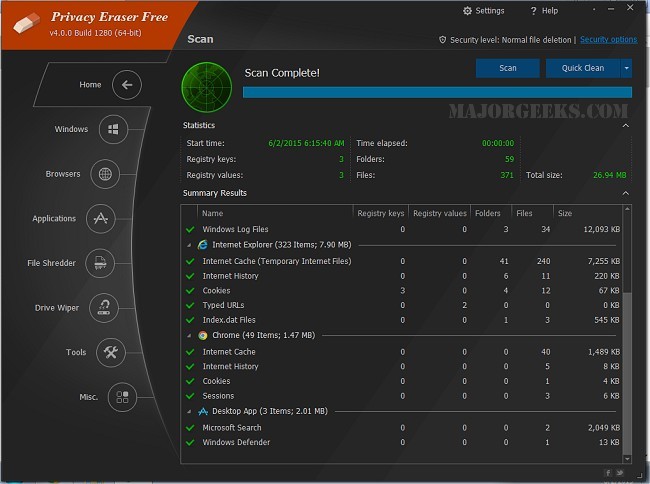
Privacy Eraser is an effective privacy suite designed to enhance user security while optimizing computer performance. It functions as both a drive cleaner and a comprehensive tool that helps users maintain their privacy by erasing traces of online and offline activities. The recent release of version 6.27.0 Build 5500 comes with a video tutorial to assist users in navigating its features.
Key Features and Functionality
Privacy Eraser's main objective is to protect user privacy by eliminating personal data that could be misused by advertisers, trackers, or cybercriminals. It optimizes computer performance by removing unnecessary files, thus freeing up disk space and making systems run more efficiently. With a user-friendly interface, it caters to both beginners and advanced users, offering one-click cleaning for simplicity while allowing for custom cleaning options to target specific folders, applications, or logs.
The software is available in both free and pro versions. The free version includes essential features such as browser cleaning, Windows cleanup, third-party application support, secure file deletion, and registry cleaning. However, the pro version provides additional functionalities, including real-time monitoring, automatic cleaning, software updates, premium support, and a commercial use license.
Comprehensive Cleaning Features
Privacy Eraser excels in various cleaning tasks, including:
- Browser Cleaning: Removes browsing history, cookies, cache, and more from popular web browsers.
- Windows Cleanup: Deletes temporary files and other digital traces to enhance system performance.
- Third-Party Application Support: Cleans residual data from commonly used applications.
- Drive & File Wiping: Permanently deletes files using advanced security methods.
- Registry Cleaning: Cleans obsolete registry entries to improve system stability.
- Automation & Scheduling: Allows users to set automatic cleaning schedules for ongoing protection.
Considerations and Cautions
While Privacy Eraser offers robust cleaning capabilities, users should be cautious when performing certain actions, such as file shredding and registry cleaning, as these processes are irreversible. It's advisable to keep backups and create a registry backup before making changes. Additionally, users should be prepared for potentially longer drive wiping times when using advanced erasure methods.
Pros and Cons
Pros:
- Supports multiple browsers and applications.
- Secure file deletion using military-grade methods.
- Automates cleaning tasks for user convenience.
- The free version covers fundamental features.
Cons:
- Some advanced features require upgrading to the Pro version.
- Registry cleaning should be approached with caution.
Conclusion
Privacy Eraser is an excellent option for users seeking to clean up their devices, enhance security, and reclaim disk space. The free version offers a solid array of tools, while the Pro version adds valuable features for users who prioritize automation and ongoing privacy protection. For those concerned about their privacy and system performance, Privacy Eraser is a worthwhile consideration.
For further exploration, users can check out comparative reviews of similar software like CCleaner, Wise Disk Cleaner, and PrivaZer, or learn about other cleaning methods and tools available for Windows systems
Key Features and Functionality
Privacy Eraser's main objective is to protect user privacy by eliminating personal data that could be misused by advertisers, trackers, or cybercriminals. It optimizes computer performance by removing unnecessary files, thus freeing up disk space and making systems run more efficiently. With a user-friendly interface, it caters to both beginners and advanced users, offering one-click cleaning for simplicity while allowing for custom cleaning options to target specific folders, applications, or logs.
The software is available in both free and pro versions. The free version includes essential features such as browser cleaning, Windows cleanup, third-party application support, secure file deletion, and registry cleaning. However, the pro version provides additional functionalities, including real-time monitoring, automatic cleaning, software updates, premium support, and a commercial use license.
Comprehensive Cleaning Features
Privacy Eraser excels in various cleaning tasks, including:
- Browser Cleaning: Removes browsing history, cookies, cache, and more from popular web browsers.
- Windows Cleanup: Deletes temporary files and other digital traces to enhance system performance.
- Third-Party Application Support: Cleans residual data from commonly used applications.
- Drive & File Wiping: Permanently deletes files using advanced security methods.
- Registry Cleaning: Cleans obsolete registry entries to improve system stability.
- Automation & Scheduling: Allows users to set automatic cleaning schedules for ongoing protection.
Considerations and Cautions
While Privacy Eraser offers robust cleaning capabilities, users should be cautious when performing certain actions, such as file shredding and registry cleaning, as these processes are irreversible. It's advisable to keep backups and create a registry backup before making changes. Additionally, users should be prepared for potentially longer drive wiping times when using advanced erasure methods.
Pros and Cons
Pros:
- Supports multiple browsers and applications.
- Secure file deletion using military-grade methods.
- Automates cleaning tasks for user convenience.
- The free version covers fundamental features.
Cons:
- Some advanced features require upgrading to the Pro version.
- Registry cleaning should be approached with caution.
Conclusion
Privacy Eraser is an excellent option for users seeking to clean up their devices, enhance security, and reclaim disk space. The free version offers a solid array of tools, while the Pro version adds valuable features for users who prioritize automation and ongoing privacy protection. For those concerned about their privacy and system performance, Privacy Eraser is a worthwhile consideration.
For further exploration, users can check out comparative reviews of similar software like CCleaner, Wise Disk Cleaner, and PrivaZer, or learn about other cleaning methods and tools available for Windows systems
Privacy Eraser 6.27.0 Build 5500 released
Privacy Eraser is not just a drive cleaner but also an all-in-one privacy suite that protects your privacy and optimizes your computer so it runs faster. Video tutorial available.