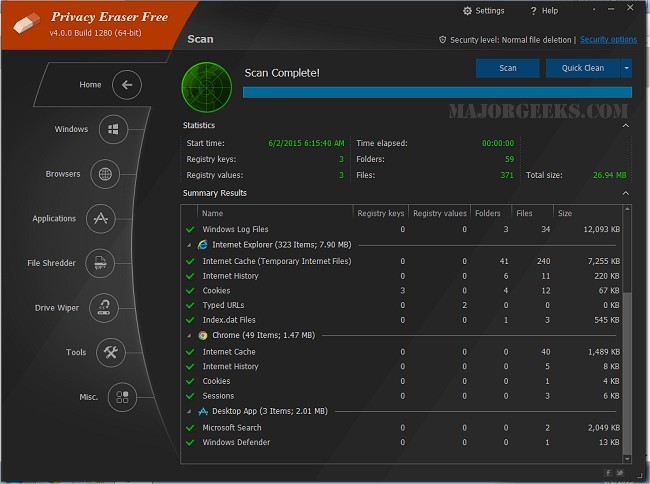
Privacy Eraser 6.26.0 Build 5480 has been released, enhancing its capabilities as a comprehensive privacy suite and system optimizer. This tool is designed not only to clean drives but also to protect user privacy by removing traces of both online and offline activities. This release emphasizes its role in maintaining a secure computing environment while improving system performance, making it an essential tool for users concerned about privacy and efficiency.
- Browser Cleaning: Effectively clears browsing history, cookies, and cache from popular browsers like Chrome, Firefox, and Edge.
- Windows Cleanup: Removes temporary files, recent documents, and clipboard data, helping to free up disk space and enhance performance.
- Third-Party Application Support: Cleans residual data from commonly used applications to prevent unnecessary data accumulation.
- File Wiping: Uses advanced methods to ensure deleted files cannot be recovered, offering peace of mind for sensitive data.
- Registry Cleaning: Identifies and eliminates obsolete registry entries to improve system stability.
- Automation and Scheduling: Users can automate cleaning tasks to run at scheduled times for continuous protection.
Key Features
Privacy Eraser provides a variety of cleaning features, including:- Browser Cleaning: Effectively clears browsing history, cookies, and cache from popular browsers like Chrome, Firefox, and Edge.
- Windows Cleanup: Removes temporary files, recent documents, and clipboard data, helping to free up disk space and enhance performance.
- Third-Party Application Support: Cleans residual data from commonly used applications to prevent unnecessary data accumulation.
- File Wiping: Uses advanced methods to ensure deleted files cannot be recovered, offering peace of mind for sensitive data.
- Registry Cleaning: Identifies and eliminates obsolete registry entries to improve system stability.
- Automation and Scheduling: Users can automate cleaning tasks to run at scheduled times for continuous protection.
Version Comparison
Privacy Eraser is available in both Free and Pro versions. The Free version includes essential functionalities such as browser and Windows cleaning, secure file deletion, and registry cleaning. The Pro version enhances the software with features like real-time monitoring, automatic cleaning, and priority customer support.Important Considerations
While Privacy Eraser offers robust cleaning capabilities, users should exercise caution. Actions such as file shredding are irreversible, and users are advised to create backups before performing clean-up tasks. Additionally, registry modifications can impact system stability, so it's recommended to back up the registry before making any changes.Conclusion
Overall, Privacy Eraser is a strong contender for users looking to enhance their system's performance and safeguard their privacy. Its user-friendly interface caters to both novices and experienced users, and the dual-tiered pricing model allows flexibility based on individual needs. For anyone prioritizing privacy and system efficiency, Privacy Eraser is certainly worth considering.Extension
In light of increasing privacy concerns in the digital age, tools like Privacy Eraser are becoming indispensable for both personal and professional users. As cyber threats evolve, the need for reliable software that ensures data protection and system optimization is paramount. Future iterations of Privacy Eraser could potentially integrate artificial intelligence to enhance cleaning algorithms or provide users with predictive analytics on system performance and privacy risks. Furthermore, incorporating user feedback into feature development could lead to an even more tailored experience, helping users feel more secure while navigating their digital environmentsPrivacy Eraser 6.26.0 Build 5480 released
Privacy Eraser is not just a drive cleaner but also an all-in-one privacy suite that protects your privacy and optimizes your computer so it runs faster. Video tutorial available.