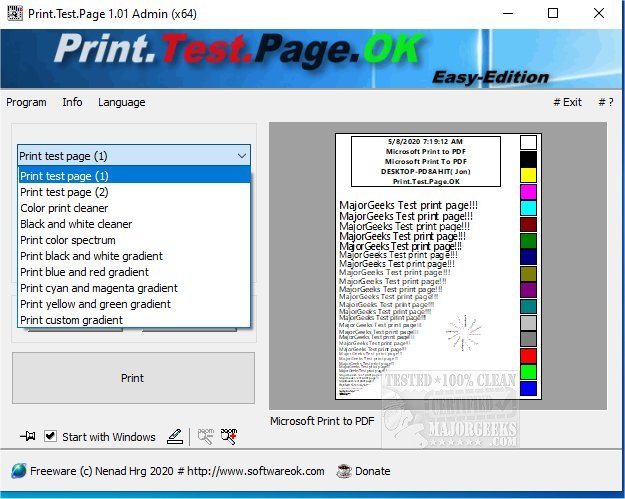
Print.Test.Page.OK is a newly released tool designed to assist users in assessing the performance and reliability of their printers. This test page printing application is particularly useful for identifying errors and evaluating the efficiency of both color laser and modern inkjet printers.
The software includes two dedicated test pages and various color gradients, enabling users to thoroughly examine print quality. The process is user-friendly, allowing individuals to initiate a test print with a simple click of the Print button. A key feature of Print.Test.Page.OK is its focus on color accuracy; it helps users identify issues such as streaks, missing colors, or other deviations in print quality. By quickly detecting problems with toner or ink cartridges, users can address issues proactively, including returning defective products if necessary.
In addition to color testing, the tool also highlights the potential impact of dust particles on print quality. Users can effectively clean their printers, whether laser or inkjet, to eliminate these minor issues. For those who require high-resolution image printing, Print.Test.Page.OK has the capability to handle that as well, although it is advisable to prioritize clear color and gradient tests for error detection.
This straightforward application caters to users of all skill levels, making it an invaluable resource for troubleshooting printing problems before investing in a new printer or incurring routine maintenance costs.
Extended Features and Resources
In addition to its primary functions, Print.Test.Page.OK 3.51 may offer the following enhancements:
- User-Friendly Interface: An intuitive layout that guides users through the testing process, ensuring even novices can easily navigate the tool.
- Detailed Troubleshooting Guide: Step-by-step instructions to help resolve common printing issues identified during testing.
- Logging Functionality: Users can save their test results and track changes over time, allowing for better management of printer performance.
- Compatibility Information: A comprehensive list of compatible printer models, ensuring users can ascertain if their device is supported.
- Support and Updates: Regular software updates to improve functionality and add features, along with access to a dedicated support team for user inquiries.
For those seeking additional resources related to printer management, Print.Test.Page.OK also provides links to articles on how to print a test page in Windows, reset the print spooler, fix printer issues, create printer queue shortcuts, and rename printers in Windows 10 and 11.
With Print.Test.Page.OK 3.51, users can confidently ensure their printers are functioning at their best, ultimately leading to improved printing results and reduced frustration
The software includes two dedicated test pages and various color gradients, enabling users to thoroughly examine print quality. The process is user-friendly, allowing individuals to initiate a test print with a simple click of the Print button. A key feature of Print.Test.Page.OK is its focus on color accuracy; it helps users identify issues such as streaks, missing colors, or other deviations in print quality. By quickly detecting problems with toner or ink cartridges, users can address issues proactively, including returning defective products if necessary.
In addition to color testing, the tool also highlights the potential impact of dust particles on print quality. Users can effectively clean their printers, whether laser or inkjet, to eliminate these minor issues. For those who require high-resolution image printing, Print.Test.Page.OK has the capability to handle that as well, although it is advisable to prioritize clear color and gradient tests for error detection.
This straightforward application caters to users of all skill levels, making it an invaluable resource for troubleshooting printing problems before investing in a new printer or incurring routine maintenance costs.
Extended Features and Resources
In addition to its primary functions, Print.Test.Page.OK 3.51 may offer the following enhancements:
- User-Friendly Interface: An intuitive layout that guides users through the testing process, ensuring even novices can easily navigate the tool.
- Detailed Troubleshooting Guide: Step-by-step instructions to help resolve common printing issues identified during testing.
- Logging Functionality: Users can save their test results and track changes over time, allowing for better management of printer performance.
- Compatibility Information: A comprehensive list of compatible printer models, ensuring users can ascertain if their device is supported.
- Support and Updates: Regular software updates to improve functionality and add features, along with access to a dedicated support team for user inquiries.
For those seeking additional resources related to printer management, Print.Test.Page.OK also provides links to articles on how to print a test page in Windows, reset the print spooler, fix printer issues, create printer queue shortcuts, and rename printers in Windows 10 and 11.
With Print.Test.Page.OK 3.51, users can confidently ensure their printers are functioning at their best, ultimately leading to improved printing results and reduced frustration
Print.Test.Page.OK 3.51 released
Print.Test.Page.OK is a test page printing tool that allows you to test your printer for errors and efficiency.