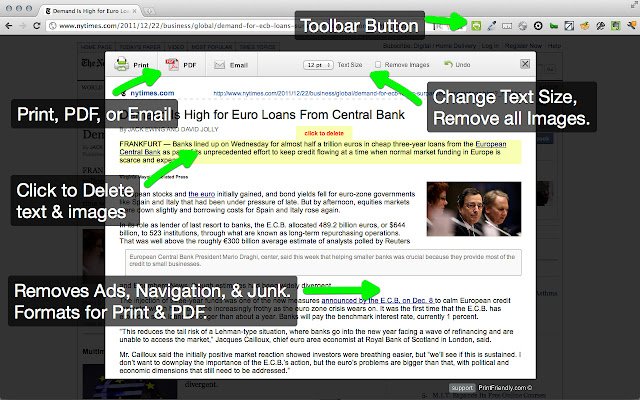
The latest release of Print Friendly & PDF, version 6.9.5, is now available for Chrome, Firefox, Edge, and Safari. This extension enhances the printing experience by cleaning and formatting web pages, effectively removing ads, navigation elements, and other unnecessary content. This not only simplifies the printed output but also helps users save paper and ink.
Key features include:
- Print Preview: This allows users to see how the content will appear when printed.
- Edit Before Printing: Users can selectively remove images and text, ensuring that only the desired content is printed.
- Print or Save as PDF: The extension offers the flexibility to either print immediately or save the document as a PDF for later use.
For new users, the process is straightforward—simply copy and paste a URL at PrintFriendly.com. Regular users can enhance their workflow by adding the extension to their browser for quick access to print-friendly pages. Additionally, developers and bloggers can integrate the print-friendly button into their websites for improved usability.
In addition to this, there are tips and related articles on topics such as enabling two-page view for PDFs in Google Chrome and managing PDF and HTML file openings in Microsoft Edge, which may be of interest to users looking to optimize their document handling experience.
Overall, Print Friendly & PDF is a valuable tool for anyone who frequently prints web content, streamlining the process while contributing to resource conservation
Key features include:
- Print Preview: This allows users to see how the content will appear when printed.
- Edit Before Printing: Users can selectively remove images and text, ensuring that only the desired content is printed.
- Print or Save as PDF: The extension offers the flexibility to either print immediately or save the document as a PDF for later use.
For new users, the process is straightforward—simply copy and paste a URL at PrintFriendly.com. Regular users can enhance their workflow by adding the extension to their browser for quick access to print-friendly pages. Additionally, developers and bloggers can integrate the print-friendly button into their websites for improved usability.
In addition to this, there are tips and related articles on topics such as enabling two-page view for PDFs in Google Chrome and managing PDF and HTML file openings in Microsoft Edge, which may be of interest to users looking to optimize their document handling experience.
Overall, Print Friendly & PDF is a valuable tool for anyone who frequently prints web content, streamlining the process while contributing to resource conservation
Print Friendly and PDF for Chrome, Firefox, Edge, and Safari 6.9.5 released
Print Friendly & PDF for Chrome, Firefox, Edge, and Safari cleans and formats web pages for the perfect print experience.
Print Friendly and PDF for Chrome, Firefox, Edge, and Safari 6.9.5 released @ MajorGeeks