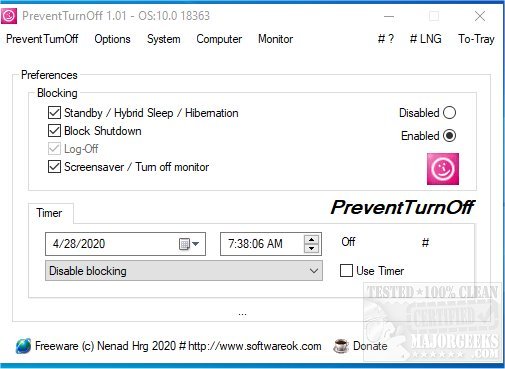
PreventTurnOff is a newly released software designed to simplify the process of preventing your computer from shutting down. It serves as a streamlined alternative to the more complex Don't Sleep application, which some users found overwhelming due to its extensive range of features.
The main function of PreventTurnOff is to act as a shutdown timer while incorporating a PC Anti-Blocking System that retains the essential capabilities of Don't Sleep. The developer created this tool in response to user feedback, aiming to provide a more straightforward solution for those who want to keep their machines running without interruption.
Key Features of PreventTurnOff:
- Maintains PC and Monitor Activity: PreventTurnOff ensures that both the computer and its monitor stay on by signaling to the operating system that it has critical tasks to perform.
- Scheduled Shutdowns: Users can set specific times for their PC to shut down, providing flexibility and control over when to power off the machine.
- Quick Access to Power Options: The software offers easy access to energy settings, allowing users to manage their power preferences effortlessly.
Moreover, PreventTurnOff communicates with the operating system to prioritize its tasks, preventing premature shutdowns of other applications. It informs the system that it has the highest shutdown priority, ensuring that it can execute its functions without being interrupted.
Additional Context:
This release is particularly relevant as many users seek ways to customize their computing experience, especially in the context of managing energy settings and optimizing performance. The software complements existing options for PC management, such as sleep and hibernate modes, and provides solutions for common issues encountered in Windows 10 and 11, such as unintended sleep states.
Overall, PreventTurnOff serves as an efficient tool for users looking to maintain their computer's operation without the complexities of more advanced software, streamlining the process of managing shutdowns and energy settings
The main function of PreventTurnOff is to act as a shutdown timer while incorporating a PC Anti-Blocking System that retains the essential capabilities of Don't Sleep. The developer created this tool in response to user feedback, aiming to provide a more straightforward solution for those who want to keep their machines running without interruption.
Key Features of PreventTurnOff:
- Maintains PC and Monitor Activity: PreventTurnOff ensures that both the computer and its monitor stay on by signaling to the operating system that it has critical tasks to perform.
- Scheduled Shutdowns: Users can set specific times for their PC to shut down, providing flexibility and control over when to power off the machine.
- Quick Access to Power Options: The software offers easy access to energy settings, allowing users to manage their power preferences effortlessly.
Moreover, PreventTurnOff communicates with the operating system to prioritize its tasks, preventing premature shutdowns of other applications. It informs the system that it has the highest shutdown priority, ensuring that it can execute its functions without being interrupted.
Additional Context:
This release is particularly relevant as many users seek ways to customize their computing experience, especially in the context of managing energy settings and optimizing performance. The software complements existing options for PC management, such as sleep and hibernate modes, and provides solutions for common issues encountered in Windows 10 and 11, such as unintended sleep states.
Overall, PreventTurnOff serves as an efficient tool for users looking to maintain their computer's operation without the complexities of more advanced software, streamlining the process of managing shutdowns and energy settings
PreventTurnOff 3.53 released
PreventTurnOff is a simplified version of Don't Sleep designed to prevent the shutdown of your machine.