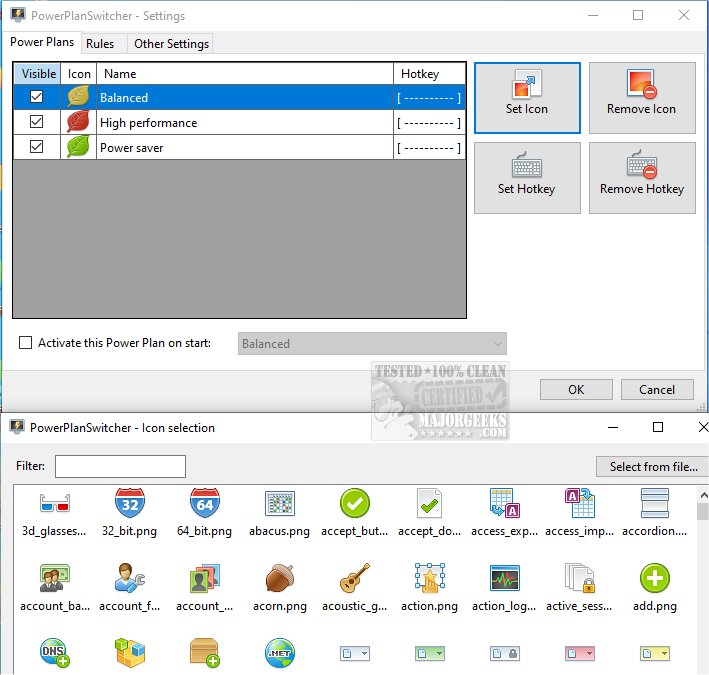
PowerPlanSwitcher is a lightweight, open-source tool designed to facilitate quick and efficient switching between various power plans on your Windows device. This utility automatically adjusts your power settings based on the applications you are using, allowing you to find the optimal balance between performance and battery life as needed.
While it may not seem like a flashy tool, once you experience its functionality, you'll find it invaluable. PowerPlanSwitcher caters to a wide range of users, including gamers, video editors, remote workers, students, and IT professionals. It empowers users by allowing their PC to adapt to their specific usage patterns instead of applying a one-size-fits-all approach.
Why You'd Want It
When engaged in resource-intensive tasks like gaming, video editing, or 3D modeling, having your PC operate at maximum performance is crucial. Conversely, if you are performing lighter tasks such as checking emails, browsing the web, or working on Excel, your machine can switch to Power Saver mode, conserving energy, reducing noise, and extending battery life on laptops. This dynamic adjustment is beneficial for remote workers transitioning between video calls and productivity applications, as it creates a more efficient computing environment.
PowerPlanSwitcher operates in real-time, automatically adjusting your power plan as you launch or close applications—eliminating the need for manual changes through the Control Panel.
How It Works
The application runs discreetly in the background. Users can configure a simple settings file that lists the applications of interest and their corresponding power plans. When a specified app is opened, PowerPlanSwitcher instantly alters the power plan, reverting it upon closing the app. This seamless automation enhances user experience without requiring any additional clicks or memory.
Usage Examples:
- Gamers: Automatically switch to High Performance mode when launching games.
- Media Editors: Activate full power mode when using editing software like Premiere Pro or DaVinci Resolve.
- Remote Workers: Engage Power Saver mode during tasks in Word, Slack, or web browsers.
- Developers: Maintain Balanced mode with code editors, but elevate performance for heavier IDEs or local servers.
- Battery Savers: Optimize laptop performance by switching to Power Saver for light tasks or when unplugged.
Geek Verdict
PowerPlanSwitcher is an effective utility that fulfills a specific need, allowing users to finely tune their PC's performance in response to their workload without the hassle of constant manual adjustments. Whether you're gaming, editing videos, taking notes in class, or simply trying to maximize your laptop's battery life throughout a busy day, this application provides reliable support. It's a free, intelligent solution that excels at its primary function—making it a highly recommended tool for any PC user.
Related Resources:
- Learn how to enable the Ultimate Performance power plan in Windows 10/11.
- Discover ways to modify power plan settings in Windows.
- Restore missing power plans or add high-performance options in Windows.
- Instructions for deleting or restoring Windows power plans.
- Guide to creating a custom power plan in Windows.
With its latest update, PowerPlanSwitcher remains a must-have utility for anyone looking to optimize their computing experience
While it may not seem like a flashy tool, once you experience its functionality, you'll find it invaluable. PowerPlanSwitcher caters to a wide range of users, including gamers, video editors, remote workers, students, and IT professionals. It empowers users by allowing their PC to adapt to their specific usage patterns instead of applying a one-size-fits-all approach.
Why You'd Want It
When engaged in resource-intensive tasks like gaming, video editing, or 3D modeling, having your PC operate at maximum performance is crucial. Conversely, if you are performing lighter tasks such as checking emails, browsing the web, or working on Excel, your machine can switch to Power Saver mode, conserving energy, reducing noise, and extending battery life on laptops. This dynamic adjustment is beneficial for remote workers transitioning between video calls and productivity applications, as it creates a more efficient computing environment.
PowerPlanSwitcher operates in real-time, automatically adjusting your power plan as you launch or close applications—eliminating the need for manual changes through the Control Panel.
How It Works
The application runs discreetly in the background. Users can configure a simple settings file that lists the applications of interest and their corresponding power plans. When a specified app is opened, PowerPlanSwitcher instantly alters the power plan, reverting it upon closing the app. This seamless automation enhances user experience without requiring any additional clicks or memory.
Usage Examples:
- Gamers: Automatically switch to High Performance mode when launching games.
- Media Editors: Activate full power mode when using editing software like Premiere Pro or DaVinci Resolve.
- Remote Workers: Engage Power Saver mode during tasks in Word, Slack, or web browsers.
- Developers: Maintain Balanced mode with code editors, but elevate performance for heavier IDEs or local servers.
- Battery Savers: Optimize laptop performance by switching to Power Saver for light tasks or when unplugged.
Geek Verdict
PowerPlanSwitcher is an effective utility that fulfills a specific need, allowing users to finely tune their PC's performance in response to their workload without the hassle of constant manual adjustments. Whether you're gaming, editing videos, taking notes in class, or simply trying to maximize your laptop's battery life throughout a busy day, this application provides reliable support. It's a free, intelligent solution that excels at its primary function—making it a highly recommended tool for any PC user.
Related Resources:
- Learn how to enable the Ultimate Performance power plan in Windows 10/11.
- Discover ways to modify power plan settings in Windows.
- Restore missing power plans or add high-performance options in Windows.
- Instructions for deleting or restoring Windows power plans.
- Guide to creating a custom power plan in Windows.
With its latest update, PowerPlanSwitcher remains a must-have utility for anyone looking to optimize their computing experience
PowerPlanSwitcher 1.2.7.0 released
PowerPlanSwitcher enables fast and efficient switching between different power plans on your device.