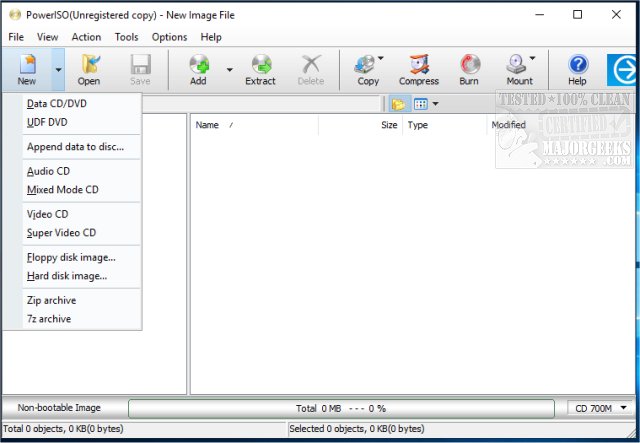
PowerISO 9.3 has been released, enhancing its reputation as a comprehensive solution for managing CD, DVD, and Blu-ray image files. This software allows users to open, extract, burn, create, edit, compress, encrypt, split, and convert ISO files, making it an essential tool for professionals and enthusiasts alike.
Key Features and Capabilities:
1. All-in-One Image File Management:
PowerISO supports a wide range of formats, including ISO, BIN, NRG, and DAA, thereby eliminating the need for multiple applications. Its user-friendly interface simplifies tasks such as creation, editing, extraction, and burning of ISO files.
2. Virtual Drive Mounting:
Users can mount ISO files onto virtual drives, allowing for easy access to disc images without physical discs. PowerISO supports up to 23 virtual drives at once, catering to users who require quick access to multiple images.
3. Burning and Ripping Functionality:
The software excels in burning data to various discs and can also rip audio CDs into formats like MP3, FLAC, or WAV, making it ideal for music lovers looking to preserve their collections. Additionally, it offers tools for compressing and splitting large files, and for encrypting sensitive data.
4. Lightweight and User-Friendly:
Unlike many other utilities that can be cumbersome and filled with unnecessary features, PowerISO is streamlined and easy to navigate. Users can also utilize right-click integration with Windows Explorer for quick access to mounting and burning options.
Considerations:
While PowerISO is feature-rich, the free version has a file size limitation of 300MB for editing or creating image files, which necessitates a paid license for larger files. Users should also be cautious during installation, as the installer might offer additional software that may not be needed.
Conclusion:
PowerISO is a robust, high-performance tool for those needing to manage disk images effectively. Its flexibility and all-inclusive features make it a valuable download for users looking for a reliable utility. However, potential users should remain aware of the limitations of the free version and ensure they customize the installation process to avoid unwanted extras.
Future Outlook:
As technology continues to evolve, PowerISO is likely to keep pace with emerging formats and user demands, potentially introducing features such as cloud integration for remote access to disk images or enhanced security protocols for encrypted files. This adaptability will further solidify its position as a leading tool in disk image management
Key Features and Capabilities:
1. All-in-One Image File Management:
PowerISO supports a wide range of formats, including ISO, BIN, NRG, and DAA, thereby eliminating the need for multiple applications. Its user-friendly interface simplifies tasks such as creation, editing, extraction, and burning of ISO files.
2. Virtual Drive Mounting:
Users can mount ISO files onto virtual drives, allowing for easy access to disc images without physical discs. PowerISO supports up to 23 virtual drives at once, catering to users who require quick access to multiple images.
3. Burning and Ripping Functionality:
The software excels in burning data to various discs and can also rip audio CDs into formats like MP3, FLAC, or WAV, making it ideal for music lovers looking to preserve their collections. Additionally, it offers tools for compressing and splitting large files, and for encrypting sensitive data.
4. Lightweight and User-Friendly:
Unlike many other utilities that can be cumbersome and filled with unnecessary features, PowerISO is streamlined and easy to navigate. Users can also utilize right-click integration with Windows Explorer for quick access to mounting and burning options.
Considerations:
While PowerISO is feature-rich, the free version has a file size limitation of 300MB for editing or creating image files, which necessitates a paid license for larger files. Users should also be cautious during installation, as the installer might offer additional software that may not be needed.
Conclusion:
PowerISO is a robust, high-performance tool for those needing to manage disk images effectively. Its flexibility and all-inclusive features make it a valuable download for users looking for a reliable utility. However, potential users should remain aware of the limitations of the free version and ensure they customize the installation process to avoid unwanted extras.
Future Outlook:
As technology continues to evolve, PowerISO is likely to keep pace with emerging formats and user demands, potentially introducing features such as cloud integration for remote access to disk images or enhanced security protocols for encrypted files. This adaptability will further solidify its position as a leading tool in disk image management
PowerISO 9.3 released
PowerISO is a powerful all-in-one solution for CD/DVD/BD image file processing that permits opening, extracting, burning, creating, editing, compressing, encrypting, splitting and converting ISO files.