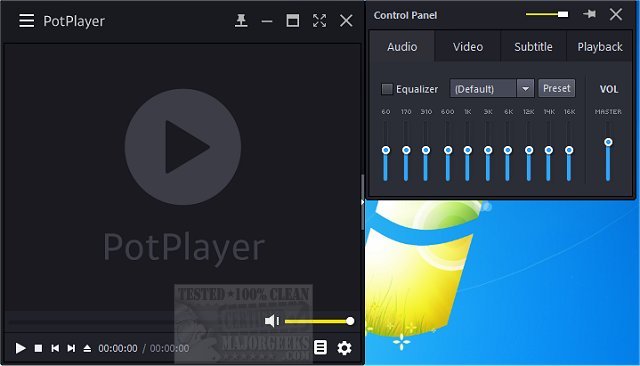
PotPlayer is a versatile media player designed for both video and audio playback, offering support for TV channels, subtitles, and customizable skins. Recently updated to version 1.7.22853, it remains a top choice for users seeking a powerful yet lightweight media player that effortlessly handles a wide range of formats.
Why PotPlayer Stands Out
PotPlayer excels in delivering high-quality media playback without taxing your system resources. Its extensive format support means you can play nearly any video or audio file type, eliminating the need to search for additional codec packs. The software is optimized for hardware acceleration, ensuring smooth playback of high-definition content, even on older machines.
Key Features:
- Extensive Format Compatibility: PotPlayer supports an impressive array of formats, including MP4, MKV, AVI, FLV, MP3, and FLAC, allowing for seamless playback without compatibility issues.
- Efficient Performance: Utilizing technologies like DXVA, CUDA, and QuickSync, PotPlayer provides smooth video playback while maintaining low CPU usage, perfect for users with less powerful hardware.
- Advanced Subtitle Options: The player supports various subtitle formats, including SRT, ASS, and Blu-ray subtitles. Users can easily adjust subtitle settings to enhance their viewing experience.
- Customizable Playback Controls: PotPlayer allows users to modify playback speed, adjust audio settings with equalizers, and apply video filters, all while maintaining a user-friendly interface.
- Playlist Management & Auto-Resume: The player remembers the last 200 files played, ensuring users can easily continue watching from where they left off.
- 3D and 360-Degree Video Support: In addition to standard videos, PotPlayer supports 3D playback and interactive 360-degree videos, providing an immersive viewing experience.
- Built-in Screen Capture and Bookmarking: Users can take screenshots or record video segments, as well as bookmark favorite scenes for quick access later.
- Minimal System Impact: PotPlayer is tailored for efficiency, making it suitable for everyday use on both modern and older hardware without compromising performance.
Conclusion
Overall, PotPlayer is a standout media player that combines exceptional functionality with an intuitive user experience. It competes effectively with other popular players like VLC and MPC-HC, making it a recommended choice for anyone in search of a free, feature-rich media player. For those who appreciate high-quality playback and extensive customization, PotPlayer is a must-have. Download the latest version today to experience seamless media enjoyment like never before.
Related Tutorials:
- How to Enable Windows Sonic Surround Sound on Windows 10 & 11
- How to Rename Your Sound Input or Output Devices
- How to Change Sound Audio Balance in Windows 10 & 11
- How to Change Default Sound Output Device in Windows 10 & 11
Future Enhancements:
As media consumption continues to evolve, future updates to PotPlayer could include enhanced streaming capabilities, improved integration with online media services, and even more advanced video editing features to further enrich the user experience
Why PotPlayer Stands Out
PotPlayer excels in delivering high-quality media playback without taxing your system resources. Its extensive format support means you can play nearly any video or audio file type, eliminating the need to search for additional codec packs. The software is optimized for hardware acceleration, ensuring smooth playback of high-definition content, even on older machines.
Key Features:
- Extensive Format Compatibility: PotPlayer supports an impressive array of formats, including MP4, MKV, AVI, FLV, MP3, and FLAC, allowing for seamless playback without compatibility issues.
- Efficient Performance: Utilizing technologies like DXVA, CUDA, and QuickSync, PotPlayer provides smooth video playback while maintaining low CPU usage, perfect for users with less powerful hardware.
- Advanced Subtitle Options: The player supports various subtitle formats, including SRT, ASS, and Blu-ray subtitles. Users can easily adjust subtitle settings to enhance their viewing experience.
- Customizable Playback Controls: PotPlayer allows users to modify playback speed, adjust audio settings with equalizers, and apply video filters, all while maintaining a user-friendly interface.
- Playlist Management & Auto-Resume: The player remembers the last 200 files played, ensuring users can easily continue watching from where they left off.
- 3D and 360-Degree Video Support: In addition to standard videos, PotPlayer supports 3D playback and interactive 360-degree videos, providing an immersive viewing experience.
- Built-in Screen Capture and Bookmarking: Users can take screenshots or record video segments, as well as bookmark favorite scenes for quick access later.
- Minimal System Impact: PotPlayer is tailored for efficiency, making it suitable for everyday use on both modern and older hardware without compromising performance.
Conclusion
Overall, PotPlayer is a standout media player that combines exceptional functionality with an intuitive user experience. It competes effectively with other popular players like VLC and MPC-HC, making it a recommended choice for anyone in search of a free, feature-rich media player. For those who appreciate high-quality playback and extensive customization, PotPlayer is a must-have. Download the latest version today to experience seamless media enjoyment like never before.
Related Tutorials:
- How to Enable Windows Sonic Surround Sound on Windows 10 & 11
- How to Rename Your Sound Input or Output Devices
- How to Change Sound Audio Balance in Windows 10 & 11
- How to Change Default Sound Output Device in Windows 10 & 11
Future Enhancements:
As media consumption continues to evolve, future updates to PotPlayer could include enhanced streaming capabilities, improved integration with online media services, and even more advanced video editing features to further enrich the user experience
PotPlayer 1.7.22853 released
PotPlayer is a comprehensive video and audio player that also supports TV channels, subtitles, and skins. Portable version also available.