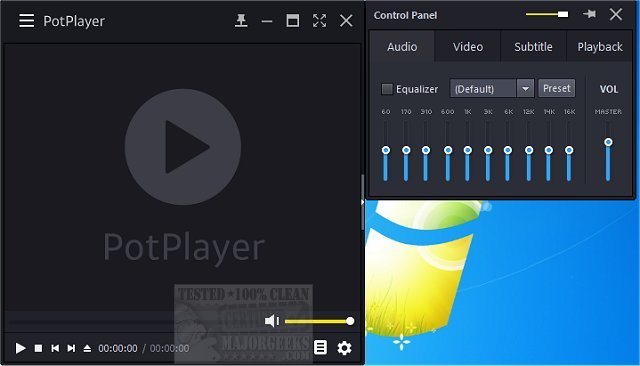
PotPlayer has recently released version 1.7.22777, enhancing its reputation as a versatile media player for both video and audio files. This player is not only equipped to handle a wide range of formats, including popular options like MP4, MKV, and FLAC, but it also supports TV channels and subtitles, making it a well-rounded choice for media consumption. Furthermore, a portable version is available, allowing users to take their media player on the go.
Why PotPlayer Stands Out
PotPlayer is designed for users who prioritize performance without compromising ease of use. Its extensive support for various media formats means users won't need to worry about installing additional codec packs. The player is optimized for hardware acceleration, ensuring smooth playback of high-definition content without excessive strain on system resources.
Key Features
- Wide Format Support: Plays a multitude of audio and video formats without the need for external codecs.
- Smooth Performance & Hardware Acceleration: Utilizes technologies like DXVA, CUDA, and QuickSync to ensure fluid playback, even on older PCs.
- Advanced Subtitle Support: Compatible with numerous subtitle formats, allowing for customization in size, position, and timing.
- Highly Customizable Playback Controls: Offers options for speed adjustments, audio equalization, and video filters for a tailored viewing experience.
- Seamless Playlist Management & Auto-Resume: Remembers the last 200 files played, making it easy to pick up where you left off.
- 3D and 360-Degree Video Support: Provides options for viewing 3D content and interactive 360-degree videos, enhancing immersion.
- Built-in Screen Capture & Bookmarking: Users can take snapshots of videos and bookmark favorite scenes for quick access.
- Minimal System Impact: Efficiently runs on both new and older hardware, making it suitable for everyday use.
The Verdict
Overall, PotPlayer is considered one of the top media players on the market, rivaling well-known options like VLC and MPC-HC. Its combination of exceptional format support, impressive performance, and extensive customization features make it a compelling choice for anyone seeking a free and feature-rich media player. For those looking to elevate their media playback experience, downloading PotPlayer is a highly recommended step.
Future Enhancements
As media consumption continues to evolve, PotPlayer has the potential to further enhance its offerings by integrating cloud support for seamless access across devices, enhancing user interface design for even better usability, and incorporating AI-driven features for automatic enhancements in video and audio quality. These developments could solidify PotPlayer's status as a leader in the media player space
Why PotPlayer Stands Out
PotPlayer is designed for users who prioritize performance without compromising ease of use. Its extensive support for various media formats means users won't need to worry about installing additional codec packs. The player is optimized for hardware acceleration, ensuring smooth playback of high-definition content without excessive strain on system resources.
Key Features
- Wide Format Support: Plays a multitude of audio and video formats without the need for external codecs.
- Smooth Performance & Hardware Acceleration: Utilizes technologies like DXVA, CUDA, and QuickSync to ensure fluid playback, even on older PCs.
- Advanced Subtitle Support: Compatible with numerous subtitle formats, allowing for customization in size, position, and timing.
- Highly Customizable Playback Controls: Offers options for speed adjustments, audio equalization, and video filters for a tailored viewing experience.
- Seamless Playlist Management & Auto-Resume: Remembers the last 200 files played, making it easy to pick up where you left off.
- 3D and 360-Degree Video Support: Provides options for viewing 3D content and interactive 360-degree videos, enhancing immersion.
- Built-in Screen Capture & Bookmarking: Users can take snapshots of videos and bookmark favorite scenes for quick access.
- Minimal System Impact: Efficiently runs on both new and older hardware, making it suitable for everyday use.
The Verdict
Overall, PotPlayer is considered one of the top media players on the market, rivaling well-known options like VLC and MPC-HC. Its combination of exceptional format support, impressive performance, and extensive customization features make it a compelling choice for anyone seeking a free and feature-rich media player. For those looking to elevate their media playback experience, downloading PotPlayer is a highly recommended step.
Future Enhancements
As media consumption continues to evolve, PotPlayer has the potential to further enhance its offerings by integrating cloud support for seamless access across devices, enhancing user interface design for even better usability, and incorporating AI-driven features for automatic enhancements in video and audio quality. These developments could solidify PotPlayer's status as a leader in the media player space
PotPlayer 1.7.22777 released
PotPlayer is a comprehensive video and audio player that also supports TV channels, subtitles, and skins. Portable version also available.