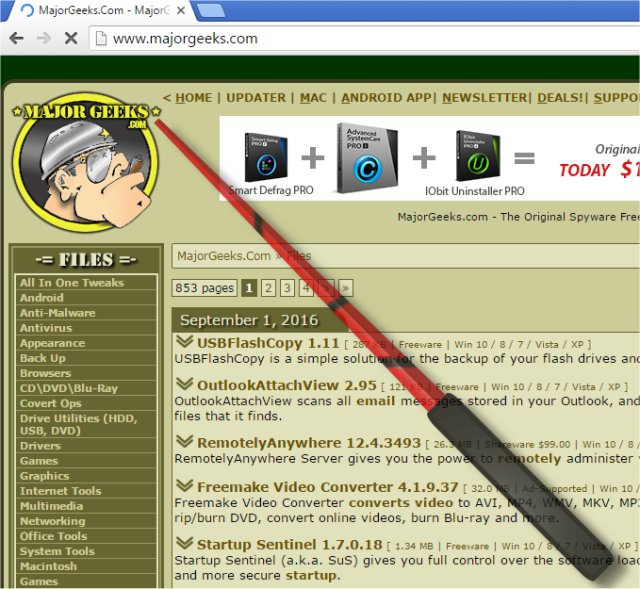
PointerStick 6.88 has been released, offering users a portable tool that displays a virtual pointer stick on the Windows Desktop. This innovative software is particularly useful for presentations, allowing users to emphasize their topics by highlighting the current mouse position, thereby enhancing audience engagement. The virtual pointer stick is designed for optimal use with projectors and larger LED/LCD screens, making it an ideal companion for public speaking and educational settings.
Key features of PointerStick include its compact size, low CPU usage, and adjustable size of the pointer stick. Users can choose from a variety of textures (bitmaps) for the stick, and the tool also offers optional alpha transparency for a customizable appearance. Additionally, PointerStick allows users to deactivate the pointer via mouse or keyboard input and includes a translation feature for multilingual support.
For those looking for similar tools or solutions, references are made to enabling mouse pointer trails, troubleshooting random cursor movements while typing, and Logitech's firmware update and unifying software tools.
In extending this information, it's worth noting that the use of virtual pointer tools can significantly enhance the clarity and effectiveness of presentations. By drawing attention to specific areas on a screen or projection, presenters can better engage their audience, leading to improved retention of information. Furthermore, as remote presentations and online meetings become more common, tools like PointerStick may prove invaluable in bridging the gap between in-person and virtual communication. Overall, PointerStick 6.88 not only simplifies the presentation process but also empowers users to deliver their messages more effectively
Key features of PointerStick include its compact size, low CPU usage, and adjustable size of the pointer stick. Users can choose from a variety of textures (bitmaps) for the stick, and the tool also offers optional alpha transparency for a customizable appearance. Additionally, PointerStick allows users to deactivate the pointer via mouse or keyboard input and includes a translation feature for multilingual support.
For those looking for similar tools or solutions, references are made to enabling mouse pointer trails, troubleshooting random cursor movements while typing, and Logitech's firmware update and unifying software tools.
In extending this information, it's worth noting that the use of virtual pointer tools can significantly enhance the clarity and effectiveness of presentations. By drawing attention to specific areas on a screen or projection, presenters can better engage their audience, leading to improved retention of information. Furthermore, as remote presentations and online meetings become more common, tools like PointerStick may prove invaluable in bridging the gap between in-person and virtual communication. Overall, PointerStick 6.88 not only simplifies the presentation process but also empowers users to deliver their messages more effectively
PointerStick 6.88 released
PointerStick is a portable tool that presents on the Windows Desktop a virtual pointer stick, for example, for presentations to highlight the current mouse position and the emphasis on your topic will be better.