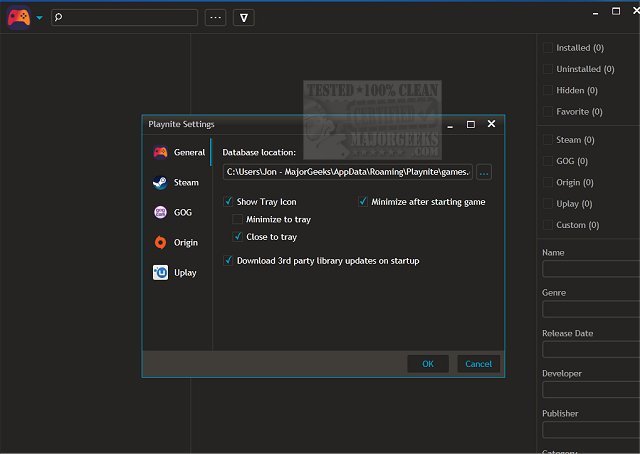
Playnite 10.52 has recently been released, enhancing its status as an open-source application designed to streamline the management and launching of video games across multiple platforms, such as Steam, Battle.net, Origin, GOG, and Uplay. Its unified interface allows gamers to effortlessly navigate their libraries, making it an essential tool for those who play across various gaming services.
Game Management: Playnite allows users to import games from various platforms, even if they are not currently installed on their devices. This feature simplifies the organization of a gaming library.
Customizable Viewing Options: With three different viewing modes, users can choose how they wish to browse their game collections, enhancing their overall experience.
Custom Game Options: Users can add any game or program to the platform, along with personalized launch settings, providing flexibility in how games are managed.
Portability and Syncing: Playnite supports portability, enabling users to carry their entire library on-the-go. It also allows for automatic syncing of the game database through services like Dropbox or Google Drive, making access hassle-free across various devices.
Automatic Updates: The application features an auto-update function, ensuring users always have the latest version without manual intervention.
Overall, Playnite stands out as a beautifully designed platform that transforms the often cumbersome task of game management into an enjoyable experience. With its intuitive interface and robust features, it caters to gamers seeking an efficient way to organize their gaming libraries.
As Playnite continues to evolve, future updates could focus on expanding compatibility with more platforms, enhancing social features for gamers, and integrating community-driven functionalities such as game recommendations based on user preferences. Additionally, improved customization options for the interface could allow users to tailor their experience even further, making Playnite an even more indispensable tool for gamers
Key Features of Playnite
Game Management: Playnite allows users to import games from various platforms, even if they are not currently installed on their devices. This feature simplifies the organization of a gaming library.
Customizable Viewing Options: With three different viewing modes, users can choose how they wish to browse their game collections, enhancing their overall experience.
Custom Game Options: Users can add any game or program to the platform, along with personalized launch settings, providing flexibility in how games are managed.
Portability and Syncing: Playnite supports portability, enabling users to carry their entire library on-the-go. It also allows for automatic syncing of the game database through services like Dropbox or Google Drive, making access hassle-free across various devices.
Automatic Updates: The application features an auto-update function, ensuring users always have the latest version without manual intervention.
Conclusion
Overall, Playnite stands out as a beautifully designed platform that transforms the often cumbersome task of game management into an enjoyable experience. With its intuitive interface and robust features, it caters to gamers seeking an efficient way to organize their gaming libraries.
Future Enhancements
As Playnite continues to evolve, future updates could focus on expanding compatibility with more platforms, enhancing social features for gamers, and integrating community-driven functionalities such as game recommendations based on user preferences. Additionally, improved customization options for the interface could allow users to tailor their experience even further, making Playnite an even more indispensable tool for gamers
Playnite 10.52 released
Playnite is an Open-Source application designed to manage and launch video games seamlessly. It supports various gaming platforms, including Steam, Battle.net, Origin, GOG, and Uplay.