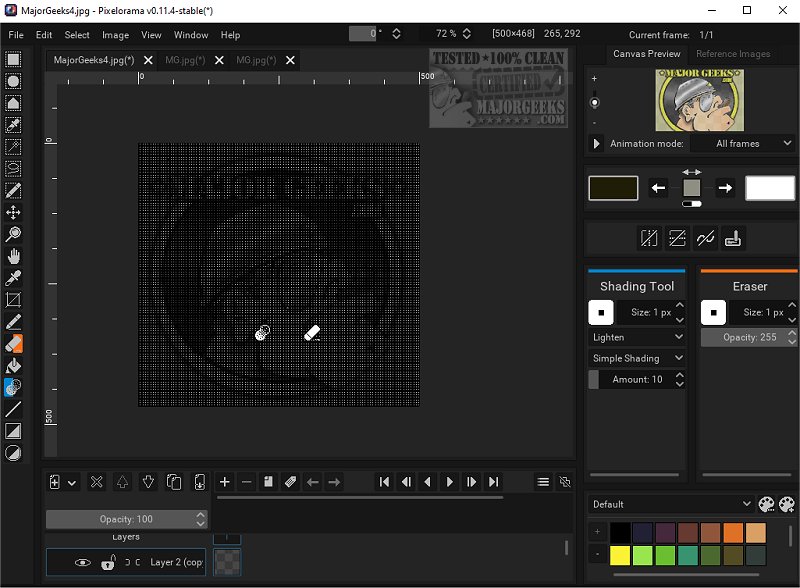
Pixelorama is an open-source art tool specifically designed for pixel art creation, catering to both novice and seasoned artists. The latest version, 1.1.9, introduces enhancements to its user-friendly interface and an extensive range of features that make it a versatile choice for graphic design and artistry. Additionally, a portable version is available for those who prefer to work on-the-go.
Key Features and Customization Options
Pixelorama boasts a comprehensive suite of tools aimed at simplifying the pixel art creation process. Users can easily customize their experience by mapping tools to the left and right mouse buttons. The software supports animation with a timeline that includes layers and frames, enabling users to create dynamic animations efficiently. Features such as onion skinning, frame tags, and the ability to draw during playback enhance the animation workflow.
A notable feature is the pixel-perfect mode, which allows artists to create precise pixel lines in their work. The software also includes pre-made color palettes and the ability to import additional palettes, providing users with a wide range of color options. Various image manipulation effects are available to help artists refine their creations.
Pixelorama introduces specialized rotation and scaling algorithms like cleanEdge, OmniScale, and rotxel, enhancing the quality of pixel art. Users can also leverage 3D layers, allowing for the integration of 3D shapes into their 2D canvas, which expands creative possibilities.
User Interface and Export Options
The customizable interface allows users to tailor the software to their preferences and workflow needs. Users can export their artwork in multiple formats such as PNG, GIFs, and animated PNGs, facilitating easy sharing of their creations. The software also supports the importation of sprite sheets and multiple images as separate frames, making it easier to integrate external assets into projects.
Guides and Autosave Features
Pixelorama includes a flexible drawing canvas equipped with guides, a rectangular grid, an isometric grid, and a tile mode, which streamline the pattern creation process. The autosave feature continuously saves users' work, along with data recovery options to restore projects after potential software crashes.
The Creative Potential
Pixelorama provides the essential tools for crafting stunning sprites, intricate tiles, and captivating animations. With its user-centric features and powerful capabilities, artists can turn their imaginative ideas into vibrant, tangible pieces of art. Whether you choose the standard or portable version, Pixelorama empowers users to realize their artistic vision without limits.
Looking Ahead
As Pixelorama continues to evolve, future updates may include additional features, improved performance, and enhanced community integration, further solidifying its position as a leading tool for pixel art creation. Artists and designers are encouraged to explore and experiment with the software, as the only limit is their imagination
Key Features and Customization Options
Pixelorama boasts a comprehensive suite of tools aimed at simplifying the pixel art creation process. Users can easily customize their experience by mapping tools to the left and right mouse buttons. The software supports animation with a timeline that includes layers and frames, enabling users to create dynamic animations efficiently. Features such as onion skinning, frame tags, and the ability to draw during playback enhance the animation workflow.
A notable feature is the pixel-perfect mode, which allows artists to create precise pixel lines in their work. The software also includes pre-made color palettes and the ability to import additional palettes, providing users with a wide range of color options. Various image manipulation effects are available to help artists refine their creations.
Pixelorama introduces specialized rotation and scaling algorithms like cleanEdge, OmniScale, and rotxel, enhancing the quality of pixel art. Users can also leverage 3D layers, allowing for the integration of 3D shapes into their 2D canvas, which expands creative possibilities.
User Interface and Export Options
The customizable interface allows users to tailor the software to their preferences and workflow needs. Users can export their artwork in multiple formats such as PNG, GIFs, and animated PNGs, facilitating easy sharing of their creations. The software also supports the importation of sprite sheets and multiple images as separate frames, making it easier to integrate external assets into projects.
Guides and Autosave Features
Pixelorama includes a flexible drawing canvas equipped with guides, a rectangular grid, an isometric grid, and a tile mode, which streamline the pattern creation process. The autosave feature continuously saves users' work, along with data recovery options to restore projects after potential software crashes.
The Creative Potential
Pixelorama provides the essential tools for crafting stunning sprites, intricate tiles, and captivating animations. With its user-centric features and powerful capabilities, artists can turn their imaginative ideas into vibrant, tangible pieces of art. Whether you choose the standard or portable version, Pixelorama empowers users to realize their artistic vision without limits.
Looking Ahead
As Pixelorama continues to evolve, future updates may include additional features, improved performance, and enhanced community integration, further solidifying its position as a leading tool for pixel art creation. Artists and designers are encouraged to explore and experiment with the software, as the only limit is their imagination
Pixelorama 1.1.9 released
Pixelorama is an Open Source art tool designed specifically for creating pixel art. It provides a comprehensive set of features perfect for both beginners and experienced artists, making it an accessible and versatile option for graphic design and artistry. We also have the portable version.