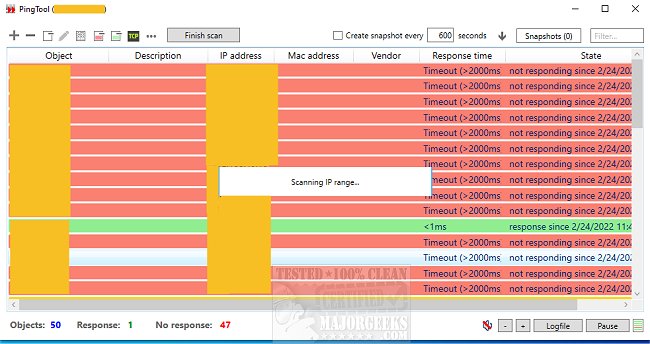
PingTool has just released version 5.0.0.96, a versatile ping monitoring application designed primarily for system administrators. This user-friendly tool not only facilitates ping monitoring but also includes additional functionalities such as Wake-on-LAN to power on computers remotely and TCP port checking for enhanced network diagnostics.
PingTool stands out for its simplicity and efficiency, making it a valuable asset for any admin's toolkit. The application is lightweight and easy to deploy, featuring a straightforward interface that utilizes color coding for quick status visualization—red indicates no response while green signifies an active connection.
Key features of PingTool include:
- Continuous status monitoring of network devices with color indicators.
- IP range scanning that displays MAC addresses and vendor information.
- TCP port status checks to detect remote device responsiveness.
- Wake-on-LAN capabilities for powering up computers remotely.
- Direct access to devices through protocols like Telnet, SSH, and HTTP(s).
For those seeking robust yet accessible network management tools, PingTool is a commendable choice.
Moreover, users might also find interest in related topics such as using the ping command in Windows, flushing the Windows DNS cache, resetting Winsock in various Windows versions, and understanding Windows Auto-Tuning settings, which complement the use of PingTool and enhance overall network troubleshooting and management skills.
As networks continue to grow in complexity, tools like PingTool will be essential for maintaining connectivity and ensuring efficient network operations
PingTool stands out for its simplicity and efficiency, making it a valuable asset for any admin's toolkit. The application is lightweight and easy to deploy, featuring a straightforward interface that utilizes color coding for quick status visualization—red indicates no response while green signifies an active connection.
Key features of PingTool include:
- Continuous status monitoring of network devices with color indicators.
- IP range scanning that displays MAC addresses and vendor information.
- TCP port status checks to detect remote device responsiveness.
- Wake-on-LAN capabilities for powering up computers remotely.
- Direct access to devices through protocols like Telnet, SSH, and HTTP(s).
For those seeking robust yet accessible network management tools, PingTool is a commendable choice.
Moreover, users might also find interest in related topics such as using the ping command in Windows, flushing the Windows DNS cache, resetting Winsock in various Windows versions, and understanding Windows Auto-Tuning settings, which complement the use of PingTool and enhance overall network troubleshooting and management skills.
As networks continue to grow in complexity, tools like PingTool will be essential for maintaining connectivity and ensuring efficient network operations
PingTool 5.0.0.96 released
PingTool is a powerful yet simple ping monitoring app perfect for admins that includes several other useful features.