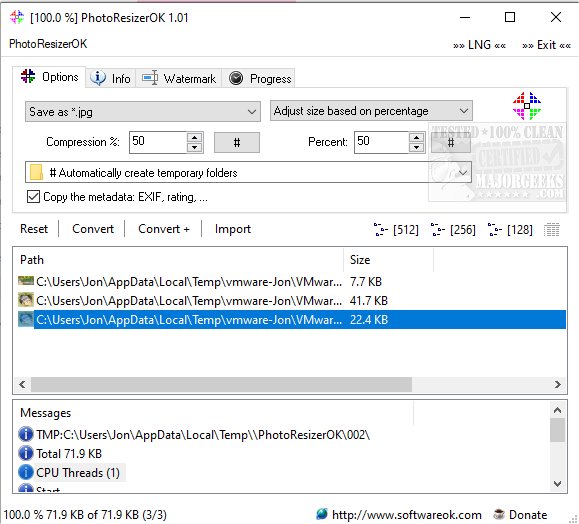
The latest version of PhotoResizerOK, 3.51, is now available, offering users a fast and efficient solution for reducing photo sizes. This handy application is designed to help free up valuable space on hard drives by allowing users to easily resize their images.
To use PhotoResizerOK, simply drag and drop your desired photo files onto the application or its desktop icon, then press the "Convert" button. After the images are processed, users can select a folder to save the resized photos. Additionally, there's an option to drag and drop images directly into a Windows Explorer folder. The program also supports copying images to the clipboard, either as an image or a Base64 string, by right-clicking within the list view. For those looking to personalize their images further, PhotoResizerOK allows the addition of text watermarks.
This straightforward tool is designed with a user-friendly interface, making it suitable for even novice users who need to save disk space. Key features of PhotoResizerOK include:
- Conversion of images to various file formats
- Adjustable compression settings
- Rapid processing speed (over 1 GB per minute)
- Optional multiline watermarks
- Support for RAW images (e.g., Canon camera files)
- Preservation of image metadata (EXIF, rating, etc.)
In addition to its core functionality, users may find the following resources useful for enhancing their experience with photo management on Windows:
- Instructions on adding or removing the 'Edit With Photos' context menu in Windows 10 & 11
- Guides to restore the Windows Photo Viewer on Windows 10 & 11
- Tips for adding and removing folders in the Windows Photos app
- Methods to stop Windows 10 & 11 from automatically deleting the thumbnail cache
PhotoResizerOK 3.51 positions itself as a vital tool for users looking to manage their photo collections efficiently while also maintaining the quality and integrity of their images. With its extensive features and ease of use, it is a valuable addition to any digital toolkit
To use PhotoResizerOK, simply drag and drop your desired photo files onto the application or its desktop icon, then press the "Convert" button. After the images are processed, users can select a folder to save the resized photos. Additionally, there's an option to drag and drop images directly into a Windows Explorer folder. The program also supports copying images to the clipboard, either as an image or a Base64 string, by right-clicking within the list view. For those looking to personalize their images further, PhotoResizerOK allows the addition of text watermarks.
This straightforward tool is designed with a user-friendly interface, making it suitable for even novice users who need to save disk space. Key features of PhotoResizerOK include:
- Conversion of images to various file formats
- Adjustable compression settings
- Rapid processing speed (over 1 GB per minute)
- Optional multiline watermarks
- Support for RAW images (e.g., Canon camera files)
- Preservation of image metadata (EXIF, rating, etc.)
In addition to its core functionality, users may find the following resources useful for enhancing their experience with photo management on Windows:
- Instructions on adding or removing the 'Edit With Photos' context menu in Windows 10 & 11
- Guides to restore the Windows Photo Viewer on Windows 10 & 11
- Tips for adding and removing folders in the Windows Photos app
- Methods to stop Windows 10 & 11 from automatically deleting the thumbnail cache
PhotoResizerOK 3.51 positions itself as a vital tool for users looking to manage their photo collections efficiently while also maintaining the quality and integrity of their images. With its extensive features and ease of use, it is a valuable addition to any digital toolkit
PhotoResizerOK 3.51 released
PhotoResizerOK permits fast and efficient photo size reduction.