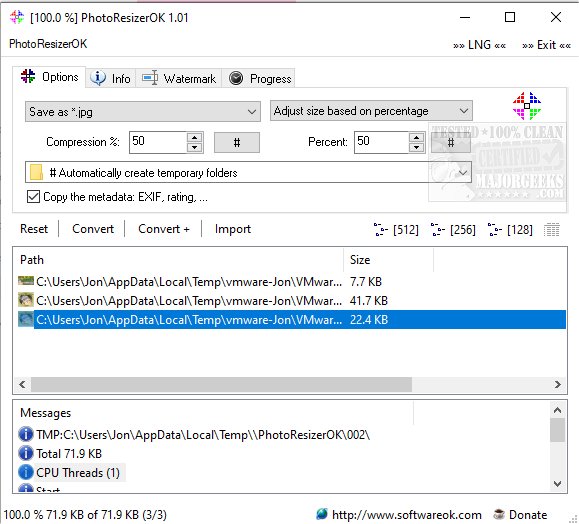
PhotoResizerOK has just released version 3.48, a user-friendly utility designed for quick and efficient photo size reduction. This software is particularly beneficial for users looking to optimize storage space on their hard drives by decreasing the file size of images. The process is simple: users can drag and drop their target files onto the application or its desktop icon, then hit "Convert." After conversion, users can select a designated folder for saving the resized images or directly drag and drop them into a Windows Explorer folder.
Additional features include the ability to copy images to the clipboard as either an image or Base64 string, and the option to add text watermarks to photos. With a job-oriented interface, PhotoResizerOK is accessible even to novice users. Key features of the software include:
- Conversion of images to various file formats
- Customizable compression settings
- High-speed processing (over 1 GB per minute)
- Support for RAW images, including those from Canon cameras
- Retention of image metadata such as EXIF data and ratings
- Multi-line watermarking options
PhotoResizerOK is an excellent tool for anyone looking to manage their image files more efficiently, whether for personal use or professional photography. Alongside this release, users may also find useful guides on related topics such as modifying the Windows context menu for photo editing, restoring the Windows Photo Viewer, and managing folders within the Windows Photos app
Additional features include the ability to copy images to the clipboard as either an image or Base64 string, and the option to add text watermarks to photos. With a job-oriented interface, PhotoResizerOK is accessible even to novice users. Key features of the software include:
- Conversion of images to various file formats
- Customizable compression settings
- High-speed processing (over 1 GB per minute)
- Support for RAW images, including those from Canon cameras
- Retention of image metadata such as EXIF data and ratings
- Multi-line watermarking options
PhotoResizerOK is an excellent tool for anyone looking to manage their image files more efficiently, whether for personal use or professional photography. Alongside this release, users may also find useful guides on related topics such as modifying the Windows context menu for photo editing, restoring the Windows Photo Viewer, and managing folders within the Windows Photos app
PhotoResizerOK 3.48 released
PhotoResizerOK permits fast and efficient photo size reduction.