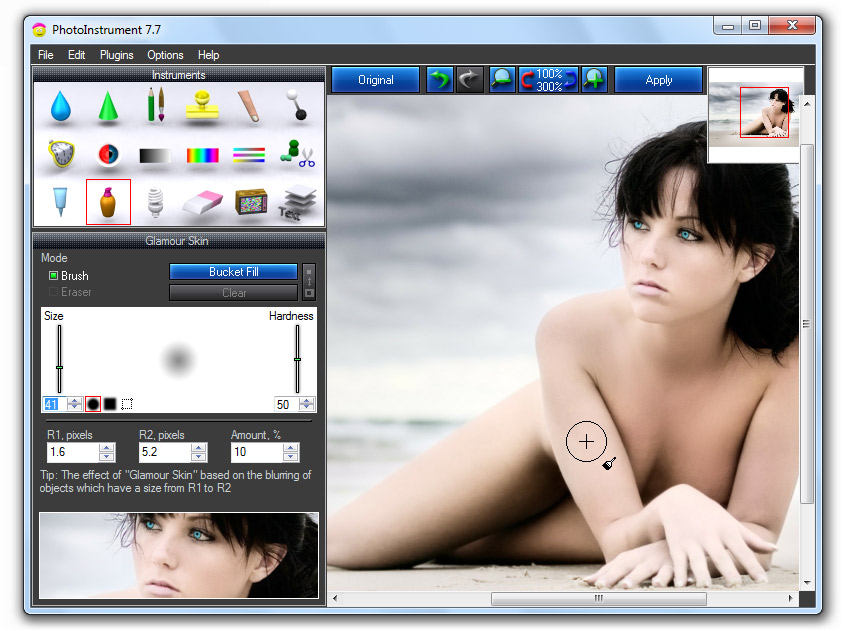
PhotoInstrument is a powerful yet user-friendly raster graphics editor designed for those who want to enhance their digital photos without the steep learning curve associated with professional software. This latest version offers essential tools for retouching, image correction, and digital makeup, making it a preferred choice for efficient photo editing.
PhotoInstrument provides a simple interface that facilitates drag-and-drop editing and supports Photoshop-compatible plugins. It can handle various file formats, including JPEG, PNG, BMP, GIF, and PSD. Each tool in the software comes with a video walkthrough, ensuring that users can quickly learn and utilize each feature without the need for extensive tutorials.
The software includes a variety of editing tools such as:
- Liquify Tool: For reshaping image elements naturally.
- Clone and Smudge: To cover unwanted areas.
- Skin Cleaner and Glamour Skin: For easy portrait retouching.
- Dodge/Burn: For precise light and shadow adjustments.
- Additional features such as Sharpen, Blur, Red Eye Removal, and Glow enhance the final image quality.
For more complex edits, users can take advantage of layers, image overlays, and object removal features. Batch resizing capability allows users to process multiple images simultaneously, significantly improving workflow efficiency.
PhotoInstrument is optimized for raster graphics, which are pixel-based images ideal for photo editing and detailed adjustments. This specialization allows for precise editing at the pixel level, essential for realistic touch-ups. However, it's important to note that raster images can lose quality when resized significantly.
PhotoInstrument offers a free trial version with full functionality, except for the ability to save images. To access all features, users must purchase a license:
- Single License: $29.95 for one computer (non-commercial).
- Home License: $49.95 for up to three computers in a household.
- Business License: $99.95 for commercial use on one computer.
All licenses are one-time purchases and include free updates.
Pros:
- Intuitive interface, ideal for beginners.
- Essential tools for retouching and editing.
- Supports Photoshop plugins for expanded functionality.
- Fast workflow with batch resizing and drag-and-drop features.
- Affordable one-time purchase with free updates.
- Video walkthroughs for easy learning.
Cons:
- Lacks some advanced features found in professional-grade editors.
- The raster-based nature means potential quality loss when scaling images.
- The free trial does not allow saving edited images.
PhotoInstrument is an excellent alternative to more complex photo editing software. Its lightweight design, combined with its robust feature set, makes it perfect for tasks such as portrait editing, exposure fixes, and image resizing. Users can achieve professional-level results without the hassle of complicated software. The inclusion of video walkthroughs further enhances the user experience, allowing for a quick understanding of each functionality.
As digital photography continues to evolve, PhotoInstrument could benefit from integrating more advanced features that cater to professional users, such as advanced color grading tools or AI-driven enhancements. Additionally, improving the raster quality handling during resizing could attract a wider audience. Offering cloud storage options for edited images might also enhance the user experience, allowing easy access and sharing. Overall, PhotoInstrument remains a strong contender in the world of photo editing software, balancing simplicity and functionality effectively
Key Features
PhotoInstrument provides a simple interface that facilitates drag-and-drop editing and supports Photoshop-compatible plugins. It can handle various file formats, including JPEG, PNG, BMP, GIF, and PSD. Each tool in the software comes with a video walkthrough, ensuring that users can quickly learn and utilize each feature without the need for extensive tutorials.
The software includes a variety of editing tools such as:
- Liquify Tool: For reshaping image elements naturally.
- Clone and Smudge: To cover unwanted areas.
- Skin Cleaner and Glamour Skin: For easy portrait retouching.
- Dodge/Burn: For precise light and shadow adjustments.
- Additional features such as Sharpen, Blur, Red Eye Removal, and Glow enhance the final image quality.
For more complex edits, users can take advantage of layers, image overlays, and object removal features. Batch resizing capability allows users to process multiple images simultaneously, significantly improving workflow efficiency.
Why Raster Graphics?
PhotoInstrument is optimized for raster graphics, which are pixel-based images ideal for photo editing and detailed adjustments. This specialization allows for precise editing at the pixel level, essential for realistic touch-ups. However, it's important to note that raster images can lose quality when resized significantly.
Pricing and Trial
PhotoInstrument offers a free trial version with full functionality, except for the ability to save images. To access all features, users must purchase a license:
- Single License: $29.95 for one computer (non-commercial).
- Home License: $49.95 for up to three computers in a household.
- Business License: $99.95 for commercial use on one computer.
All licenses are one-time purchases and include free updates.
Pros and Cons
Pros:
- Intuitive interface, ideal for beginners.
- Essential tools for retouching and editing.
- Supports Photoshop plugins for expanded functionality.
- Fast workflow with batch resizing and drag-and-drop features.
- Affordable one-time purchase with free updates.
- Video walkthroughs for easy learning.
Cons:
- Lacks some advanced features found in professional-grade editors.
- The raster-based nature means potential quality loss when scaling images.
- The free trial does not allow saving edited images.
The Verdict
PhotoInstrument is an excellent alternative to more complex photo editing software. Its lightweight design, combined with its robust feature set, makes it perfect for tasks such as portrait editing, exposure fixes, and image resizing. Users can achieve professional-level results without the hassle of complicated software. The inclusion of video walkthroughs further enhances the user experience, allowing for a quick understanding of each functionality.
Extensions and Future Considerations
As digital photography continues to evolve, PhotoInstrument could benefit from integrating more advanced features that cater to professional users, such as advanced color grading tools or AI-driven enhancements. Additionally, improving the raster quality handling during resizing could attract a wider audience. Offering cloud storage options for edited images might also enhance the user experience, allowing easy access and sharing. Overall, PhotoInstrument remains a strong contender in the world of photo editing software, balancing simplicity and functionality effectively
PhotoInstrument 7.7.0.1062 released
PhotoInstrument is a user-friendly yet powerful raster graphics editor designed for anyone who wants to enhance their digital photos without the learning curve of professional software.