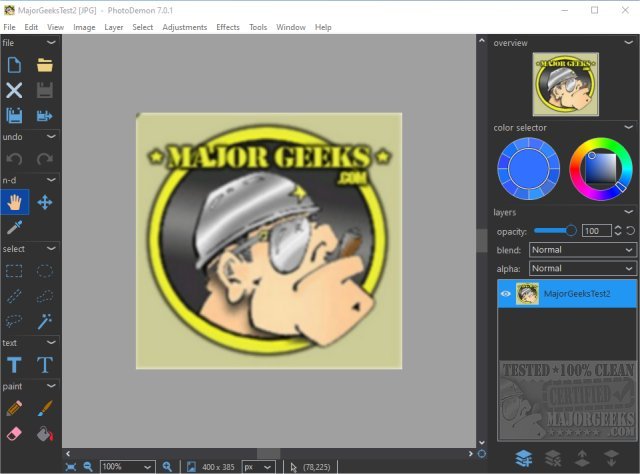
PhotoDemon is a portable photo editing software that aims to provide a smooth and efficient user experience. Its latest version, 2025.12, comes packed with a plethora of professional-grade tools designed for precise image enhancement and manipulation.
Key Features and Functionalities:
The software's standout features include a built-in macro recorder and batch processing capabilities, enabling users to automate repetitive tasks and manage multiple images efficiently. Its adaptable user interface offers light, dark, and monochrome themes, ensuring a personalized experience. Users can expect real-time previews of edits, customizable presets, and keyboard shortcuts for easy navigation, along with unlimited undo/redo functionality.
PhotoDemon boasts over 100 filters and tools, allowing for extensive image enhancement options. The addition of layers facilitates advanced editing techniques, while automatic update notifications keep users informed about the latest features and improvements.
Notable Enhancements in 2025.12:
- Introduction of new selection tools: magic wand, lasso, and polygon.
- Automatic updates, including delta patches for smaller files like languages, customizable through the Tools > Options menu.
- Interface improvements featuring a new tab strip, enhanced navigation buttons, and tools specifically designed for the platform.
- Improved file format support, including RAW compatibility for 200 new camera models, and better PNG functionality.
- A new tone-mapping dialog designed for HDR and RAW images, as well as improved processing for high-bit-depth files.
- Adaptive supersampling available for all distortion and transformation tools.
- Several newly added or revamped tools, including Cross-Screen, Lens Flare, single-shot HDR, and more.
- Performance enhancements across the program, including a new viewport pipeline and improved image compositing.
- Enhanced localization and translation support, ensuring a complete language experience without any missing files.
- Usability improvements in the main editor screen, including a resizable toolbox and new quick-access buttons for frequent actions.
- Introduction of smart zoom options such as Fit Image, Fit Width, and Fit Height.
PhotoDemon also excels in managing EXIF and XMP metadata, making organization straightforward. With its support for RAW formats and a color-managed workflow, it stands out as a robust tool for high-quality image editing.
Conclusion:
The latest version of PhotoDemon, 2025.12, solidifies its reputation as an impressive, lightweight, and portable photo editing application, especially valuable for Windows users. With features like layers, RAW support, and batch processing, it serves as a powerful free alternative to Photoshop, catering to both novice and experienced editors alike.
Related Topics:
- Restoring Windows Photo Viewer on Windows 10 & 11
- Managing Notifications in Windows 10/11 Photos App
- Customizing the 'Edit With Photos' Context Menu in Windows 10 & 11
- Taking High-Resolution Screenshots in Windows 10 & 11
Overall, PhotoDemon continues to evolve, making it a comprehensive solution for photographers and graphic editors seeking powerful yet accessible editing tools
Key Features and Functionalities:
The software's standout features include a built-in macro recorder and batch processing capabilities, enabling users to automate repetitive tasks and manage multiple images efficiently. Its adaptable user interface offers light, dark, and monochrome themes, ensuring a personalized experience. Users can expect real-time previews of edits, customizable presets, and keyboard shortcuts for easy navigation, along with unlimited undo/redo functionality.
PhotoDemon boasts over 100 filters and tools, allowing for extensive image enhancement options. The addition of layers facilitates advanced editing techniques, while automatic update notifications keep users informed about the latest features and improvements.
Notable Enhancements in 2025.12:
- Introduction of new selection tools: magic wand, lasso, and polygon.
- Automatic updates, including delta patches for smaller files like languages, customizable through the Tools > Options menu.
- Interface improvements featuring a new tab strip, enhanced navigation buttons, and tools specifically designed for the platform.
- Improved file format support, including RAW compatibility for 200 new camera models, and better PNG functionality.
- A new tone-mapping dialog designed for HDR and RAW images, as well as improved processing for high-bit-depth files.
- Adaptive supersampling available for all distortion and transformation tools.
- Several newly added or revamped tools, including Cross-Screen, Lens Flare, single-shot HDR, and more.
- Performance enhancements across the program, including a new viewport pipeline and improved image compositing.
- Enhanced localization and translation support, ensuring a complete language experience without any missing files.
- Usability improvements in the main editor screen, including a resizable toolbox and new quick-access buttons for frequent actions.
- Introduction of smart zoom options such as Fit Image, Fit Width, and Fit Height.
PhotoDemon also excels in managing EXIF and XMP metadata, making organization straightforward. With its support for RAW formats and a color-managed workflow, it stands out as a robust tool for high-quality image editing.
Conclusion:
The latest version of PhotoDemon, 2025.12, solidifies its reputation as an impressive, lightweight, and portable photo editing application, especially valuable for Windows users. With features like layers, RAW support, and batch processing, it serves as a powerful free alternative to Photoshop, catering to both novice and experienced editors alike.
Related Topics:
- Restoring Windows Photo Viewer on Windows 10 & 11
- Managing Notifications in Windows 10/11 Photos App
- Customizing the 'Edit With Photos' Context Menu in Windows 10 & 11
- Taking High-Resolution Screenshots in Windows 10 & 11
Overall, PhotoDemon continues to evolve, making it a comprehensive solution for photographers and graphic editors seeking powerful yet accessible editing tools
PhotoDemon 2025.12 released
PhotoDemon is a portable photo editing software that provides a seamless user experience.